
Skip to content
  • Blog
  • Docs
  • Documentation
  • Imprint
SKYVVA Integration App – Documentation
SKYVVA Integration App - Documentation
  • Documentation
  • Zurück zur Webseite
  • Back to website
SKYVVA Integration App – Documentation
SKYVVA Integration App - Documentation
Popular Search how tohow to useagenthowdatarestformulacustombatchstore

SAP PI/PO Adapter

Tutorials (Lightning)

Agent Old Administration Guide

SAP Release Notes

Agent Release Notes

Agent - New Administration Guide

SAP CPI Adapter

SKYVVA Administration Guide (Lightning)

SKYVVA Release Notes

SAP/ERP | S4/HANA (Latest Version) Adapter

SAP-ERP (Old Version) Adapter

  • How to get the Salesforce Id return back in the response interface using Agent SAP ERP Adapter?
    • 1. How to get the Salesforce Id return back in the response interface using Agent SAP ERP Adapter?
  • How to invoke IDOC XML using Agent S/4 HANA Adapter?
    • 1. How to invoke IDOC XML using Agent S/4 HANA Adapter?
  • How to invoke Asynchronous BAPI XML using Agent SAP ERP Adapter?
    • 1. How to invoke Asynchronous BAPI XML using Agent SAP ERP Adapter?
  • How to invoke BAPI XML using Agent SAP ERP Adapter?
    • 1. How to invoke BAPI XML using Agent SAP ERP Adapter?
  • How to invoke BAPI XML using Agent SAP S/4 HANA Adapter?
    • 1. How to invoke BAPI XML using Agent SAP S/4 HANA Adapter?
  • How to invoke IDOC XML using Agent SAP ERP Adapter?
    • 1. How to invoke IDOC XML using Agent SAP ERP Adapter?
  • Prerequisite for SKYVVA solution
    • 1. Prerequisite for SKYVVA solution
  • Import/Deploy ABAP Transport in SAP
    • 2. Import/Deploy ABAP Transport in SAP
  • Certificate for Secured Communications
    • 3. Certificate for Secured Communications
  • Create SAP Adapter in Salesforce – Classic Version
    • 4. Configuration for SAP Adapter
    • 5. Create SAP Adapter in Salesforce – Classic Version
  • Generic Inbound Configuration
    • 1. Generic Inbound Configuration
  • How to develop inbound interface using BAPI with the multi-itab adapter synchronously?
    • 1. How to develop inbound interface using BAPI with the multi-itab adapter synchronously?
  • How to develop inbound interface using IDoc asynchronously?
    • 1. How to develop inbound interface using IDoc asynchronously?
  • How to develop Outbound interface using BAPI asynchronously?
    • 1. How to develop Outbound interface using BAPI asynchronously?
  • How to develop Outbound interface using BAPI synchronously?
    • 1. How to develop Outbound interface using BAPI synchronously?
  • How to develop Outbound interface using IDoc asynchronously?
    • 1. How to develop Outbound interface using IDoc asynchronously?
  • How to invoke Asynchronous BAPI XML using Skyvva SAP ERP Adapter?
    • 1. How to invoke Asynchronous BAPI XML using Skyvva SAP ERP Adapter?
  • Configuration of IService
    • 1. Configuration of IService
  • Configure Enterprise Service
    • 1. Configure Enterprise Service
  • How to invoke SAP SOAP API using Skyvva SOAP Adapter?
    • 1. How to invoke SAP SOAP API using Skyvva SOAP Adapter?
  • How to invoke SAP REST API using Skyvva REST Adapter?
    • 1. How to invoke SAP REST API using Skyvva REST Adapter?
  • How to invoke IDOC XML using SKYVVA SOAP Adapter?
    • 1. How to invoke IDOC XML using SKYVVA SOAP Adapter?
  • How to invoke IDOC XML using SAP S/4 HANA Adapter?
    • 1. How to invoke IDOC XML using SAP S/4 HANA Adapter?
  • Skyvva configuration generic Information
    • 1. Skyvva configuration generic Information
  • How to invoke BAPI XML using SAP S/4 HANA Adapter?
    • 1. How to invoke BAPI XML using SAP S/4 HANA Adapter?
  • How to invoke IDOC XML using SAP ERP Adapter?
    • 1. How to invoke IDOC XML using SAP ERP Adapter?
  • How to invoke BAPI XML using SAP ERP Adapter?
    • 1. How to invoke BAPI XML using SAP ERP Adapter?

Mule Adapter

Migration from SAP-PO SOAP Skyvva connector to REST connector module

View Categories
  • Home
  • Documentation
  • SAP-ERP (Old Version) Adapter
  • Import/Deploy ABAP Transport in SAP

2. Import/Deploy ABAP Transport in SAP

To let the SKYVVA Integration Suite exchange Data between SAP and SFDC (Salesforce.com) it is necessary that both systems agree on one data format.
The leading system to create a common data structure here is the SKYVVA configuration environment in SAP. With creating a data structure, a communication interface for this specific message is also created on the SAP site. The created data structure will then be exported as a .xml file and saved in SFDC as a so-called iStructure.
The focus of this document is to describe how to install/deploy SKYVVA adapter in SAP.
Apsara team will provide a SAP transport package, which will contain 2 files in it. It needs to be handover to SAP Basis team so that they can upload it in SAP. Alternatively, upload the file starting with K* into the location “/usr/sap/trans/cofiles” and the other file which start from R* into the location “/usr/sap/trans/data”.
Once above activity get done, go to the Transaction code STMS (Transport Management System)
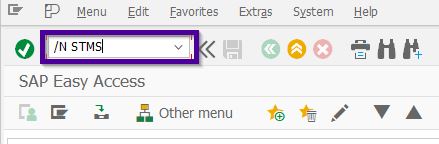
Here, select the option “Import Overview”
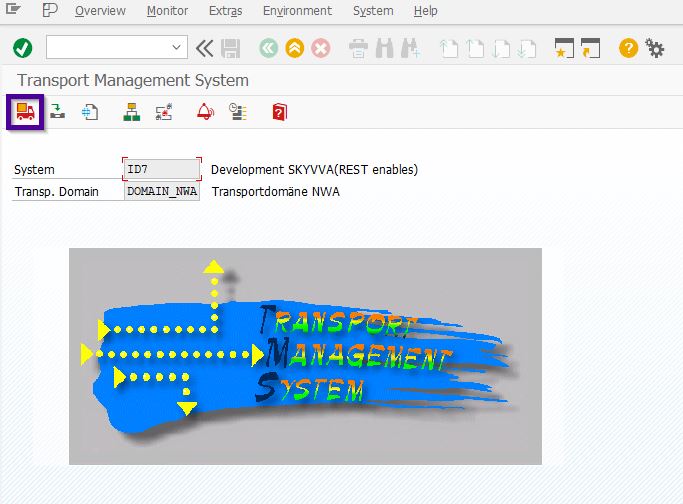
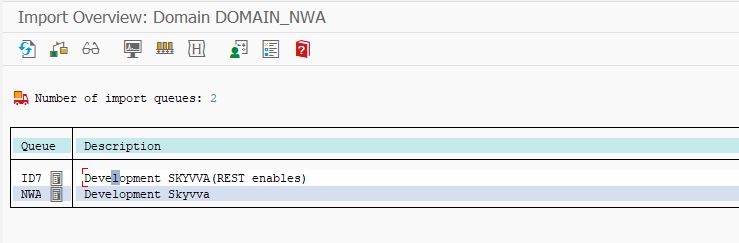
Now, based on your SAP system configuration there might be multiple Queue will appear. Double click on the correct Queue where you wanted to import this SAP Transport.
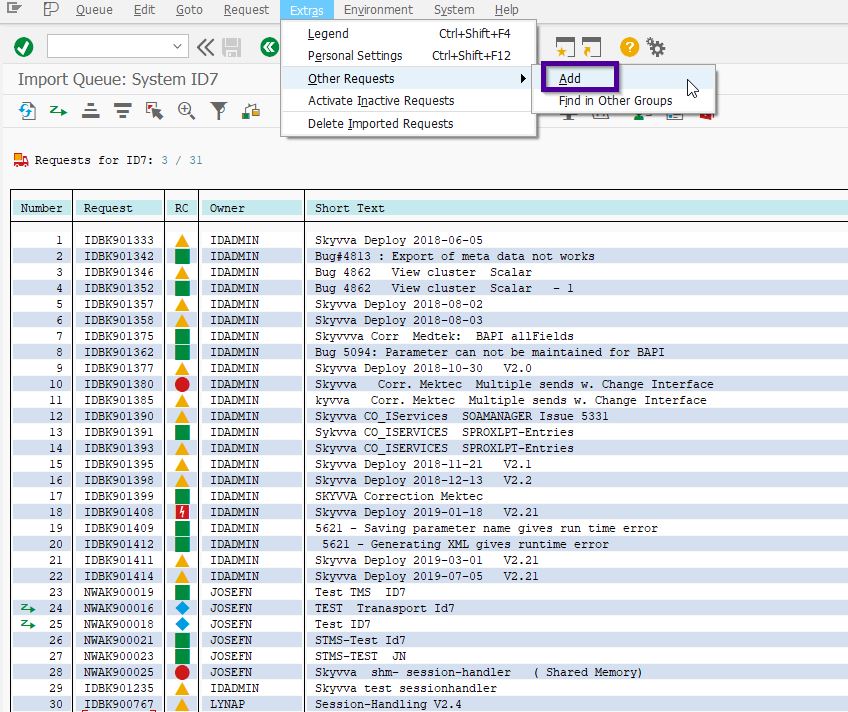
It will open a new screen. Here, we need to manual enter the transport number, path for this activity is: Extras–>Other Requests–>Add
It will open a pop-up, here enter/select the Transport Number and press Continue
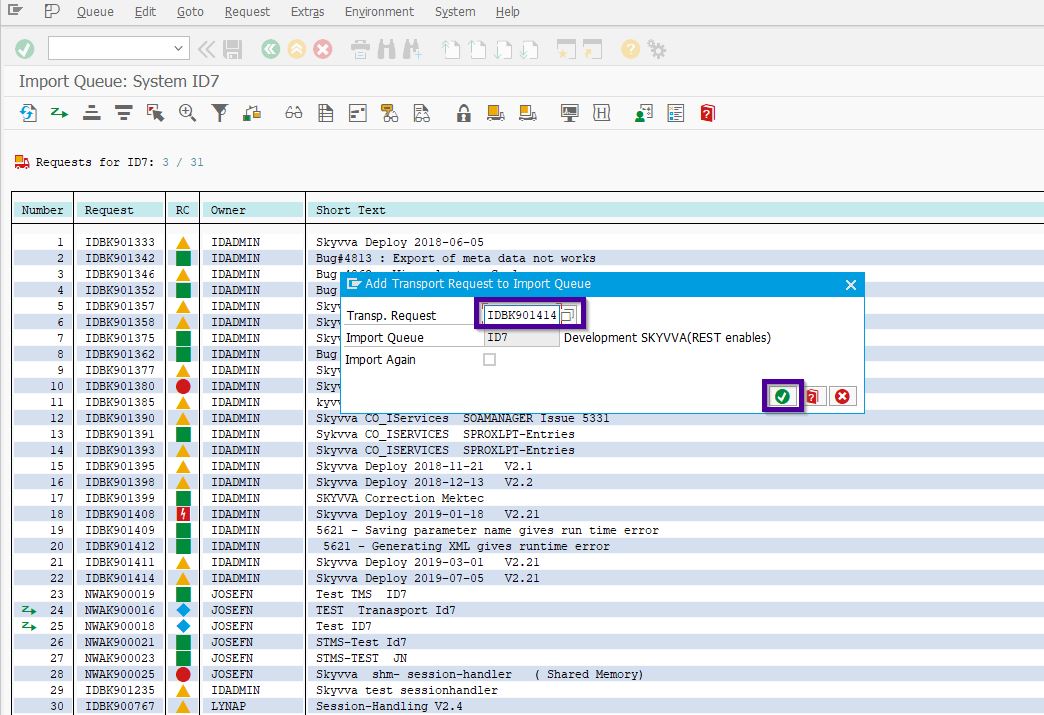
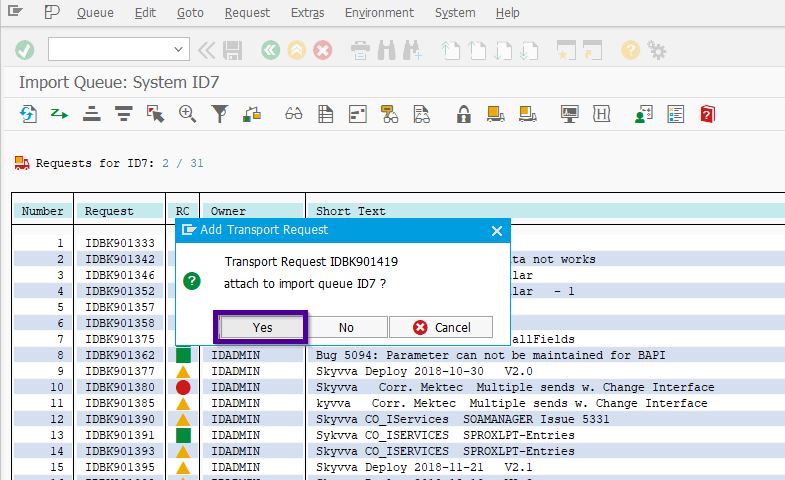
Now a popup will appear for the confirmation to add the transport into import Queue, here press Yes.
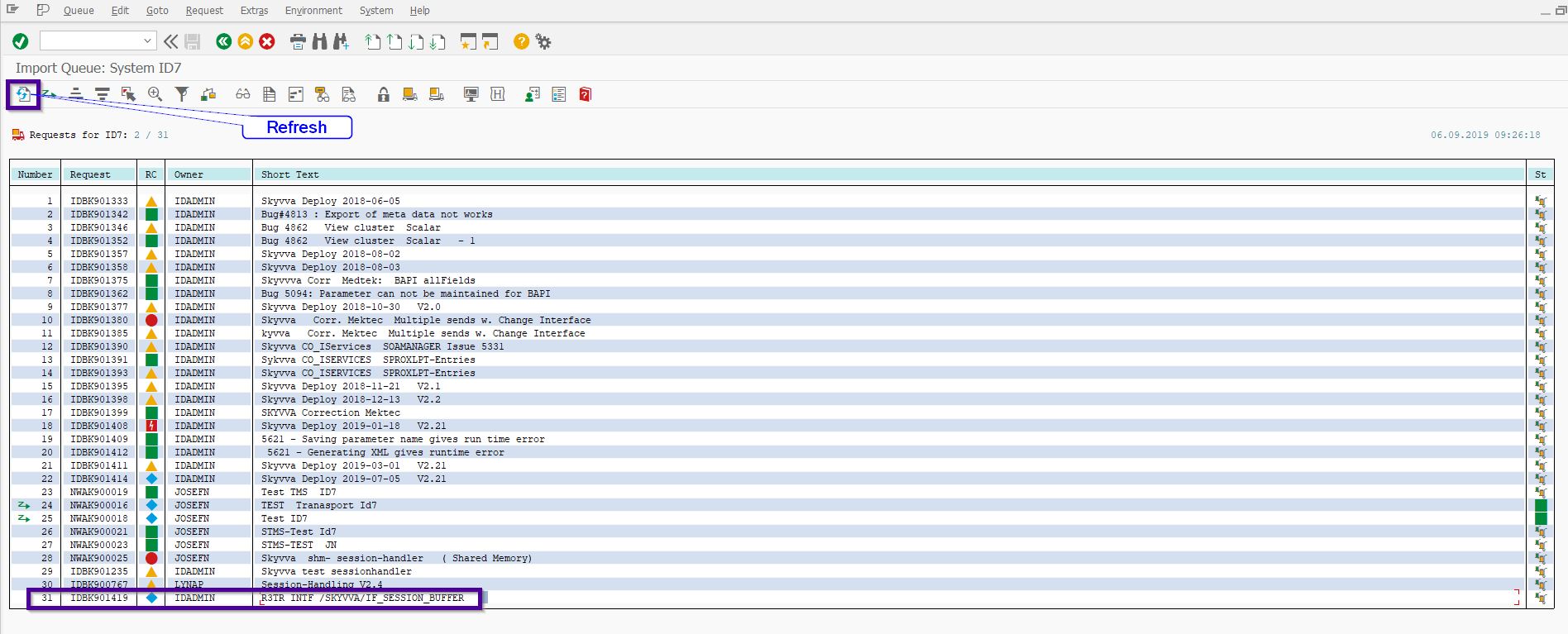
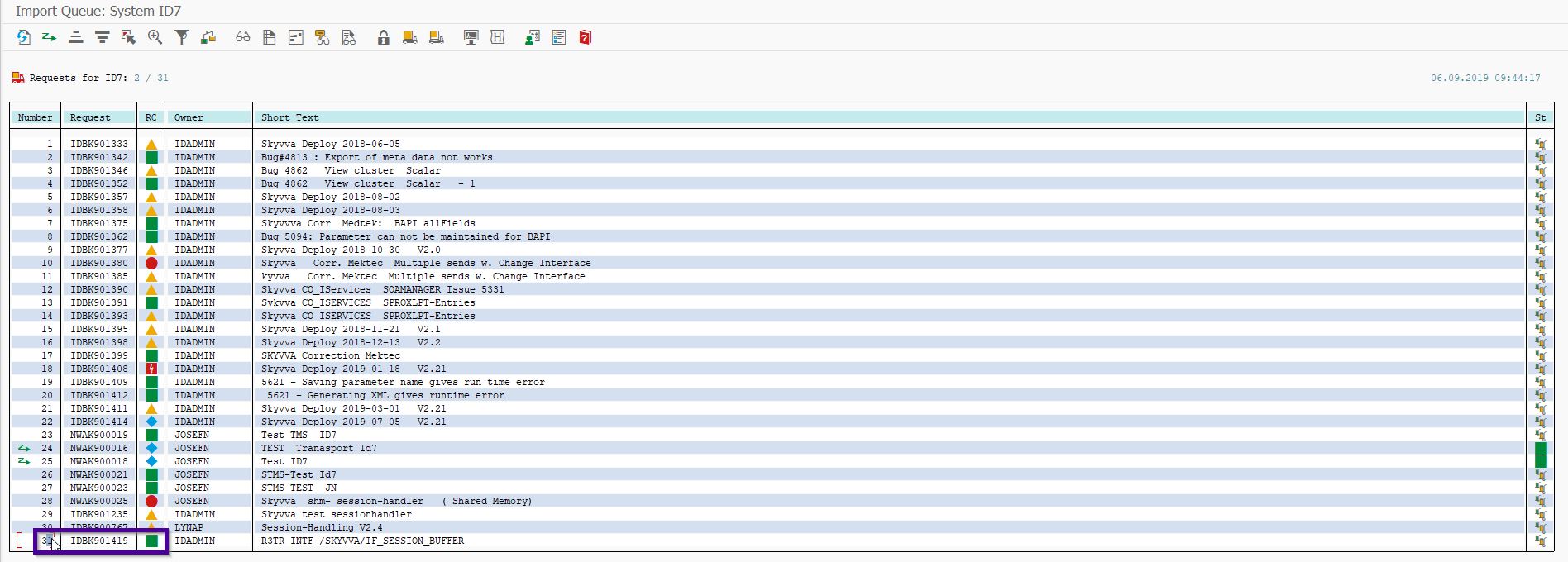
Now, transport should come into display at the last. If it does not appear then press the button Refresh
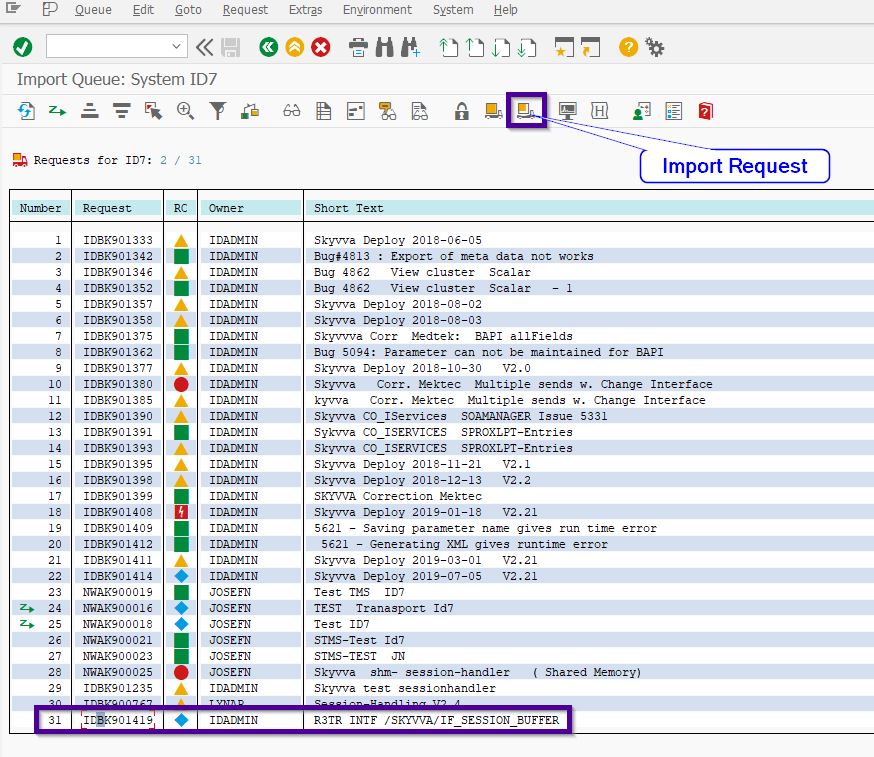
Now select the transport and click the option Import Request
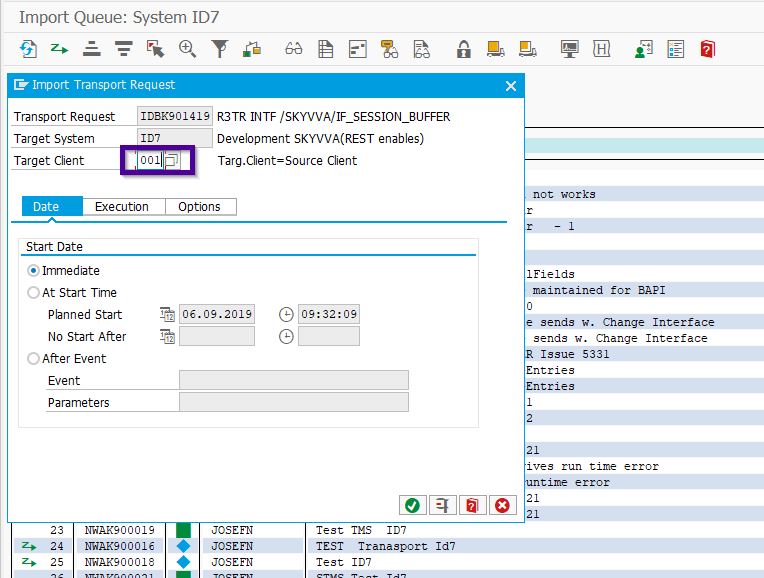
Now a new popup will appear, here enter the target client where you wanted to import the SKYVVA adapter. Here we can also schedule for specific time or event at which transport will be imported. By default “Immediate” option will be selected.
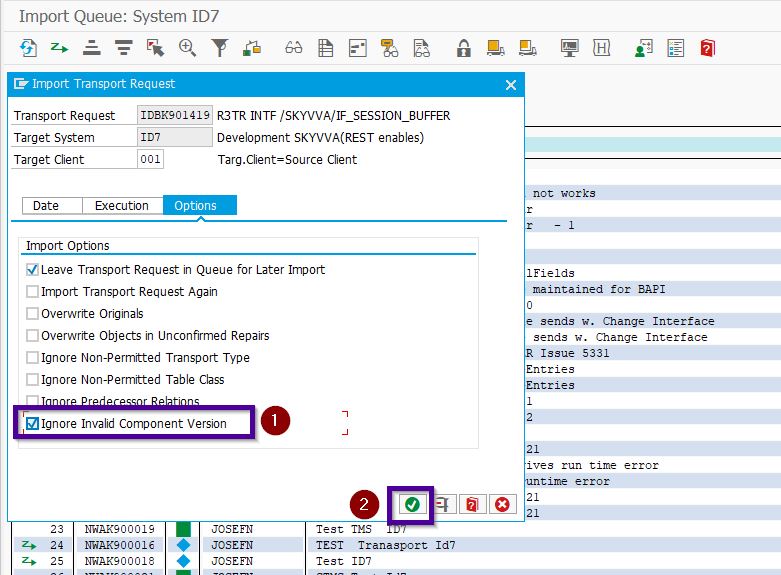
Now, click on the Options. Here by default “Leave Transport Request in Queue for Later Import” option will be select, select also the option “Ignore Invalid Component Version” and press Continue.
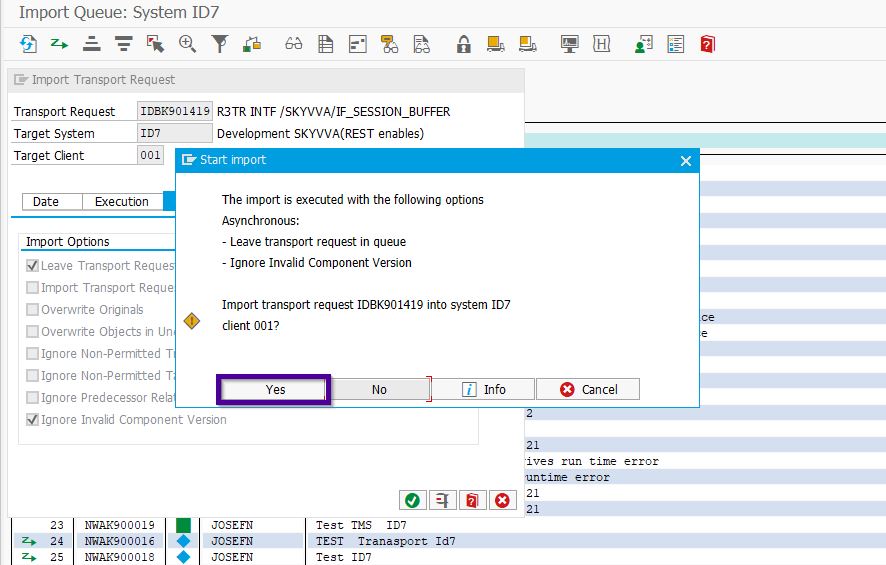
Now a final pop-up will appear which will show all the option selected. Here press Yes, it will put transport into Import Queue.
Now observe the symbol will appear as Vehicle against the transport. Now select the refresh option after some time, if everything goes OK then the color will change in Green.
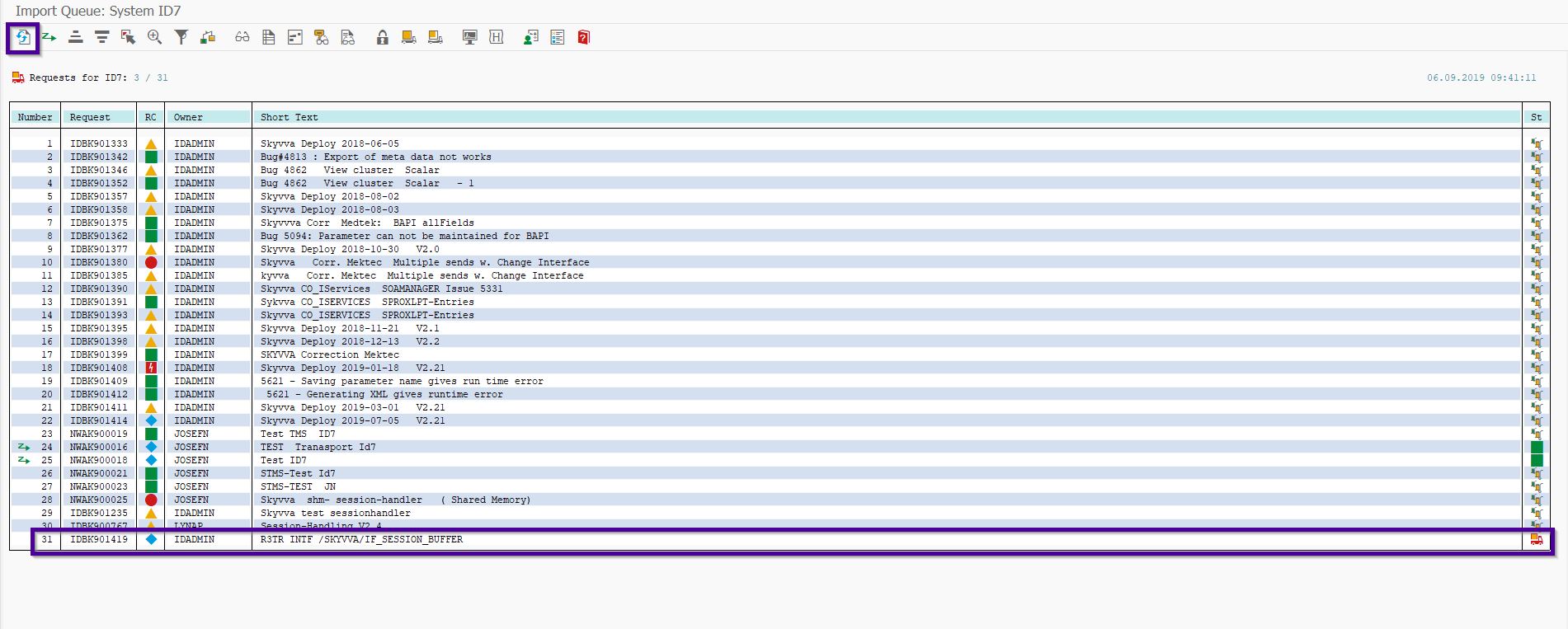
In this case, transport imported successfully into the system(Green status), if it turned into RED or YELLOW then contact the SKYVVA support for further assistance.
Share This Article :

  • Facebook
  • X
  • LinkedIn
2. Import/Deploy ABAP Transport in SAP2. Import/Deploy ABAP Transport in SAP

Copyright © 2026 | Apsara Consulting GmbH | All rights reserved

  • Imprint
  • Zurück zur Apsara Webseite
  • Back to Apsara website