
Skip to content
  • Blog
  • Docs
  • Documentation
  • Imprint
SKYVVA Integration App – Documentation
SKYVVA Integration App - Documentation
  • Documentation
  • Zurück zur Webseite
  • Back to website
SKYVVA Integration App – Documentation
SKYVVA Integration App - Documentation
Popular Search how tohow to useagenthowdatarestformulacustombatchstore

SAP PI/PO Adapter

Tutorials (Lightning)

Agent Old Administration Guide

SAP Release Notes

Agent Release Notes

Agent - New Administration Guide

SAP CPI Adapter

SKYVVA Administration Guide (Lightning)

SKYVVA Release Notes

SAP/ERP | S4/HANA (Latest Version) Adapter

SAP-ERP (Old Version) Adapter

  • How to get the Salesforce Id return back in the response interface using Agent SAP ERP Adapter?
    • 1. How to get the Salesforce Id return back in the response interface using Agent SAP ERP Adapter?
  • How to invoke IDOC XML using Agent S/4 HANA Adapter?
    • 1. How to invoke IDOC XML using Agent S/4 HANA Adapter?
  • How to invoke Asynchronous BAPI XML using Agent SAP ERP Adapter?
    • 1. How to invoke Asynchronous BAPI XML using Agent SAP ERP Adapter?
  • How to invoke BAPI XML using Agent SAP ERP Adapter?
    • 1. How to invoke BAPI XML using Agent SAP ERP Adapter?
  • How to invoke BAPI XML using Agent SAP S/4 HANA Adapter?
    • 1. How to invoke BAPI XML using Agent SAP S/4 HANA Adapter?
  • How to invoke IDOC XML using Agent SAP ERP Adapter?
    • 1. How to invoke IDOC XML using Agent SAP ERP Adapter?
  • Prerequisite for SKYVVA solution
    • 1. Prerequisite for SKYVVA solution
  • Import/Deploy ABAP Transport in SAP
    • 2. Import/Deploy ABAP Transport in SAP
  • Certificate for Secured Communications
    • 3. Certificate for Secured Communications
  • Create SAP Adapter in Salesforce – Classic Version
    • 4. Configuration for SAP Adapter
    • 5. Create SAP Adapter in Salesforce – Classic Version
  • Generic Inbound Configuration
    • 1. Generic Inbound Configuration
  • How to develop inbound interface using BAPI with the multi-itab adapter synchronously?
    • 1. How to develop inbound interface using BAPI with the multi-itab adapter synchronously?
  • How to develop inbound interface using IDoc asynchronously?
    • 1. How to develop inbound interface using IDoc asynchronously?
  • How to develop Outbound interface using BAPI asynchronously?
    • 1. How to develop Outbound interface using BAPI asynchronously?
  • How to develop Outbound interface using BAPI synchronously?
    • 1. How to develop Outbound interface using BAPI synchronously?
  • How to develop Outbound interface using IDoc asynchronously?
    • 1. How to develop Outbound interface using IDoc asynchronously?
  • How to invoke Asynchronous BAPI XML using Skyvva SAP ERP Adapter?
    • 1. How to invoke Asynchronous BAPI XML using Skyvva SAP ERP Adapter?
  • Configuration of IService
    • 1. Configuration of IService
  • Configure Enterprise Service
    • 1. Configure Enterprise Service
  • How to invoke SAP SOAP API using Skyvva SOAP Adapter?
    • 1. How to invoke SAP SOAP API using Skyvva SOAP Adapter?
  • How to invoke SAP REST API using Skyvva REST Adapter?
    • 1. How to invoke SAP REST API using Skyvva REST Adapter?
  • How to invoke IDOC XML using SKYVVA SOAP Adapter?
    • 1. How to invoke IDOC XML using SKYVVA SOAP Adapter?
  • How to invoke IDOC XML using SAP S/4 HANA Adapter?
    • 1. How to invoke IDOC XML using SAP S/4 HANA Adapter?
  • Skyvva configuration generic Information
    • 1. Skyvva configuration generic Information
  • How to invoke BAPI XML using SAP S/4 HANA Adapter?
    • 1. How to invoke BAPI XML using SAP S/4 HANA Adapter?
  • How to invoke IDOC XML using SAP ERP Adapter?
    • 1. How to invoke IDOC XML using SAP ERP Adapter?
  • How to invoke BAPI XML using SAP ERP Adapter?
    • 1. How to invoke BAPI XML using SAP ERP Adapter?

Mule Adapter

Migration from SAP-PO SOAP Skyvva connector to REST connector module

View Categories
  • Home
  • Documentation
  • SAP-ERP (Old Version) Adapter
  • How to invoke IDOC XML using SAP ERP Adapter?

1. How to invoke IDOC XML using SAP ERP Adapter?

Posting IDOC XML to SAP ERP over Skyvva SAP ERP Adapter
In SAP ERP we have to do the following settings
Transaction: SRTIDOC

  • Execute with the default values in the transaction with the option “Register Service” selected
  • Registration should be successful with the message “Registration Successful”
  • If this service has already been registered, you may get the error message – “Access Address already used for Web service”.
    • In such a case, this step can be ignored as the SOAP Service is already registered and running.

Transaction: SICF
Hierarchy Type: SERVICE & Execute
Navigate to Default Host –> sap –> bc –> srt –> IDoc. Right Click & Test Service
Note the URL that comes in your browser.
This is the generic endpoint for idoc xml posting to SAP.
http://host:port/sap/bc/srt/idoc?sap-client=<clientnumber>. 
The following is the endpoint for our SAP system ID7 with client 800
“http://195.201.104.232:16080/sapid7/sap/bc/srt/idoc?sap-client=800”
This endpoint we will use while creating the SAP ERP adapter in skyvva.

Importing IDOC from Import SAP metadata
To Import SAP metadata first we need to create SAP Connection in skyvva as shown below
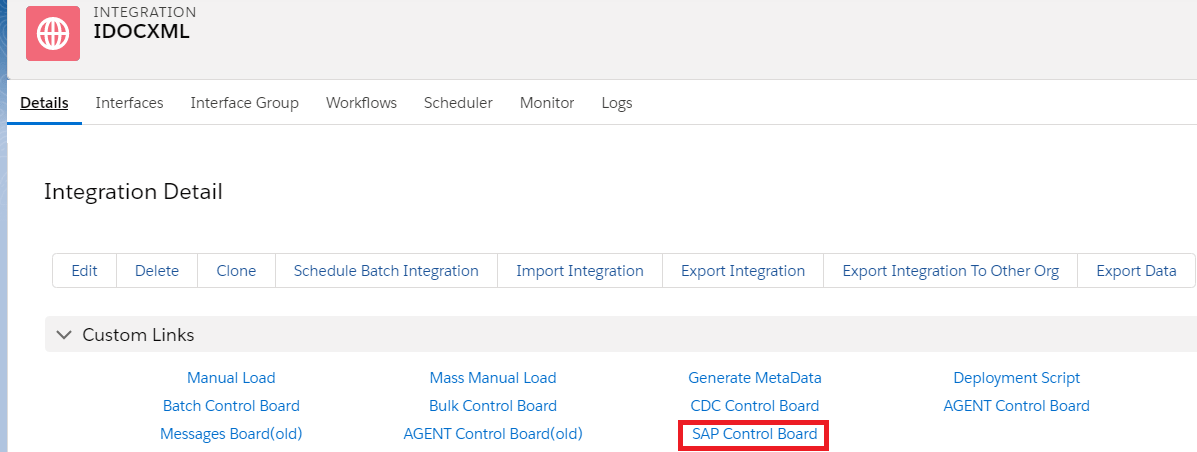
Go to Integration details tab and then select SAP Control Board
Provide the details as shown for the SAP system

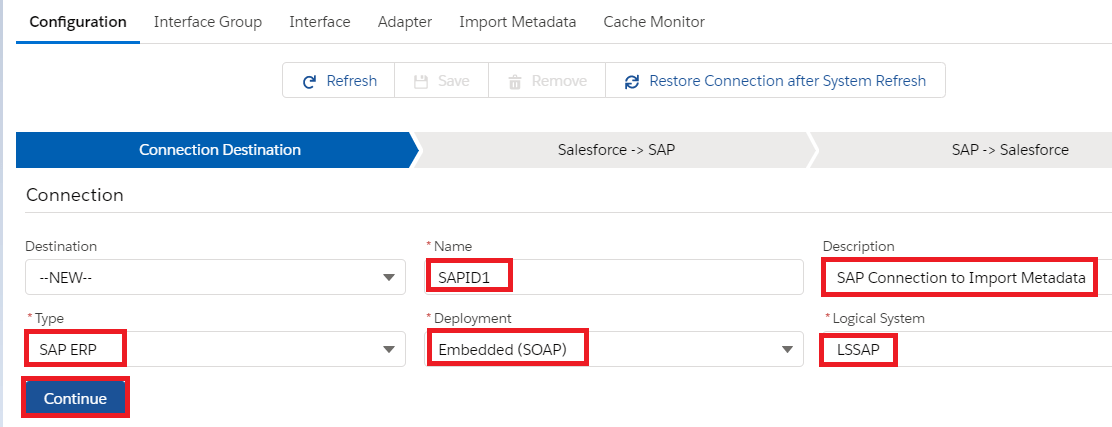
In the Configuration tab. Provide the details
Here we need to provide the sap configuration details as below
Type: SAP ERP
Deployment: Embedded
Logical System: LSSAP
Host Url: http://xxxx.com
Port: 16xxx
Username: xxxx
Password: ******
SAPID: System Id
Client: 820
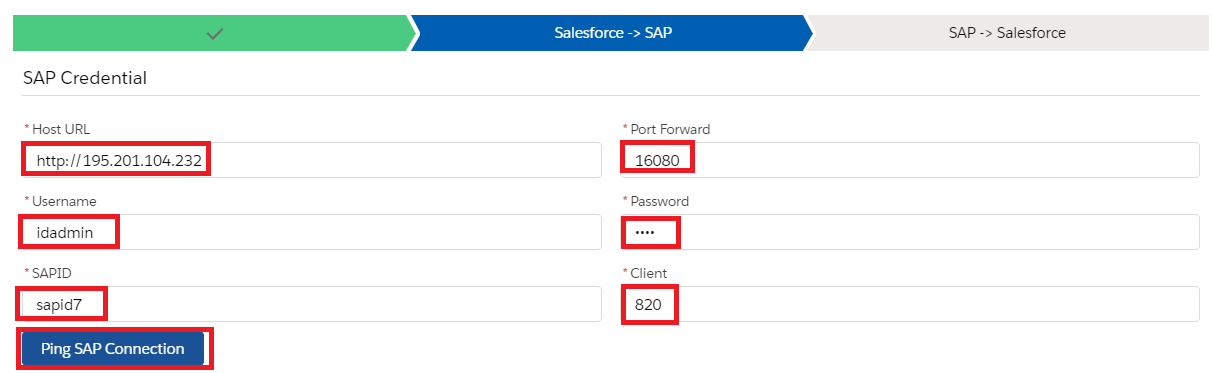
Once we provide the details we need to ping the SAP Connection. Then we can see the pop-up like its successfully connected to SAP Backend.
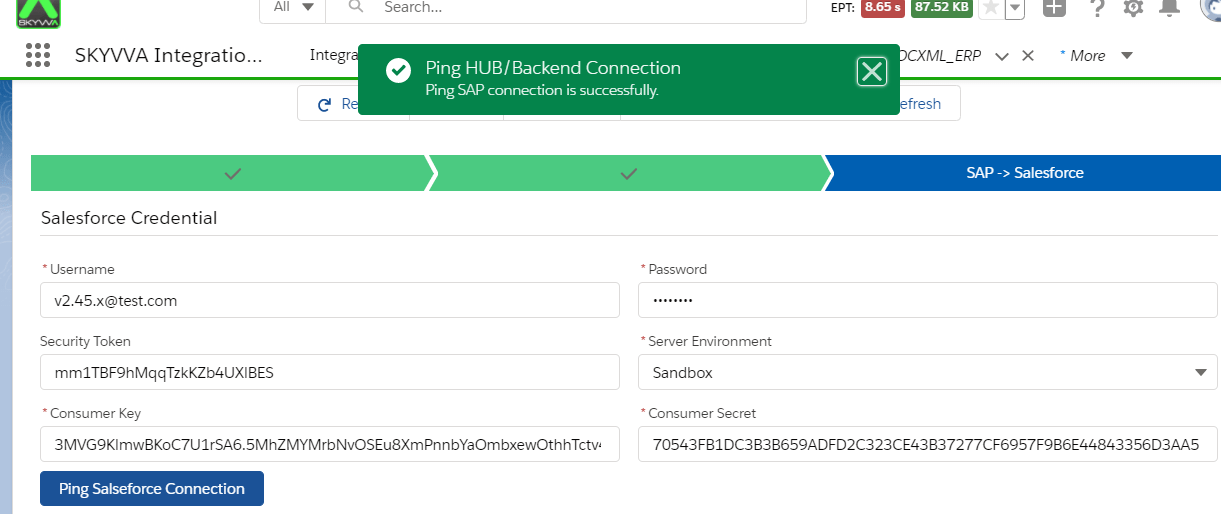
Now we have to provide the salesforce details as shown below.
Consumer Key and Consumer Secret we can get from the connected App.
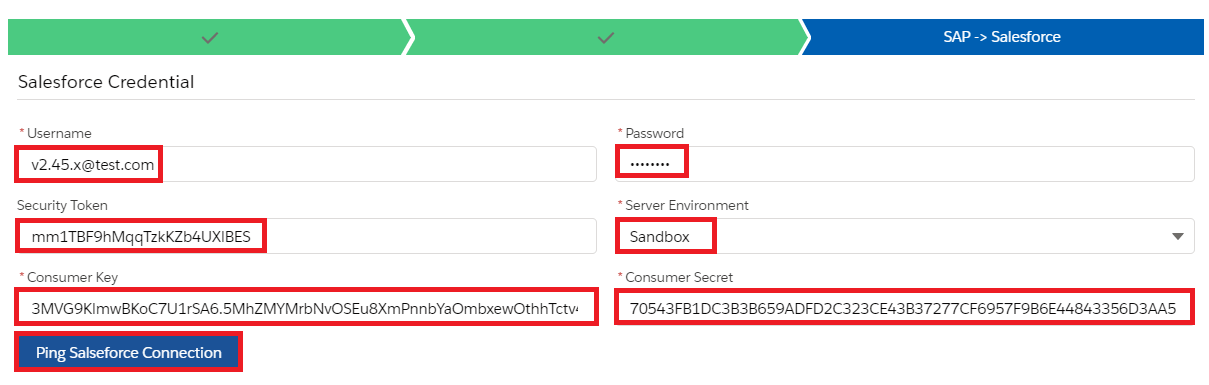
Click on Ping Connection of Salesforce to check if its connected successfully.
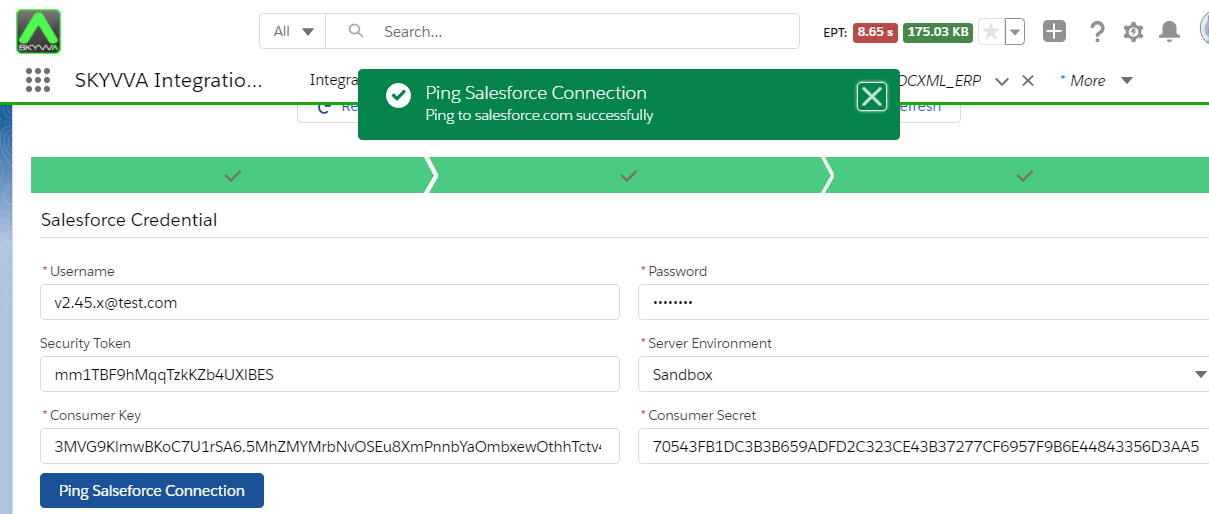
With this connection. we can import the IDOC/RFC’s from SAP.
Create Metadata Provider
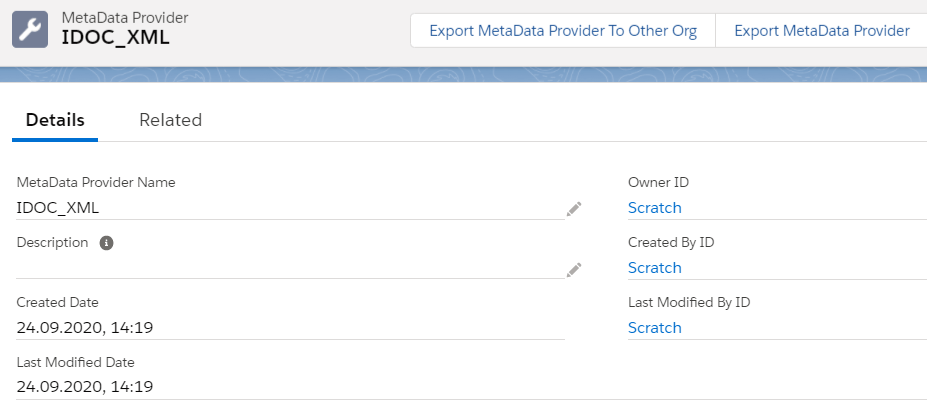
Create Repository
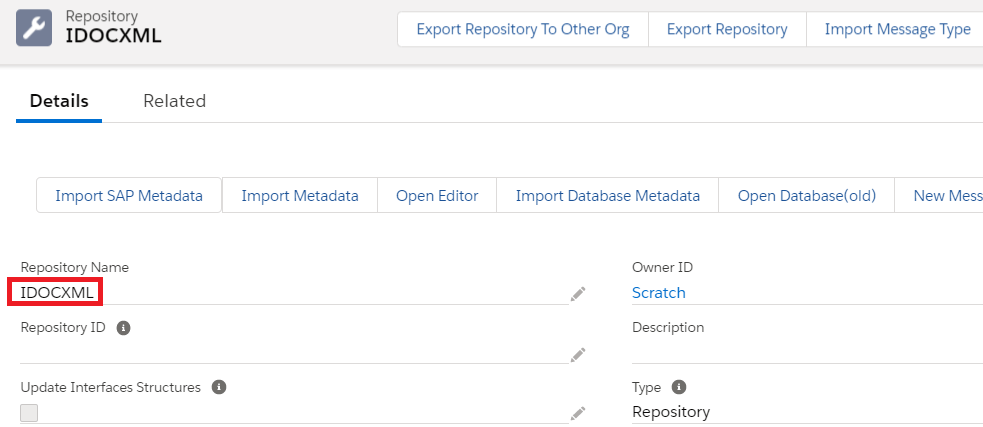
From the Repository Click on Import SAP Metadata Tab
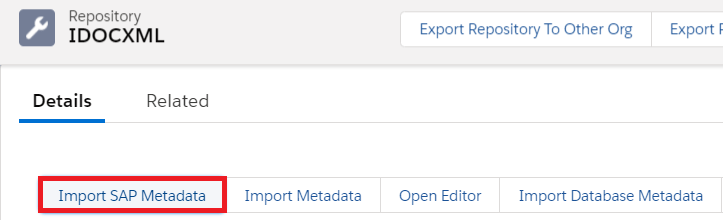

Here we need to give the details of connection type, Connection Destination which we created earlier in the SAP Control Board and the Select the Application Data type IDOC
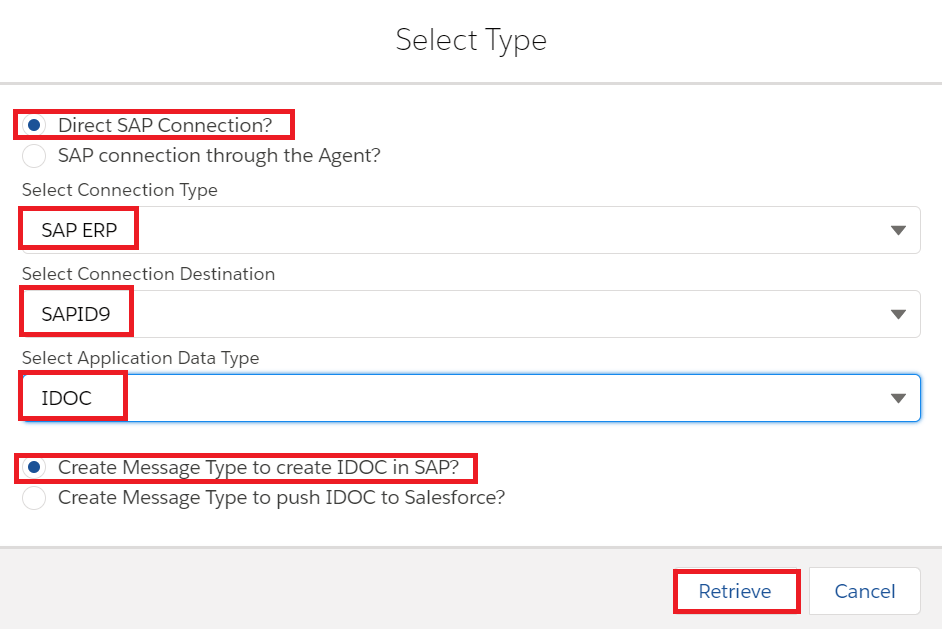
Now click on Retrieve to create the message type from SAP

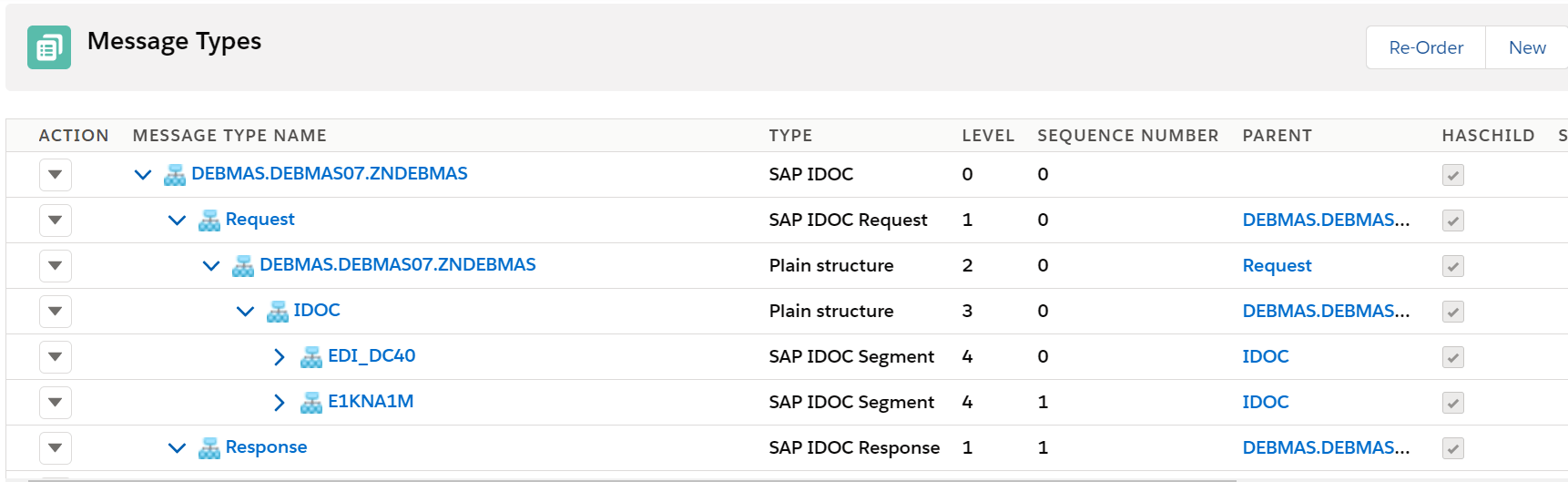
Here is the IDOC template. Here we need message type for both Request and Response also to get the IDOC number back from SAP and to show it in Skyvva Monitor. But we use only Request message type while creating the outbound interface.
Creating the SAP ERP Adapter in Skyvva
We need to provide the following details to create the soap adapter
Name – Name of the adapter
Type – SAP ERP
Description – IDOC XML Adapter
Direction – Outbound
Status – Active
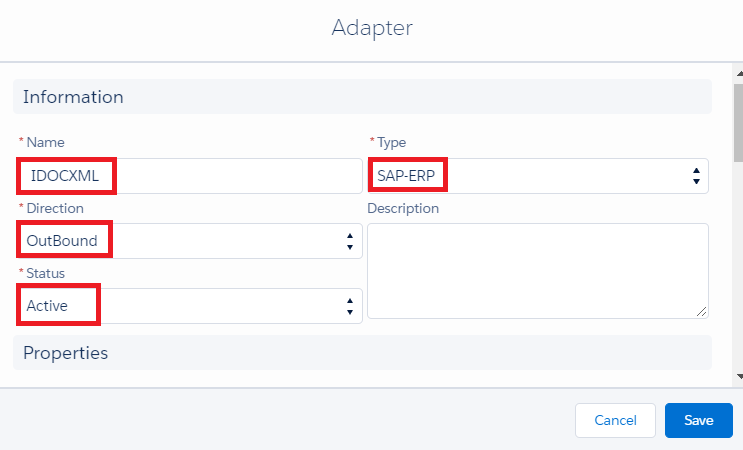
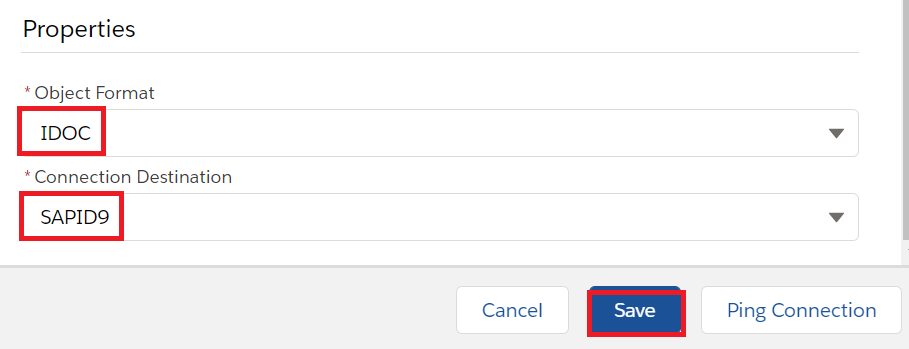
objectFormat – IDOC
Connection Destination – It means the SAP Connection which we created earlier for the backend connection – SAPID9

Now click on save button to create the adapter.
Creating an Outbound interface:
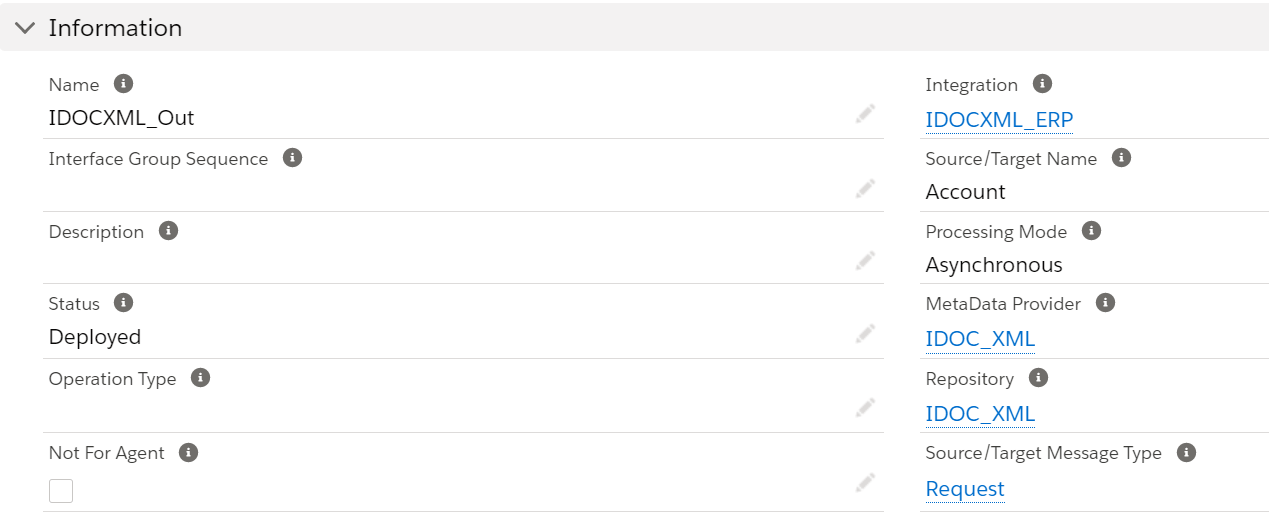
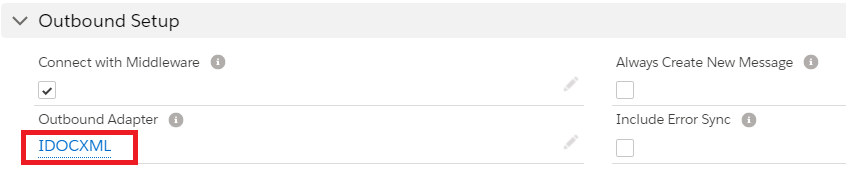
Provide the Name, sObject type, Description, Processing mode, Status, Metadata provider, Repository, Message type, outbound adapter and the SQL statement as shown in the screenshots below
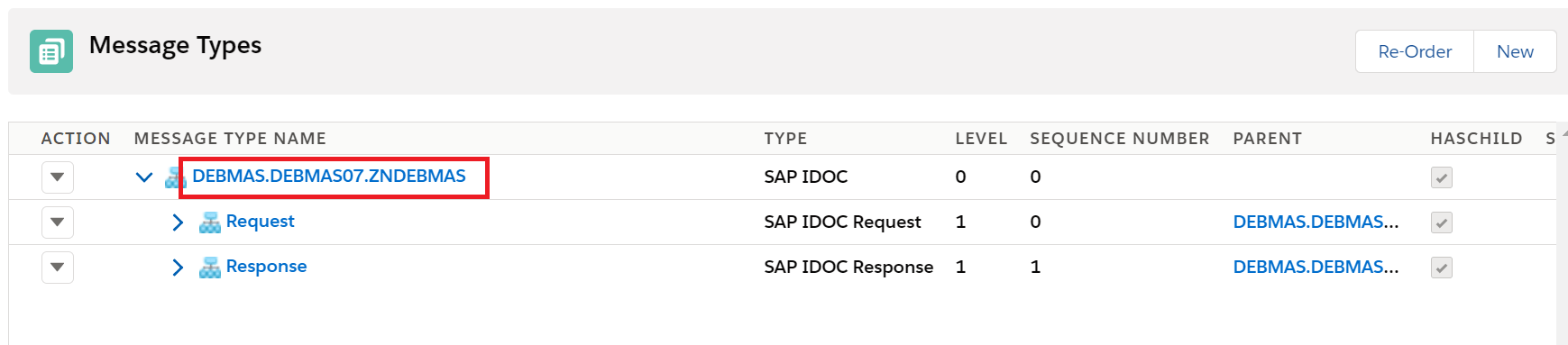
In the message type we have to select the root message type then it will automatically point to Request in the request interface
In our example DEBMAS.DEBMAS07.ZNBDEBMAS is the root message type as shown below.
For outbound interface we have to do mapping in Skyvva as shown.
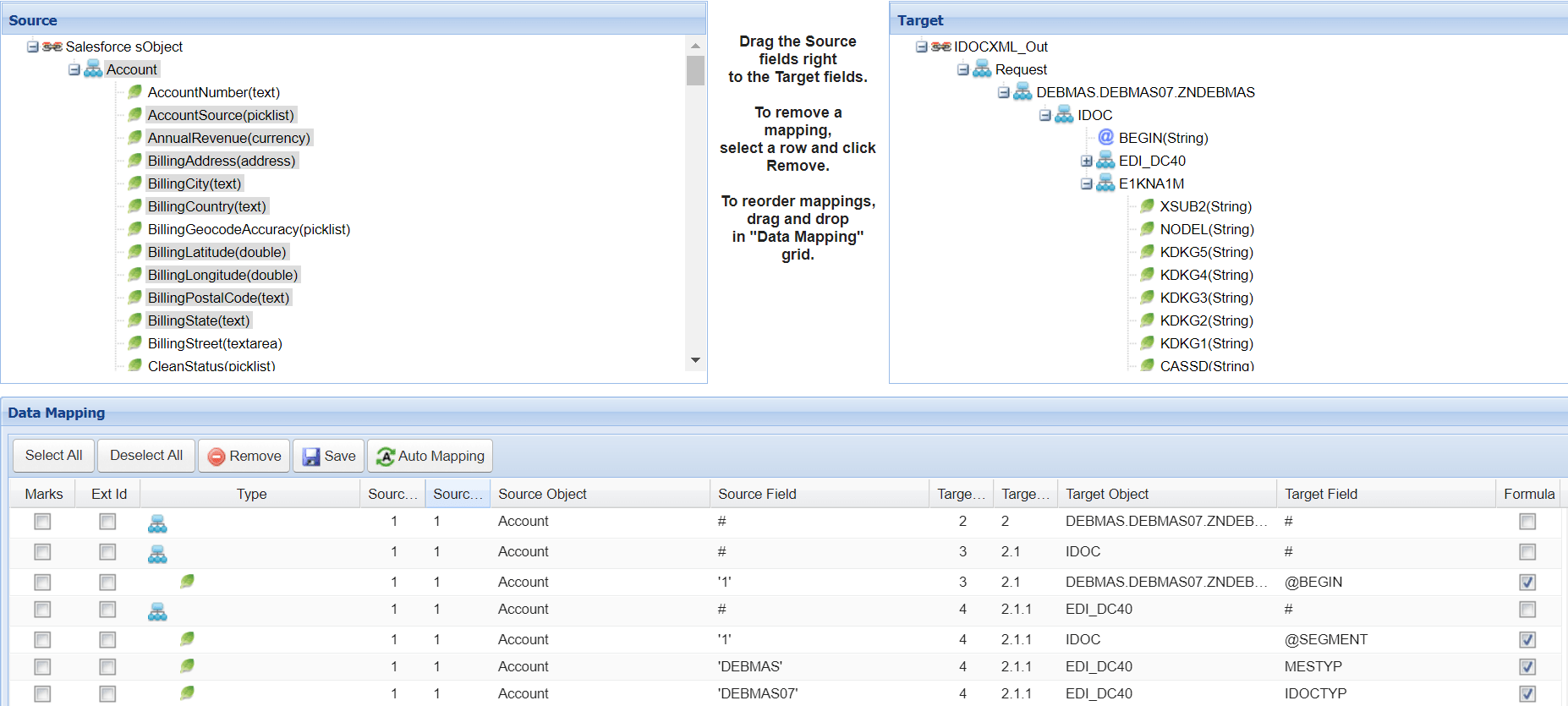


Save the interface once provide all the necessary details.
Now do the callout using below apex code:
Cskyvvasolutions.CallOutControl c=new skyvvasolutions.CallOutControl();
c.returnXml=true;
c.returnListRecord=true;
c.isCreateMessage=true;
c.actionDoIntegrate=true;
String[] ids=new String[]{‘0013E00001DKgY9QAL’};
skyvvasolutions.Iservices.invokeCalloutV3(‘IDOCXML’,’IDOCXML_Out’,ids,’SYNC’, c);

Now we can see the message in the message monitor:

IDOC posted to SAP
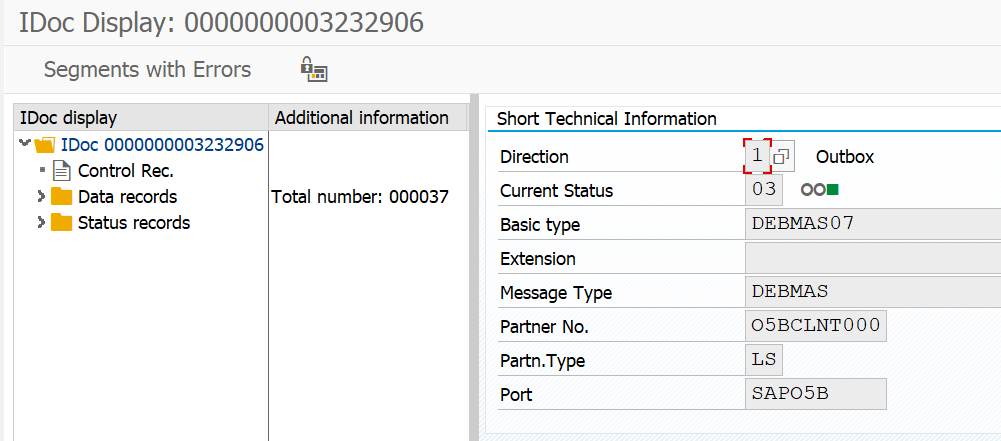
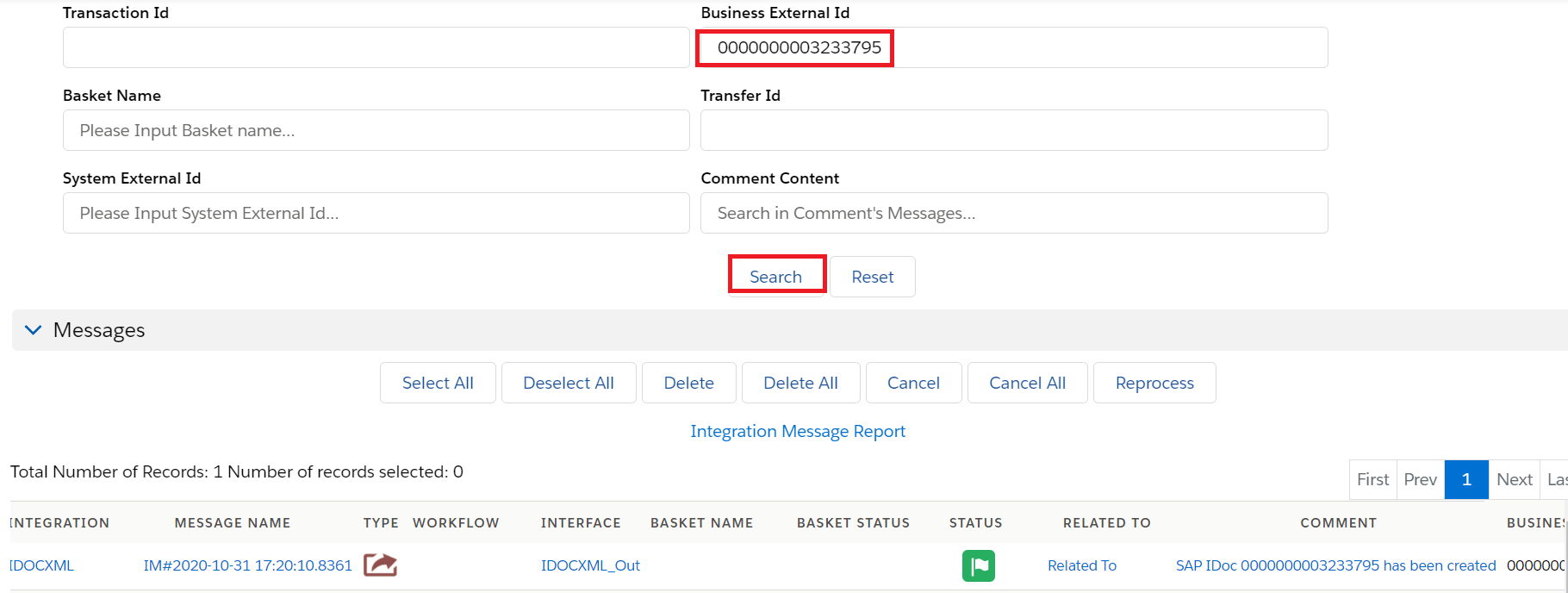
And we got the acknowledgement response back from SAP in Skyvva message monitor in the comment section like IDOC got created in SAP.
This IDOC number we can search in the Business external ID
We have also a Copy node function in Skyvva. Copy node is used to duplicate the segment if needed.
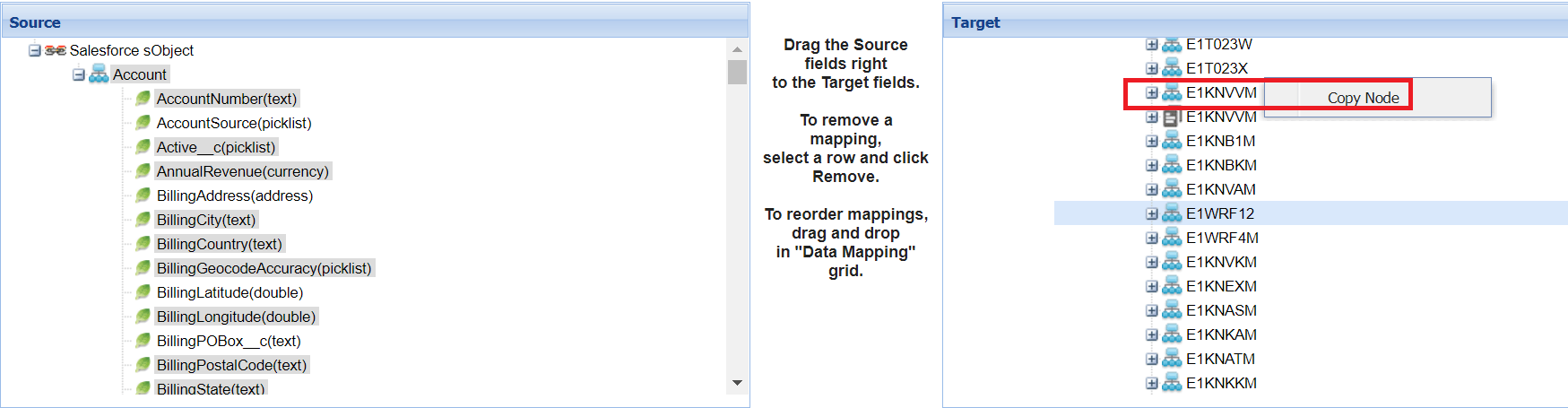
In our example we have duplicated the segment for one time

Now we can see the repeated segments in SAP as well as shown below.
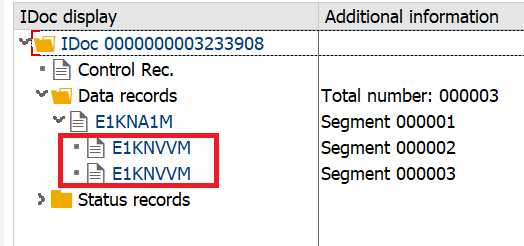
This is the functionality of Skyvva copy node.

Share This Article :

  • Facebook
  • X
  • LinkedIn
1. How to invoke IDOC XML using SAP ERP Adapter?1. How to invoke IDOC XML using SAP ERP Adapter?

Copyright © 2026 | Apsara Consulting GmbH | All rights reserved

  • Imprint
  • Zurück zur Apsara Webseite
  • Back to Apsara website
