
SKYVVA CPI Salesforce Receiver Adapter in SAP Cloud Platform Integration #
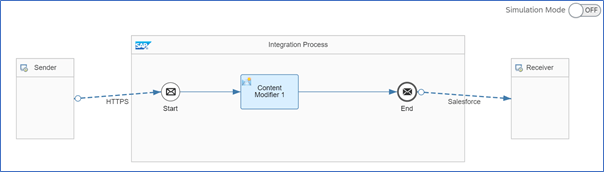
Below figure is the sample integration flow using Skyvva Salesforce Adapter at receiver side.
Figure: sample CPI integration flow using Skyvva Salesforce adapter
Skyvva Salesforce receiver adapter is used to communicate with Salesforce system using HTTPS transport protocol and Skyvva message protocol.
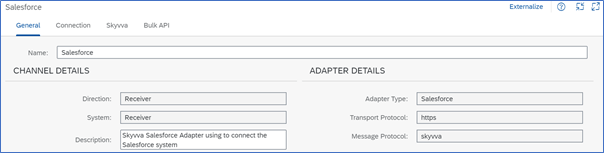
Figure: Skyvva Salesforce receiver adapter channel configurations
Connection:
LOGIN-CONFIG:
| Parameter | Description |
| Login Url |
Enter the URL of the Salesforce system to connect to. Use the following pattern: https://<hostname> |
| User Credential | Maintain Salesforce User Credential in CPI. Path: Monitoring > Manage Security > Security Material |
| Client Id |
Enter the Salesforce Client Id Note: Client Id will be provided by Salesforce. |
| Client Secret |
Enter the Client Secret. Note: Client Secret will be provided by Salesforce. |
Skyvva:
URI SETTING:
| Parameter | Description |
| REST Operation | APEX_CALL: Only APEX operation is available in the current version Note: In current version only REST operation is supporting. Other operations will support in next release. |
SALESFORCE ENDPOINT CONFIG:
| Parameter | Description |
| Apex Method | Select the Method that you want to perform from the dropdown list. Available Methods: POST, PUT, DELETE, PATCH & GET |
| Logging Option | Select the Logging option that you want to perform from the dropdown list. Default: Only Default is supporting in this version Below Logging Option will support in next release. Debug Level, Error Level, Info Level, Trace Level &Warning Level |
| Api Version (delete this content) | Enter the API version from the Salesforce |
| Apex Url | Only Integrate, integrateBatch, IntegrateSynchronous & SearchService supported in this version. createNewMessage & ProcessMessage will be support in next release. |
| Event Name | Not supported at this moment. |
| Format | Salesforce supports two formats for representations of resources: JSON and XML. |
| HTTP client timeout (sec) | Enter the HTTP client timeout Example: 60 Secs |
| Integrate Max Size | Provide the maximum size. Example: 5000 |
| Integrate Batch Max Size | Provide the maximum batch size. Example: 5000 Note: Choose this if the Apex Url is integrateBatch |
| Enable Autoswitch | This will option support in next release. |
| S Object Id | This will option support in next release. |
| S Object Fields | This will option support in next release. |
| S Object Id Name | This will option support in next release. |
| S Object Id Value | This will option support in next release. |
| S Object Blob Field Name | This will option support in next release. |
| S Object Class | This will option support in next release. |
| S Object Query | This will option support in next release. |
| S Object Search | This will option support in next release. |
Bulk API:
Note: This will support in the next release version.
BULK API:
| Parameter | Description |
| Environment | |
| Skyvva Version | |
| Bulk Operation | |
| Bulk Package Size | |
| Request Payload | |
| Bulk Mode | SFDC Bulk 1.0 SFDC Bulk 2.0 |
| Switch to Batch Mode | |
| Use Fast Batch Creation Mode |


