
Skip to content
  • Blog
  • Docs
  • Documentation
  • Imprint
SKYVVA Integration App – Documentation
SKYVVA Integration App - Documentation
  • Documentation
  • Zurück zur Webseite
  • Back to website
SKYVVA Integration App – Documentation
SKYVVA Integration App - Documentation
Popular Search how tohow to useagenthowdatarestformulacustombatchstore

SAP PI/PO Adapter

Tutorials (Lightning)

  • Tutorials Introduction
  • What is Salesforce?
    • 1. What is Salesforce?
  • What is SKYVVA?
    • 1. What is SKYVVA?
  • How to use Integration?
    • 1. What is an integration and how to create it?
    • 2. How to Use Find & Replace Function?
    • 3. Add filter criteria to search in ilog screen
  • What to do with failed messages when processing a new message with the same external Id?
    • 160.What to do with failed messages when processing a new message with the same external Id?
  • How to use interface?
    • 1. What is an Interface and How to create it ?
    • 2. How to use Merge or Override option for uploading an IStructure on the Interface ?
    • Hierarchical interface
      • 1. What is hierarchical interface?
      • 2. How to create hierarchical interface using VLOOKUP
      • 3. How to create hierarchical interface using Foreign Key?
      • 4. How to upload account, contact and asset data in a CSV file in a step according to Salesforce?
      • 5. How to import hierarchical xml file?
      • 6. How to use tree mapping concept to create hierarchical interfaces?
    • How to use IChain Interface?
      • 1. How to use IChain Interface with Init Operation ?
  • What is Skyvva Bulk Data Loader?
    • 162.What is Skyvva Bulk Data Loader?
  • How to use mapping?
    • Introduction
    • 1. How to use mapping?
    • 3. How to do filter condition on mapping?
    • 2. How to use formulas in mapping?
    • 4. How to use DateTime Mapping?
    • Inbound Mapping
      • How to Use Define External Key?
      • Allow A Formula Field Use as an External Id
      • How to Import Interface API Version V3 without a message type ?
    • Outbound Mapping
      • How to Use Re-Order Button on Mapping Tool?
      • How to Export Interface API Version V3 without a message type ?
      • How to use Copy Node and Copy Field on the Mapping?
  • How to use INFOR ION Adapter?
    • 163. How to use INFOR ION Adapter?
  • Search by the Business External Id in outbound message (Interface)
    • 169. Search by the Business External Id in outbound message (Interface)
  • How to use workflow?
    • 1. What is the Workflow transaction and how to use it?
    • 2. What is new in workflow with the Spring ’19 release?
    • 3. How to Disable workflow ?
  • 170. Update the parent record while processing the child
    • Introduction
    • Inbound Integrate V4
      • 1. Update the Parent Record while Upsert the Child of Inbound Integrate V4
      • 2. Update the Parent Record while Insert the Child of Inbound Integrate V4
      • 3. Update the Parent Record While Update the Child of Inbound integrate V4
      • 4. Update the Parent Record while Delete the Child of Inbound Integrate V4
  • How to Use message type?
    • 1. How to use message type?
    • 2. How to create free defined message type?
    • 3. How to process message type based Interface?
    • 4. How to create Trigger on MsgTypeRel?
    • 5. How to create message type from different file format as xsd, json schema, wsdl 1.1 & 2.0, swagger 2.0 and openAPI 3.x?
    • 6. How to create tree hold in hierarchical message type?
    • 7. How to create Message Type from Salesforce sObject?
    • 8. How to create Message Type from SKYVVA Business Object?
    • What is the soap template message type?
      • 1. What is the soap template message type?
    • What is the rest template message type?
      • 1. What is the rest template message type?
  • How to use new Data Loader?
    • Introduction
    • The configuration enables to Use New Data Loader
    • How to create file name into transfer Id via DataLoader ?
    • 1. Import Using Data Loader
      • How to Import CSV Using the Data Loader ?
      • How to Import XML Using the Data Loader?
      • How to Import JSON Using the Data Loader?
    • 2. Export Using Data Loader
      • How to Export CSV Data Using the Data Loader?
      • How to Export XML Data Using the Data Loader?
      • How to Export JSON Data Using the Data Loader?
  • How to use Message Monitoring?
    • 1. Message Monitoring
  • Control Board
    • 1. How to use Agent Control Board
    • 2. How to use Amazon Control Board
    • 3. How to use SAP Control Board?
    • 4. How to use Bulk Control Board
    • 5. How to use CDC Control Board
    • 6. How to use Agent cache on Agent Control Board?
    • 7. CDC Control Board
    • 8. How to use Batch Control Board
    • 9. Adapters of the Agent Control Board (Old)
    • 10. Bulk Control Board
    • 11. How to use Authentication Type on Agent Control Board ?
  • How to use batch Processing?
    • 1. How to use batch processing for inbound interfaces?
    • 2. How to speed up batch processing?
    • 3. How to use ‘Don’t process the interface in parallel’ picklist (Multi-Select) ?
  • HOW TO CREATE NGROK LOCAL SERVER ?
    • 1. How to create ngrok local server ?
  • How to use Bulk processing?
    • 1. How to use Bulk processing with new agent control board?
  • How to export the ContentVersion with the AGENT as XML/JSON and BINARY format (NEW AGENT)?
    • 1. How to export the ContentVersion with the AGENT as XML/JSON and BINARY format (NEW AGENT)?
  • How to use Raw Basket Processing ?
    • 1. What is Raw basket and how to use it?
  • Set the status for the empty message
    • How do user use cases to get the error no message?
  • How to use new button test mapping ?
    • Introduction
    • Inbound Mapping
    • Outbound Mapping
  • How to use CDC Processing?
    • 1. What is CDC and how to configure it?
    • 2. How to create change record using Process Builder?
    • 3. How to use the Salesforce CDC change event to send data out with the SKYVVA API?
  • Enable skyvva sObject Imessage__c for Interface’s source name
    • How to custom error handling?
  • How to use SKYVVA API?
    • Invokecallout API
      • InvokecalloutV3() (Version 3)
        • How to use the API InvokecalloutV3() using mode based on the Interface Setting?
        • How to use the API invokeCallout3() to pass data from the screen with Developer Console?
        • How to Pass parameter from InvokeCalloutV3() to use in the WHERE clause expression?
        • Pass Transform Query/Path/Header Parameter-Value by Mapping ?
        • How to use the Set the status for the empty message?
      • InvokecalloutV2() (Version 2)
        • 1. How to do invokeCallout2 by using Auto mode?
    • Inbound Executer
      • How to use the executeInterface() method to execute the inbound interface by Developer Console?
    • SKYVVA API
      • REST API
        • How to Obtain Authorization in Salesforce for Integration with Skyvva?
          • How to Generate an Access Token Using OAuth 2.0 Client Credentials Flow with Skyvva Permissions?
        • API Version V4 (/V4/integrate)
          • 1. How to use CSV payload with /V4/integrate?
          • 2. How to use XML payload with /V4/integrate?
          • 3. How to use JSON Payload with V4/integrate?
          • 4. How to use Push JSON Payload to Agent Using V4/integrate?
          • 5. How to Use Platform Events to Publish Salesforce Events via Skyvva V4/Integrate?
        • API Version V4 (/V4/IntegrateWithIMessage)
          • How to use /V4/IntegrateWithIMessage?
        • Fetching the data from HTTP header and Query Parameter for the Inbound API
          • Inbound API V4/integrate
  • How to Use New Agent?
    • Introduction
    • How to Create Salesforce Connected App to Get Client Id and Client Secret?
    • How to use Agent Control Board (New)?
      • How to use Agent Log and Salesforce Log ?
      • How to use Agent Control Board (New)?
      • How to use Cache Monitoring on Agent Control Board ?
      • How to Import Metadata from Agent Control Board ?
      • How to use Log and Log Configuration Tab on Agent Control Board ?
      • How to import file (binary/attachment) to salesforce using New agent?
      • How to Connect Agent to Salesforce with Authentication Type?
        • 1. How to Connect a New Agent to the Agent Control Board Using OAuth2 Username-Password Authentication?
        • 2. How to generate an access token ?
        • 2.1 How to Connection Agent to Salesforce Using OAuth2 Client-Credential Authentication Type?
        • 3. How to Connection Agent to Salesforce Using OAuth2 Client-Credential Authentication Type with API User ?
    • Installing CA-Signed certificate for Agent Service (https)
      • 1. Installing CA-Signed certificate for Agent Service (https)
    • How to install Agent 3.0 for Windows?
      • 1. How to install Agent 3.0 for Windows?
      • 2. How to install Agent 3.06 for Windows?
      • 3. How to install Agent 3.06.01 for Windows?
        • 3.1 How to Install Agent 3.06.01 for Windows?
        • 3.2 How to Upgrade the Agent to the New Patch or Version?
    • How to install Agent 3.0 for Linux?
      • 1. How to install Agent 3.0 for Linux ?
    • JDBC
      • Agent Manual Process
        • Agent Import
          • None Interface API Version (Agent Inbound)
            • Agent File
              • SFTP (Agent File)
                • How to Import CSV with Header using Agent File Adapter in the protocol: SFTP?
          • V3 Interface API Version (Agent Inbound)
            • V3 Agent File
              • SFTP (V3 Agent File)
                • How to Import CSV with Header using V3 Agent File Adapter in the protocol: SFTP?
                • How to Import CSV Files Without Header Row Using the SFTP Protocol of the Agent File Adapter?
              • How to use New Agent Streaming API?
                • 1. How to use Streaming API with PushTopic Event?
                • 2. How to use Streaming API with CDC Event?
            • V3 Agent Database
              • Ms Access Inbound
                • How to use Ms Access inbound adapter with operation type—insert ?
                • How to use Ms Access inbound adapter with operation type—upsert ?
                • How to use Ms Access inbound adapter with operation type—update ?
                • How to use Ms Access inbound adapter with operation type—delete ?
        • Agent Export
          • V3 Interface API Version (Agent Outbound)
            • V3 Agent File Outbound
              • SFTP (V3 Outbound Agent File)
                • 1. How to Export CSV Files Without Header Row Using the SFTP Protocol of the Agent File Adapter?
                • 2. How to use Custom Payload Class for Callout Row CSV?
            • V3 Agent Database Outbound
              • Ms Access Outbound
                • How to use Ms Access Outbound Adapter with Operation type—insert ?
                • How to use Ms Access Outbound Adapter with Operation type—upsert ?
                • How to use MS Access outbound adapter with operation type—update ?
                • How to use MS Access outbound adapter with operation type—delete ?
              • Oracle Database Outbound
                • How to call Stored Procedure With ORACLE Database Via invokeCalloutV3?
              • SQL Server Outbound
                • How to call stored procedure with SQL Server on Agent?
      • Agent Scheduler Process
        • Agent Import by Scheduler
          • V3 Interface API Version by Scheduler(Agent Inbound)
            • V3 Agent Database by Scheduler
              • MySQL Inbound by Scheduler
                • How to Synchronize MySQL Database Data Using an Inbound Interface via a Scheduler?
    • ODBC
      • Enable ODBC on the new Agent
  • How to Use Skyvva Event ?
    • How to use skyvvasolutions__Processing__e for raise the Publish Event with postman?
  • Adapter
    • Amazon
      • 1. How to use AWS S3 adapter?
        • 1. Introduction
        • 2. Named Credentials to access the AWS S3
        • How to import data to salesforce via AWS S3 adapter?
          • 1. Import CSV file using Amazon s3 adapter
          • 2. Import XML File Using Amazon s3 Adapter
          • 3. Import JSON File Using Amazon s3 Adapter
          • 4. Import Attachment to Salesforce Using Amazon s3 Adapter
        • How to export data to salesforce via AWS S3 adapter?
          • 1. Export CSV file using Amazon s3 Adapter
          • 2. Export XML file using Amazon s3 Adapter
          • 3. Export JSON file using Amazon s3 Adapter
      • 2. How to use Amazon SQS adapter?
        • 2. How to use Amazon SQS adapter?
    • Google
      • 1. Google Pub/Sub Adapter.
      • How to Use Google Drive Adapter?
        • Introduction
        • How to save data from Salesforce to Google Drive?
          • How to export Data from Salesforce to Google drive?
        • How to read data from Google drive and push to Salesforce?
          • 147.2 How to read data from Google drive and push to Salesforce?
      • How to Use Google Pub/Sub
        • How to develop outbound interface to publish data into Google Pub/Sub topic?
          • 120.1 How to develop outbound interface to publish data into Google Pub/Sub topic?
        • How to develop inbound interface to consume message from Google Pub/Sub topic?
          • 120.2 How to develop inbound interface to consume message from Google Pub/Sub topic?
        • How to use google cloud storage adapter?
          • 165. How to use google cloud storage adapter?
    • Dropbox
      • How to transfer Salesforce business data to store in Dropbox?
        • 142.How to transfer Salesforce business data to store in Dropbox?
      • How to read data from Dropbox and push to Salesforce?
        • 143.How to read data from Dropbox and push to Salesforce?
    • Microsoft
      • How to connect to Microsoft Dynamics NAV?
        • 145.How to connect to Microsoft Dynamics NAV?
      • How to use Microsoft Dynamics 365 Adapter ?
        • 158. How to use Microsoft Dynamics 365 Adapter ?
      • How to use Microsoft One Drive Adapter
        • 161. How to use Microsoft One Drive Adapter
      • How to use Microsoft SharePoint adapter ?
        • How to configure Microsoft SharePoint adapter?
    • New Agent
      • How to push data to the Database using the new Agent
        • 1. How to push data to the Database using the new Agent
        • 2. How to do insert operation using Synchronous and Asynchronous outbound interface?
        • 3. How to do update operation using Synchronous and Asynchronous outbound interface?
        • 4. How to do delete operation using Synchronous and Asynchronous outbound interface?
        • 5. How to do Select operation using Synchronous and Asynchronous outbound interface?
        • How to do insert operation using Synchronous and Asynchronous outbound interface?
          • 4. Restore hierarchical data using xml and csv file
      • Agent Kafka Adapter
        • 1. Agent Kafka Adapter
        • 2. How to use the Agent Kafka Adapter for Producer?
        • 3. How to use Agent Kafka adapter for Consumer?
      • How to use the New Agent File adapter?
        • 1. How to use the New Agent File adapter?
      • Agent REST Adapter
        • 1. Agent REST Adapter
        • 2. How to create REST interface using the Agent REST Adapter?
      • Agent File Adapter
        • 1. Agent File Adapter
        • 2. How to use Agent File Adapter For Consumer
        • 3. How to use Agent File Adapter For Producer
      • How to import CSV using Agent File Adapter in Protocol: Local?
        • 1. How to import CSV using Agent File Adapter in Protocol: Local?
      • How to import XML using Agent File Adapter in Protocol: FTP?
        • 1. How to import XML using Agent File Adapter in Protocol: FTP?
      • Agent ActiveMQ
        • Inbound (Agent ActiveMQ)
          • 125.1 How to use ActiveMQ Inbound Adapter with CSV Payload?
          • 125.2 How to use ActiveMQ Inbound Adapter with xml Payload?
          • 125.3 How to use ActiveMQ Inbound Adapter with JSON Payload?
        • Outbound (Agent ActiveMQ)
          • 126.1 How to use ActiveMQ Outbound Adapter with CSV Payload?
          • 127.2 How to use ActiveMQ Outbound Adapter with XML Payload?
          • 126.3 How to use ActiveMQ Outbound Adapter with JSON Payload?
      • Agent RabitMQ
        • Inbound (RabitMQ)
          • 124.1 How to use RabbitMQ Inbound Adapter with CSV Payload?
          • 124.2 How to use RabbitMQ Inbound Adapter with XML Payload?
          • 124.3 How to use RabbitMQ Inbound Adapter with JSON Payload?
        • Outbound (RabitMQ)
          • 123.1 How to use RabbitMQ Outbound Adapter for CSV Payload format?
          • 123.2 How to use RabbitMQ Outbound Adapter with XML Payload?
          • 123.3 How to use RabbitMQ Outbound Adapter with JSON Payload?
      • Agent JMS
        • Inbound (Agent JMS)
          • 127.1 Inbound JMS Adpater
        • Outbound (Agent JMS)
          • 127.2 Outbound JMS Adapter
    • Generic Adapter
      • How to use OData Adapter ?
        • 159. How to use OData Adapter ?
      • Webhook Adapter?
        • 1. How to Configure the Public Site?
        • 2. How to Create Adapter Webhook and Push Records to Raw Basket Control Board ?
      • Custom Adapter
        • 1. How to use Custom Adapter ?
      • REST Adapter
        • How to Use the REST Adapter to Transfer Data from One Salesforce Org to Another Salesforce Org?
    • Old Agent
      • How to create an adapter in Agent?
        • 1. How to create an adapter in Agent?
      • File Adapter
        • How to Import XML file Agent to Salesforce ?
          • 1. How to Import XML file Agent to Salesforce ?
          • 2. How to import hierarchical xml using Agent ?
          • 3. How to import hierarchical xml using manual load?
      • Agent Control Board (Old)
        • How to use FTP Adapter with Agent Control Board (old) ?
          • 1. How to use FTP Adapter with Agent Control Board (old) ?
        • How to use File Adapter with Agent Control Board (old) ?
          • 1. How to use File Adapter with Agent Control Board (old) ?
        • Database Adapter
          • 78. Database Adapter
          • How to use JDBC Adapter (SQLserver) with Agent Control Board (old)?
            • 1. How to use JDBC Adapter (SQLserver) with Agent Control Board (old)?
    • SAP
      • SAP Business One Adapter
        • 1. SAP Business One Adapter
        • 2. How to create a business Object SAP BusinessPartner in SAP Business One?
        • 3. How to Update a business Object SAP BusinessPartner in SAP Business One?
        • 4. How to Delete a business object SAP Business Partner in SAP Business One?
        • 5. How to Query a single, list, and Execute the SQL Query of business object in SAP Business One?
        • 6. How to Create SQL Query in SAP Business One ?
        • 7. How to use query parameter to get last data changed from SAP Business One?
      • SAP Business ByDesign Adapter
        • SAP Business Bydesign Adapter Operation Post.
        • SAP Business Bydesign adapter with operation Patch.
        • SAP Business Bydesign Adapter Operation Get to query specific records.
        • SAP Business ByDesign Adapter Operation Delete.
        • How to query limit records and all records from SAP Business Bydesign?
        • How to Query Records Changed from SAP Business Bydesign with Skyvva Scheduler?
    • Internet Driver Adapter
      • Introduction
      • Inbound Adapter (Internet Drive)
        • 1. Normal Integrate (Internet Drive Adapter)
          • How to Import CSV Hierarchical to create “File Message”?
          • How to Import Internet Adapter using Synchronous Mode?
          • How to Import Internet Adapter using Asynchronous Mode?
        • 2. Batch Mode (Internet Drive Adapter)
          • How to Import Internet Adapter using Batch Mode ?
        • 3. Bulk (Internet Drive Adapter)
          • How to Import Internet Adapter using Bulk Mode ?
      • Outbound Adapter (Internet Drive)
        • 1. How to Export CSV Hierarchical Payload?
        • 2. How to Export Binary file using manual process ?
        • 3. How to Generate Flat CSV Payload with Execute Callout V3?
        • 4. How to execute a callout CSV payload for V3 Hierarchical has multiple Levels?
  • How to execute outbound Interface?
    • 1. Different way how to invoke outbound interface
    • 2. How to push data from Salesforce by using a button, trigger, the process build process?
  • How to use Agent Control Board (old) Version 3.0 AWS?
    • 1. How to use Agent Control Board (old) Version 3.0 AWS?
  • How to import Base64 String to Object Attachment in Salesforce with Agent Control Board (Old)?
    • 1. How to import Base64 String to Object Attachment in Salesforce with Agent Control Board (Old)?
  • How to import base 64 String data to Object ContentVersion in Salesforcewith Agent Control Board (Old)?
    • 1. How to import base 64 String data to Object ContentVersion in Salesforcewith Agent Control Board (Old)?
  • How to call store procedure by handling the response using Agent?
    • 1. How to call store procedure by handling the response using Agent?
  • How is the Outbound interface using Message Type through Old Agent Control Board for JDBC Adapter (SQLServer)?
    • 1. How is the Outbound interface using Message Type through Old Agent Control Board for JDBC Adapter (SQLServer)?
  • How to use Interface group in Agent Control Board (old)?
    • 1. How to use Interface group in Agent Control Board (old)?
  • How to load mass data using bulk api using Agent?
    • 1. How to load mass data using bulk api using Agent?
  • How to use Data capture functionality Process Builder with Agent?
    • 1. How to use Data capture functionality Process Builder with Agent?
  • Agent Pulsar adapter
    • 1. Agent Pulsar adapter
    • 2. How to use Agent Pulsar adapter for Consumer?
    • 3. How to use Agent Pulsar adapter for Producer?
  • Agent SOAP Adapter
    • 1. Agent SOAP Adapter
    • 2. How to create SOAP interface using the Agent SOAP Adapter?
  • How to use apex trigger to send real time data change to Agent?
    • 1. How to use apex trigger to send real time data change to Agent?
  • How to use File Adapter (FileZilla Client & Server) with Agent Control Board for Consumer?
    • 1. How to use File Adapter (FileZilla Client & Server) with Agent Control Board for Consumer?
  • How to use File Adapter (FileZilla Client & Server) with Agent Control Board for Producer?
    • 1. How to use File Adapter (FileZilla Client & Server) with Agent Control Board for Producer?
  • What is Streaming API for the new agent?
    • 1. How to use push topic?
    • 2. How to use Streaming API with CDC event?
    • 3. What is Streaming API for the new agent?
  • How to use the Agent on a local PC with a public IP-Address?
    • 1. How to use the Agent on a local PC with a public IP-Address?
  • Outbound Attachment SF to Agent (FTP)
    • 1. Outbound Attachment SF to Agent (FTP)
  • How to use custom response using the response (outbound) interface to agent?
    • 1. How to use custom response using the response (outbound) interface to agent?
    • 1.2. How to use custom response using the response (outbound) interface to agent?
  • How to use v2 processing with New Agent?
    • 1. How to use v2 processing with New Agent?
  • How to use Batch processing with new agent control board?
    • 1. How to use Batch processing with new agent control board?
  • How to Uninstall SKYVVA Agent?
    • 1. How to Uninstall SKYVVA Agent?
  • How to Export data without header for Agent component ?
    • How to export XML using Agent File Adapter in protocol SFTP?
    • How to export CSV using Agent File Adapter in Protocol Local?
    • 1. How to Export data without header for Agent component ?
    • 2. How to Export CSV file without quotes using the Agent ?
    • 3. How to export parent-child data from Salesforce to write xml file using Agent ?
  • When to use synchronous, batch or bulk interface?
    • 1. When to use synchronous, batch or bulk interface?
  • How to use Ms Access Database ?
    • Introduction
  • How to import flat xml file?
    • 1. How to import flat xml file?
  • How to create hierarchical interface using Foreign Key?
    • 1. How to create hierarchical interface using Foreign Key?
  • What is an external Id and how to use it to handle correct data update with an interface?
    • 1. What is an external Id and how to use it to handle correct data update with an interface?
  • What are queues and where is it used?
    • 1. What are queues and where is it used?
    • 2. How does CDT works with queuing and why do we need queuing?
  • What is an interface group and in which case is it used?
    • 1. What is an interface group and in which case is it used?
  • How to configure Alerting?
    • 1. How to configure the Alerting Setup for Message Processing?
    • 2. How to use Scheduler Do-Alert when not running?
  • Skyvva Formula
    • 1. Formula reference guide?
    • 2. How use conversion table as mapping formula?
    • 3. How to use formula ‘GETORGID’ without code in Mapping?
    • 4. New SPLIT function for Formula Editor
  • How to use message reprocessing?
    • 10.4. How to Message Reprocess In Batch on Message Details?
    • 10. How to use message reprocessing?
    • 10.2 What is "Don't Persist Message" and how to use it?
    • 10.3 How to use message reprocessing per integration
  • SKYVVA Integration App – Installation?
    • 1. SKYVVA Integration App – Installation?
  • Overview of existing Skyvva adapters
    • 27. Overview of existing Skyvva adapters
    • 27.1 How to use JDBC adapter
    • 27.2 How to use file and ftp/sftp adapter?
    • 27.3 How to use eMail adapter?
    • 27.4 How to use HTTP adapter?
    • 27.5 How to create SOAP interface using the SOAP adapter?
    • 27.6 How to create REST interface using REST adapter?
    • 27.7 How to use Mule skyvva adapter?
  • How to use Bulk Control Board
    • 16.1 How to use bulk processing for inbound interfaces?
    • 16.2 What is the difference between the bulk mode supported in Skyvva?
    • 16.3 SKYVVA bulk interface processing
    • 16.4 How to use real SFDC bulk mode for SAP PI
  • How to configure Message and logs deletion?
    • 1. How to configure Message and logs deletion?
  • How to do Hierarchical mapping?
    • 1. How to do Hierarchical mapping?
  • How to use Automated Report?
    • 1. How to use Automated Report?
  • What are the differences between the mapping modes?
    • 1. What are the differences between the mapping modes?
  • How to upload Account Data using data Loader?
    • 1. How to upload Account Data using data Loader?
  • Overview of SKYVVA Scheduler
    • 21. Overview of SKYVVA Scheduler
    • 21.1 DoMaintenance Scheduler
  • Overview of SKYVVA Soap and Rest API
    • 1. Overview of SKYVVA Soap and Rest API
  • How to do invoke callout using Queueable mode?
    • 1. How to do invoke callout using Queueable mode?
  • How to upload account, contact and asset data in a CSV file in a step according to Salesforce?
    • 1. How to upload account, contact and asset data in a CSV file in a step according to Salesforce?
  • How to use streaming api with Agent?
    • 1. How to use streaming api with Agent?
  • How to import hierarchical data using xml and csv file?
    • 1. How to import hierarchical data using xml and csv file?
  • What is the Auto-Switch mode and when to use it?
    • 1. What is the Auto-Switch mode and when to use it?
  • How to build real-time outbound interface?
    • 1. How to build real-time outbound interface?
  • What to do after a instance refresh?
    • 1. What to do after a instance refresh?
  • How to Delete Messages with Bulk API
    • 1. How to Delete Messages with Bulk API
  • How to use the Message Reprocessing scheduler per integration, per interface group and per interface?
    • 1. How to use the Message Reprocessing scheduler per integration, per interface group and per interface?
  • How to export the Metadata in different format as xsd, XSD (Response for V3 Inbound), json schema, WSDL 1.1, swagger 2.0/OpenAPI 2.0 and openApi 3?
    • 47. How to export the Metadata in different format as xsd, XSD (Response for V3 Inbound), json schema, WSDL 1.1, swagger 2.0/OpenAPI 2.0 and openApi 3?
    • 47.1 How to export WSDL 1.1?
    • 47.2 How to export XSD (Response for V3 Inbound)?
    • 47.3 How to generate XSD (Integration,Interface,Repository) ?
    • 47.4 How to generate (export) JSON Schema?
    • 47.5 How to export Swagger 2.0/OpenAPI 2.0?
    • 47.6 How to export OpenAPI 3.0?
  • How to use the CDD and CDT with the different scheduler per integration, per interface group and per interface?
    • 1. How to use the CDD and CDT with the different scheduler per integration, per interface group and per interface?
  • How to pass raw data to custom class for processing with custom code?
    • 1. How to pass raw data to custom class for processing with custom code?
  • What is the operation type Upsert Auto External ID, Update Auto External ID and Delete Auto External ID?
    • 1. What is the operation type Upsert Auto External ID, Update Auto External ID and Delete Auto External ID?
  • What is the operation query and pullQuery and what is the difference?
    • 1. What is the operation query and pullQuery and what is the difference?
  • How to use the searchService to build the interface to query data from Salesforce?
    • 1. How to use the searchService to build the interface to query data from Salesforce?
  • What is the different init-operation for the chained interface?
    • 1. What is the different init-operation for the chained interface?
  • What are the different bulk mode supported?
    • 1. What are the different bulk mode supported?
  • How to generate SOQL statement for the outbound interface?
    • 1. How to generate SOQL statement for the outbound interface?
  • What is the InterfaceExecution Scheduler and when to use it?
    • 1. What is the InterfaceExecution Scheduler and when to use it?
  • What is the different posting behavior for the inbound interface?
    • 1. What is the different posting behavior for the inbound interface?
  • What is the mode By-pass the message layer and when to use it?
    • 1. What is the mode By-pass the message layer and when to use it?
  • How to publish platform event using the inbound interface?
    • 1. How to publish platform event using the inbound interface?
  • What is the difference between normal and chained interface?
    • 1. What is the difference between normal and chained interface?
  • How to subscribe Salesforce Platform Event created by SKYVVA inbound interface?
    • 1. How to subscribe Salesforce Platform Event created by SKYVVA inbound interface?
  • How to use the operation query and transform the result set using the mapping tool?
    • 1. How to use the operation query and transform the result set using the mapping tool?
  • Different ways to add custom logic for the inbound processing.
    • 68. Different ways to add custom logic for the inbound processing.
    • 68.1 How to implement custom inbound processing with apex class by old way?
    • 68.2 How to pass raw data to custom class for processing with custom code?
    • 68.3 How to execute the custom processing with operation type = Apex class?
    • 65.4 How to use Salesforce Auto Launched flow to do custom processing?
  • How to create message type from the Database table, view, and stored procedure?
    • 70. How to create message type from the Database table, view, and stored procedure?
  • How to use the API invokeCallout2() to pass data from the screen and apex class?
    • 71. How to use the API invokeCallout2() to pass data from the screen and apex class?
  • How to use LAST_INTERFACE_DATETIME() function?
    • 75. How to use LAST_INTERFACE_DATETIME() function?
  • How to use apex class ?
    • 77. How to use apex class ?
  • How to import attachment file to Account Using Content Version?
    • 82.How to import attachment file to Account Using Content Version?
  • What is the CDD (Change Data Detection) and how does it work?
    • 84.What is the CDD (Change Data Detection) and how does it work?
  • How does the new version 3 of inbound processing works?
    • 88. How does the new version 3 of inbound processing works?
    • 88.1 How to use Plug-in Custom logic of the new Inbound V3 processing?
    • How to use Plug-in Custom logic of the new Inbound V3 processing?
      • 88.1 How to use Plug-in Custom logic of the new Inbound V3 processing?
  • How to add filter condition on "Set context" in mapping?
    • 90. How to add filter condition on "Set context" in mapping?
    • 90.1 How to use the set context function to set filter on field level and in which case do we need it?
    • How to use the set context function to set filter on field level and in which case do we need it?
      • 90.1 How to use the set context function to set filter on field level and in which case do we need it?
  • How to import openAPI 3.x to create message type?
    • 94. How to import openAPI 3.x to create message type?
  • How to use Quick Action?
    • 95. How to use Quick Action?
  • Enhancement handling fault response message with V3.
    • 97. Enhancement handling fault response message with V3.
  • How to run inbound interface through the manually and scheduler?
    • 115. How to run inbound interface through the manually and scheduler?
  • How to run inbound interface group through the manually and scheduler?
    • 116. How to run inbound interface group through the manually and scheduler?
  • How user can import business and attachments that are embedded in one file (Account)?
    • 117. How user can import business and attachments that are embedded in one file (Account)?
  • How user can import business and attachments that are embedded in one file (Content Version) ?
    • 118. How user can import business and attachments that are embedded in one file (Content Version) ?
  • How to develop outbound interface to publish data into the RabitMQ queue?
    • 123. How to develop outbound interface to publish data into the RabitMQ queue?
  • How to develop inbound interface to consume message from RabitMQ queue?
    • 124. How to develop inbound interface to consume message from RabitMQ queue?
  • How to develop inbound interface to consume message from ActiveMQ queue?
    • 125. How to develop inbound interface to consume message from ActiveMQ queue?
  • How to develop outbound interface to publish data into the ActiveMQ queue?
    • 126. How to develop outbound interface to publish data into the ActiveMQ queue?
  • How to run the outbound interface through the manually or scheduler?
    • 129. How to run the outbound interface through the manually or scheduler?
  • How to use Import SAP Metadata Provider?
    • 132. How to use Import SAP Metadata Provider?
  • How to logg the request and response for debugging purpose?
    • 136.How to logg the request and response for debugging purpose?
  • How to use the init-operation 'Delete + Upsert' to handle delta changes for parent-child interface?
    • 137.How to use the init-operation 'Delete + Upsert' to handle delta changes for parent-child interface?
  • How to transfer Salesforce business data to store in OneDrive.
    • 138.How to transfer Salesforce business data to store in OneDrive.
  • How to use execute outbound interface group ?
    • How to use execute outbound interface group ?
  • How to read data from OneDrive and push to Salesforce?
    • 140.How to read data from OneDrive and push to Salesforce?
  • How to post complex objects with transactional support?
    • 141.How to post complex objects with transactional support?
  • How to use the skyvva API to push data from Nav to Salesforce?
    • 144.How to use the skyvva API to push data from Nav to Salesforce?
  • How to get Token for OAuth2?
    • 147.3 How to get Token for OAuth2?
  • How to use Flow to call our invokeCallOutV3() API?
    • 148. How to use Flow to call our invokeCallOutV3() API?
  • How to use Process Builder to call our invokeCallOutV3() api?
    • 149. How to use Process Builder to call our invokeCallOutV3() api?
  • How to call SKYVVA API from Stored Procedure in SQL Server
    • 150. How to call SKYVVA API from Stored Procedure in SQL Server
  • How to send only change field with Apex Trigger for Outbound Message?
    • 153. How to send only change field with Apex Trigger for Outbound Message?
  • Salesforce ID Handling Request and Response
    • 154. Salesforce ID Handling Request and Response
  • API -Key Authentication
    • 156.1 API -Key Authentication
  • Salesforce Authentication Provider (AWS – Signature)
    • 156.2 Salesforce Authentication Provider (AWS – Signature)

Agent Old Administration Guide

SAP Release Notes

Agent Release Notes

Agent - New Administration Guide

SAP CPI Adapter

SKYVVA Administration Guide (Lightning)

SKYVVA Release Notes

SAP/ERP | S4/HANA (Latest Version) Adapter

SAP-ERP (Old Version) Adapter

Mule Adapter

Migration from SAP-PO SOAP Skyvva connector to REST connector module

View Categories
  • Home
  • Documentation
  • Tutorials (Lightning)

Tutorials Introduction

Skyvva is a commercial software integration product that facilitates data integration. It is s a client application for the bulk import or export of data. SKYVVA´s Dataloader is a native Salesforce App and is designed to integrate data supporting CSV/XML format via a manual file upload. It is simple, intuitive and powerful to built integration in minutes. It is a Config&Click graphical mapping tool.

Required Tools: 
  1. Salesforce Organisation.
  2. Agent application.
  3. SoapUI application
  4. Postman

Here Tutorials are guided learning paths through projects that help you cover the most ground in the shortest amount of time.

Basic of Skyvva:

Learn about the Salesforce developer org.

– Enter the given link in browser: https://developer.salesforce.com/signup

–  Enter your contact information.

–  Enter a unique username.

– Submit the form, and wait for your welcome email.

– In the welcome email, click the link to set your password.

Learn about the Installation of Skyvva how to install.
The purpose is to introduce the product or component to be installed. This guide covers the installation of the system and its related components like domain creation and updates Skyvva license key. We can get an installation link from the release note.

–  How to install SKYVVA Integration Suite?

Learn about the Integration and how to create.
This is the first step and the basic to understand the concept of the SKYVVA integration Cloud. It describes the main SKYVVA object called “Integration”. SKYVVA integration is such a concept to create a container or folder to keep related interface together. So here Integration is a logical folder or group to hold interfaces belonging to the same business context.

–  What is an integration and how to create it?

Learn about the Interface and how to use.
The interface is the second main object in SKYVVA after the integration. Interface describes the structure of data to exchange between Salesforce and other applications. We have two types of Interface:

  1. Inbound Interface
  2. Outbound Interface

–  What is an interface and how to create it?

Learn about Skyvva mapping and how to use skyvva mapping tool.
SKYVVA’s Mapping tool is a tool to map other system object and field with SFDC object field. Here we will map source fields with target object fields. Source fields are nothing but our Istructure.

– How to use mapping?

– How to use formulas in mapping?

Learn about Skyvva Dataloader and how to upload data manually.
SKYVVA´s Dataloader is designed to integrate data supporting CSV/XML format via a manual file upload. Skyvva data loader use to upsert, insert, update, delete, or export Salesforce records.

– How to upload Account Data using Data Loader?

– How to import flat XML file?

Learn about Message Monitoring and how to use the message board.
Message Monitoring is used to check the integration result after processing the Inbound or Outbound interface. The integration result includes Pending, Failed, Completed, Cancelled status and the reason why it failed.  Additionally, we can know the real Sobject is integrated successfully with completed status.

– What is Message Monitoring?

Learn about Message reprocessing and how to Reprocess fail and pending message.
Fail or pending message can be reprocessed by manually or automatically. Automatic reprocessing is done by the “MessageReprocess” job.

– How to use message reprocessing?

– How to use message reprocessing per integration?

Learn about Message type and how to create message type with different file formats?
The message type is a structure definition that is stored in the Repository. We can manually create a free defined message type or create it by uploading file functionality. The message type can be resided in a WSDL, in SAP IDoc, SAP Bapi, etc… It can be stored in a file in CSV, XML, JSON,  or other formats.

– How to create free defined message type?

– How to create message type, for example: using WSDL or XSD…?

– How to create message type from different file format as xsd, json schema, wsdl 1.1 & 2.0, swagger 2.0 and openAPI 3.x?

– How to process message type based Interface?

Learn about Hierarchical data import and how to create parent-child interface. 
To arrange interfaces in order means hierarchical interface. It is a structure in which interfaces are ranked according to levels of importance. In hierarchical Interfaces, one interface is a  parent’s of another interface. It means that the child interface inherited External ID from its parent’s interface. For example, the Account interface is the parent’s contact interface because of Contact inherited External ID from Account.

– How to create hierarchical interface using VLOOKUP

– How to create hierarchical interface using Foreign Key?

– How to use tree mapping concept to create hierarchical interfaces?

– How to import hierarchical xml file?

– How to upload account, contact and asset data in a CSV file in a step according to Salesforce?


Advance of Skyvva

Learn about Skyvva workflow and how to use the formula in workflow.
Skyvva workflow rule define Rule and Condition based processing for interfaces. It controls the flow of interface processing with conditions. Workflow is used to push the database on condition, and the condition bases on Interfaces.

– How to use workflow?

– How to use formulas in workflows?

– What is the Workflow transaction and how to use it?

– What is new in workflow with the Spring ’19 release

Learn about Batch processing and how to use batch control board.
Batch Control Board is a place where you can monitor Inbound Processing, Interfaces, Queues and Schedulers. Each tab holds a different function. Batch Control Board is using for mass data which is more than 5000.

– How to use Batch Control Board?

– How to use batch processing for inbound interfaces?

– How to speed up batch processing?

Learn about Bulk processing and how to use bulk control board.
Bulk Control Board is a place where you can monitor Inbound Processing, Interfaces, and Schedulers. These tabs are using for bulk processing performance. Bulk Control Board is using for mass data. SKYVVA Bulk Interface Processing is an interface uses for running bulk attachments. When you have any data, using Bulk Interface Processing is necessary (over 5000 records).

– How to use Bulk Control Board

– How to use bulk processing for inbound interfaces?

– What is the difference between the bulk mode supported in Skyvva?

– SKYVVA bulk interface processing

– What is the Auto-Switch mode and when to use it?

Learn about different mode supported for inbound processing
SKYVVA provide a different mode  for inbound processing. Using this variety of modes we can integrate all kinds of data into salesforce. You can integrate data in different modes including Synchronous, Asynchronous, Batch Processing, Bulk Processing(SKYVVA Bulk and SFDC Bulk), and Automatic switch.
Learn about Skyva Adapter and how to use Skyvva adapter.
An adapter is a device for connecting pieces of equipment that cannot connect directly. We can use an adapter to transfer data to the external system. It provides the interface between a computer and a network connection. Skyvva provide different type of adapters. For example, File Adapter ( CSV, Excel, XML), JDBC Adapter (ORACLE, SQLServer, MySQL, MsAcess), FTP/SFTP Adapter, HTTP, EMAIL, SFDATALOADER, SAP-R/3, SFDC2SAPPI, Data Loader, REST, Soap, Force2Force Adapter.

– How to use JDBC adapter?

– How to use file and ftp/sftp adapter?

– How to use eMail adapter?

– How to use HTTP adapter?

– How to create SOAP interface using the SOAP adapter?

– How to create REST interface using REST adapter?

– How to use Mule skyvva adapter?

– How to use the REST adapter to consume Google API?

Learn about CDC processing and how to use the CDC control board.
CDC Control Board is a place where you can monitor Change Pointer, Interfaces and Scheduler. These taps added to make thing easier for you and they have a different function. we use this CDC processing for the outbound interface. CDC is made up of two components, the CDD, and the CDT. CDC stands for Change Data Detection and CDT is stand for Change Data Transfer. These two components have different functionality.

– How to use CDC Control Board?

– What is CDC and how to configure it?

– How to create change record using Process Builder?

Learn about real-time outbound processing and how to create it.
Real-time outbound interface we can do in different way i.e Using a button, Using trigger, Using the process builder. This feature use our invokeCallout2() method. This method support   SAP, SAP-PI, SAP-R/3, SFDC2SAPPI, SOAP, REST adapter types. The response could be a text of JSON, XML, List<Map<String, String>> based on given flag parameters in CallOutControl and Apex of each adapter handle setting when executing callout.

– How to build real-time outbound interface?

– How to do invoke callout using Queueable mode?

– How to do invoke callout by using Auto mode?

Learn about SKYVVA Scheduler and how to use it.
SKYVVA Schedulers is a program that starts and handles job automatically. Each scheduler has a different purpose. These functions include Agent Scheduler, Basket Processing Scheduler, Bulk Processing Scheduler, CDD&CDT Scheduler, doMaintenance Scheduler, Message Reprocessing Scheduler, Basket Reprocessing Scheduler, and Checker Scheduler.

– Overview of SKYVVA Scheduler

Learn about SKYVVA soap and rest api and how to use it.
SOAP-based APIs are designed to create, recover, update and delete records like accounts, passwords, leads, and custom objects. REST is basically an architectural style of the web services that work as a channel of communication between different computers or systems on the internet

– Overview of SKYVVA soap and rest api

Learn about interface group and how to use it
Interface group is a unit to group logical interfaces together. For example, you can group interfaces which are related to each other e.g. Account and Contact to one interface group. Interface group is the object user define at configuration time.

– What is an interface group and in which case is it used?

– How to use the CDD and CDT with the different scheduler per integration, per interface group and per interface?

– How to use the Message Reprocessing scheduler per integration, per interface group and per interface?

Learn about queues and how to use it
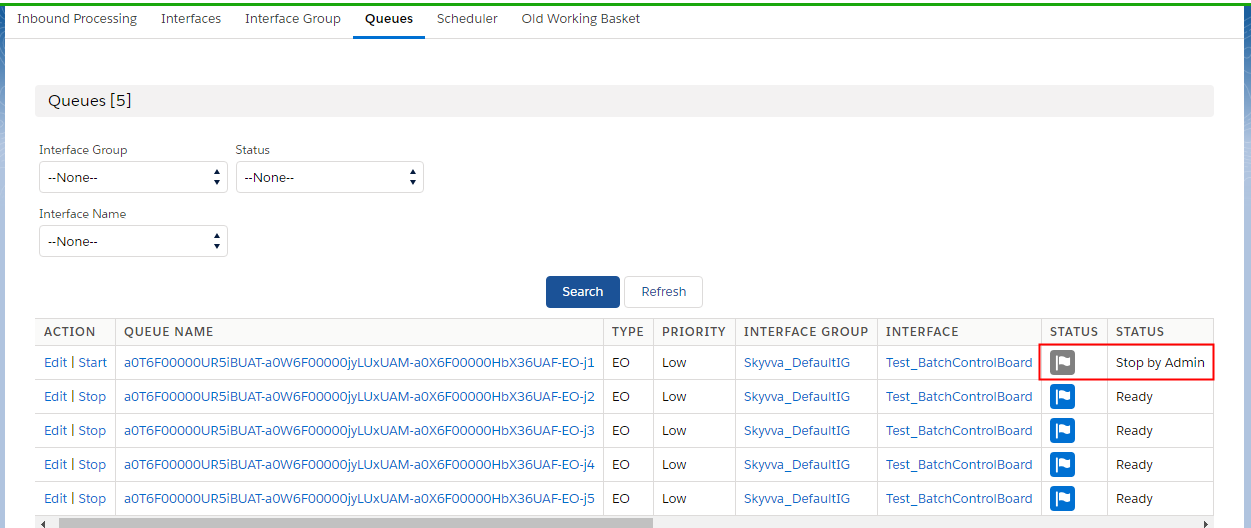
Queue is a dynamic object, which created automatically based on the interface group. You have to remember if you do not define an interface group SKYVVA will create a default interface group with the name “skyvva_DefaultIG”. Each interface group will be created queues.

–  What are queues and where is it used?
Share This Article :

  • Facebook
  • X
  • LinkedIn
Tutorials IntroductionTutorials Introduction

Copyright © 2026 | Apsara Consulting GmbH | All rights reserved

  • Imprint
  • Zurück zur Apsara Webseite
  • Back to Apsara website