Skip to content
  • Blog
  • Docs
  • Documentation
  • Imprint
SKYVVA Integration App – Documentation
SKYVVA Integration App - Documentation
  • Documentation
  • Zurück zur Webseite
  • Back to website
SKYVVA Integration App – Documentation
SKYVVA Integration App - Documentation
Popular Search how tohow to useagenthowdatarestformulacustomstorebatch

SAP PI/PO Adapter

Tutorials (Lightning)

Agent Old Administration Guide

SAP Release Notes

Agent Release Notes

Agent - New Administration Guide

SAP CPI Adapter

SKYVVA Administration Guide (Lightning)

SKYVVA Release Notes

SAP/ERP | S4/HANA (Latest Version) Adapter

SAP-ERP (Old Version) Adapter

  • How to get the Salesforce Id return back in the response interface using Agent SAP ERP Adapter?
    • 1. How to get the Salesforce Id return back in the response interface using Agent SAP ERP Adapter?
  • How to invoke IDOC XML using Agent S/4 HANA Adapter?
    • 1. How to invoke IDOC XML using Agent S/4 HANA Adapter?
  • How to invoke Asynchronous BAPI XML using Agent SAP ERP Adapter?
    • 1. How to invoke Asynchronous BAPI XML using Agent SAP ERP Adapter?
  • How to invoke BAPI XML using Agent SAP ERP Adapter?
    • 1. How to invoke BAPI XML using Agent SAP ERP Adapter?
  • How to invoke BAPI XML using Agent SAP S/4 HANA Adapter?
    • 1. How to invoke BAPI XML using Agent SAP S/4 HANA Adapter?
  • How to invoke IDOC XML using Agent SAP ERP Adapter?
    • 1. How to invoke IDOC XML using Agent SAP ERP Adapter?
  • Prerequisite for SKYVVA solution
    • 1. Prerequisite for SKYVVA solution
  • Import/Deploy ABAP Transport in SAP
    • 2. Import/Deploy ABAP Transport in SAP
  • Certificate for Secured Communications
    • 3. Certificate for Secured Communications
  • Create SAP Adapter in Salesforce – Classic Version
    • 4. Configuration for SAP Adapter
    • 5. Create SAP Adapter in Salesforce – Classic Version
  • Generic Inbound Configuration
    • 1. Generic Inbound Configuration
  • How to develop inbound interface using BAPI with the multi-itab adapter synchronously?
    • 1. How to develop inbound interface using BAPI with the multi-itab adapter synchronously?
  • How to develop inbound interface using IDoc asynchronously?
    • 1. How to develop inbound interface using IDoc asynchronously?
  • How to develop Outbound interface using BAPI asynchronously?
    • 1. How to develop Outbound interface using BAPI asynchronously?
  • How to develop Outbound interface using BAPI synchronously?
    • 1. How to develop Outbound interface using BAPI synchronously?
  • How to develop Outbound interface using IDoc asynchronously?
    • 1. How to develop Outbound interface using IDoc asynchronously?
  • How to invoke Asynchronous BAPI XML using Skyvva SAP ERP Adapter?
    • 1. How to invoke Asynchronous BAPI XML using Skyvva SAP ERP Adapter?
  • Configuration of IService
    • 1. Configuration of IService
  • Configure Enterprise Service
    • 1. Configure Enterprise Service
  • How to invoke SAP SOAP API using Skyvva SOAP Adapter?
    • 1. How to invoke SAP SOAP API using Skyvva SOAP Adapter?
  • How to invoke SAP REST API using Skyvva REST Adapter?
    • 1. How to invoke SAP REST API using Skyvva REST Adapter?
  • How to invoke IDOC XML using SKYVVA SOAP Adapter?
    • 1. How to invoke IDOC XML using SKYVVA SOAP Adapter?
  • How to invoke IDOC XML using SAP S/4 HANA Adapter?
    • 1. How to invoke IDOC XML using SAP S/4 HANA Adapter?
  • Skyvva configuration generic Information
    • 1. Skyvva configuration generic Information
  • How to invoke BAPI XML using SAP S/4 HANA Adapter?
    • 1. How to invoke BAPI XML using SAP S/4 HANA Adapter?
  • How to invoke IDOC XML using SAP ERP Adapter?
    • 1. How to invoke IDOC XML using SAP ERP Adapter?
  • How to invoke BAPI XML using SAP ERP Adapter?
    • 1. How to invoke BAPI XML using SAP ERP Adapter?

Mule Adapter

Migration from SAP-PO SOAP Skyvva connector to REST connector module

View Categories
  • Home
  • Documentation
  • SAP-ERP (Old Version) Adapter
  • How to develop Outbound interface using BAPI synchronously?

1. How to develop Outbound interface using BAPI synchronously?

Create Customer in SAP from Salesforce using BAPI and Save created customer in Salesforce table.SYNCHRONOUS call)
Table of Contents

    1. Skyvva software landscape and building blocks
    2. Used Convention
    3. Introduction, Prerequisite for creating an outbound interface
    4. Creating Outbound Interface
      • Define BAPI and fields in the skyvva config
      • Export BAPI structure from SAP
      • Create an interface
      • Import BAPI structure
      • Query editor
      • Mapping of fields
    5. Create Inbound Interface in Salesforce
    6. Import XML file
    7. Mapping of field
    8. Changing the outbound interface
    9. Making Response Interface in sap
    10. Run Apex code
    11. Testing Result

From Step 1 to Step 4 refer to the document: How to develop an Outbound interface using BAPI asynchronously?
After following the above document, the outbound interface would have been created.

5. Create Inbound Interface in Salesforce #

Here, we Need to create Inbound Interface to save the created customer number into the salesforce table.
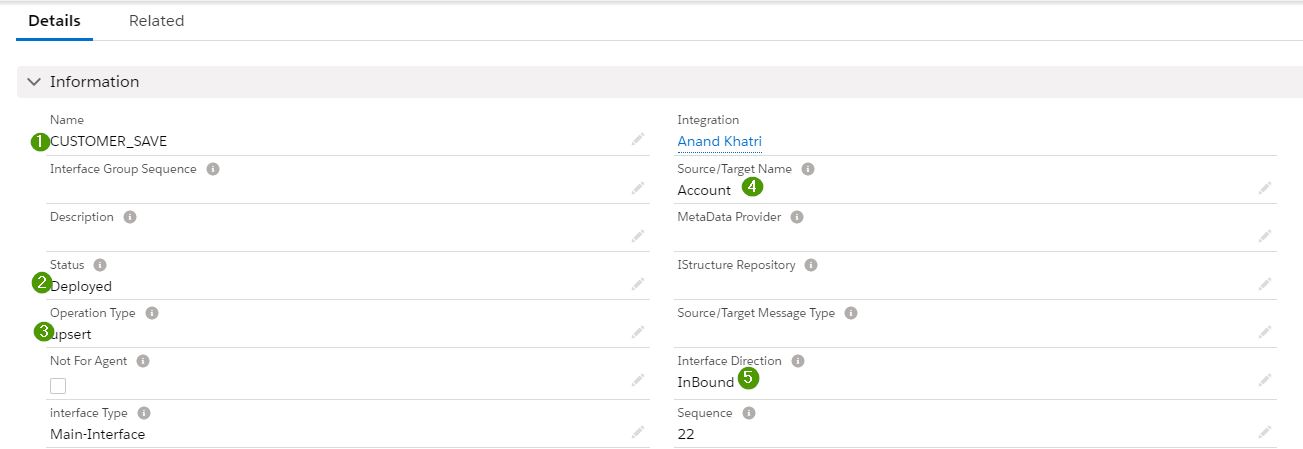
Create a New Interface.

  1. Give appropriate interface name
  2. Deployed
  3. Operation Type: upsert(update fields)
  4. Source/Target Name: Account (Table to update)
  5. Interface Direction: Inbound

6. Import XML #

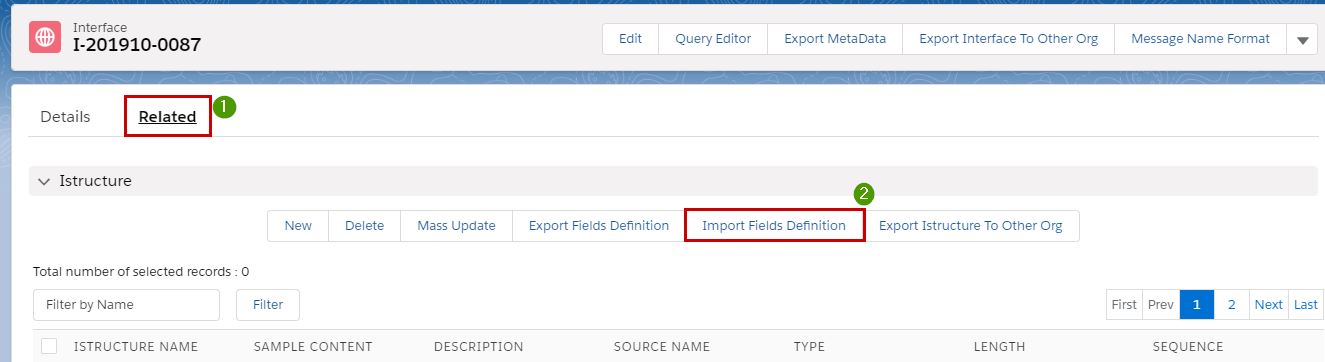
Save and Goto Related tab for XML file upload.
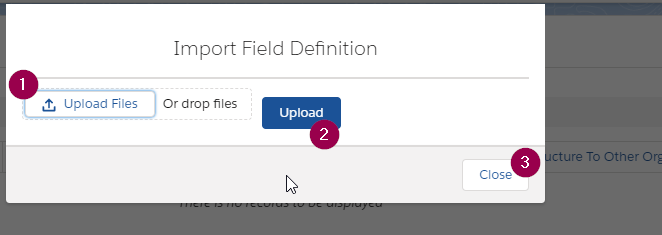
Upload file and then click on the upload button and then close the pop-up, the file will be loaded.
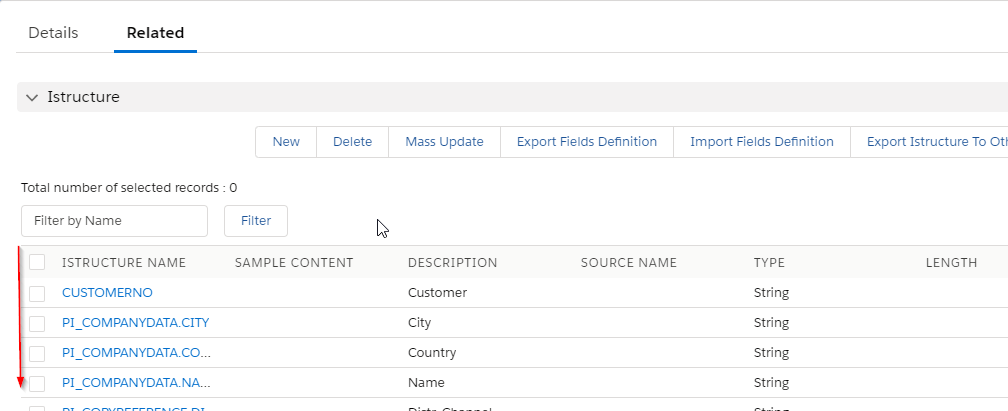
Now after loading we can see all the SAP interface fields which we have used from parameters.
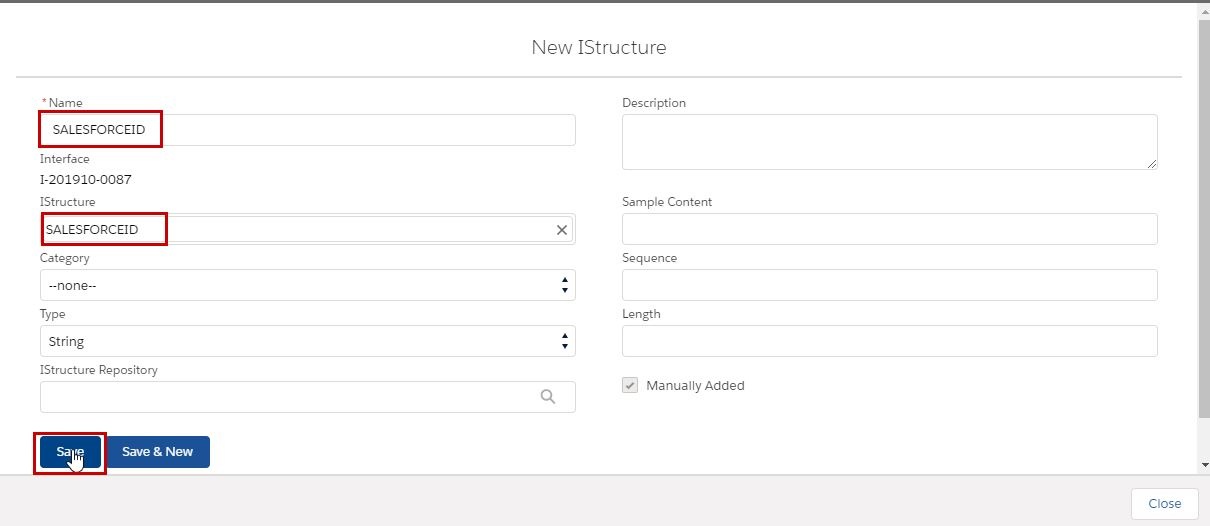
Add a salesforce id field to uniquely identify the table data as ext. id.
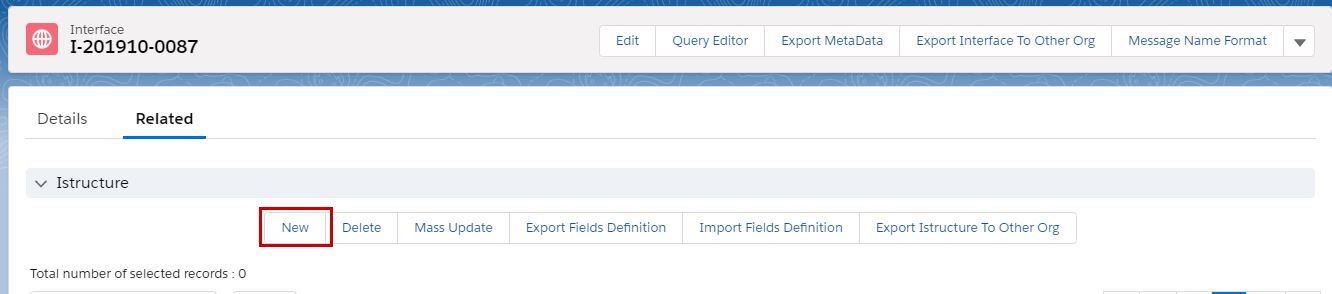
Provide the necessary details.
7. Mapping of fields #

Goto Detail tab and Mapping section.
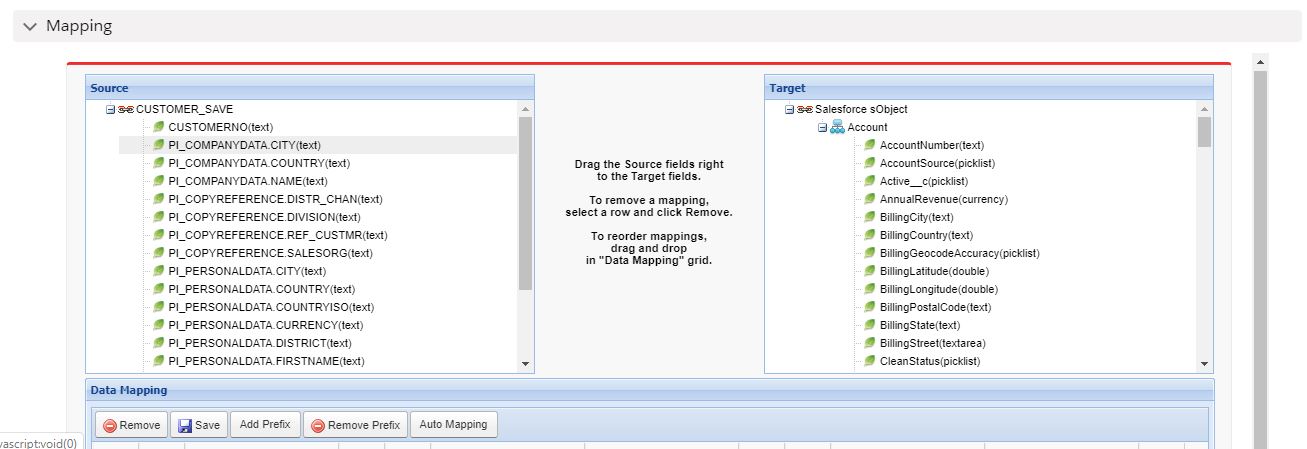
Here, we need to map only 2 fields, salesforceid and customerid.

  1. SALESFORCEID : This field identifies the record in a table which is needed to update, the salesforce will be what we have used in apex code for running interface, same record will be updated.
  2. CUSTOMERID: This field is a customer number which is created in SAP and the same needs to save in our salesforce ‘ACCOUNT’ table. So, we need to map the customer field with our salesforce ACCOUNT table field.
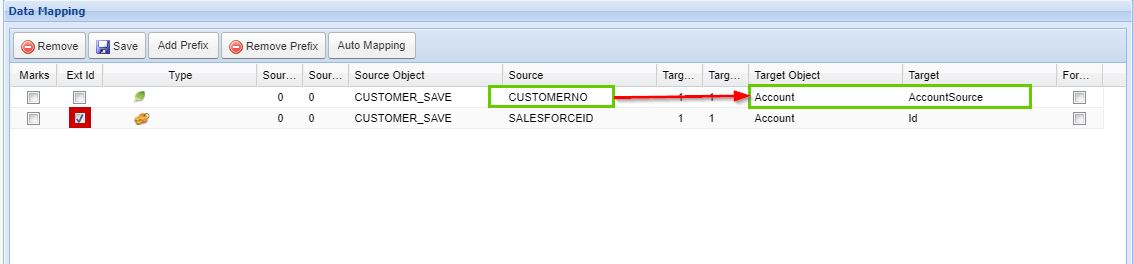

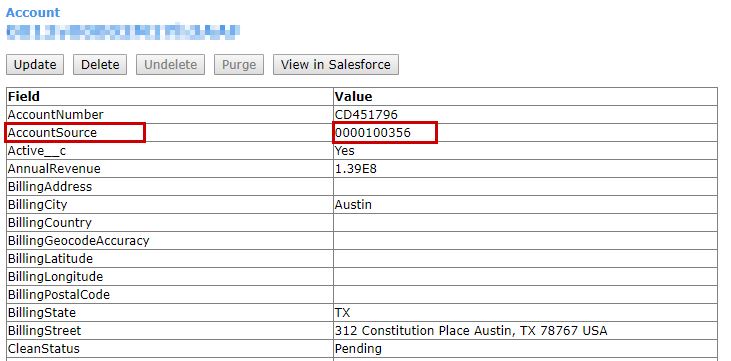
Here, CustomerNo is mapped to Account->AccountSource field, where CustomerNo is going to save.

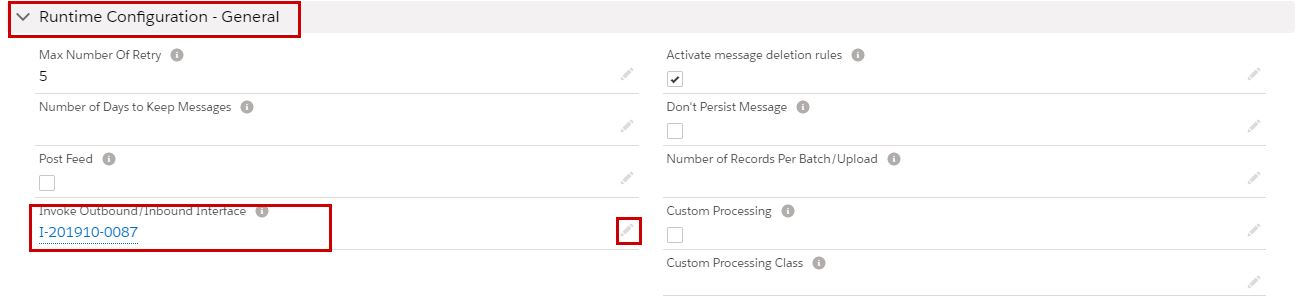
8. Change Outbound Interface. #

Goto to the interface created in step 4.
Goto Runtime Config. and Add Inbound interface-id which we created in Step 5. Save it.
It specific the workflow of execution after the Outbound Interface, Inbound Interface will be called (CUSTOMER_SAVE).
9. Making Response Interface in sap #

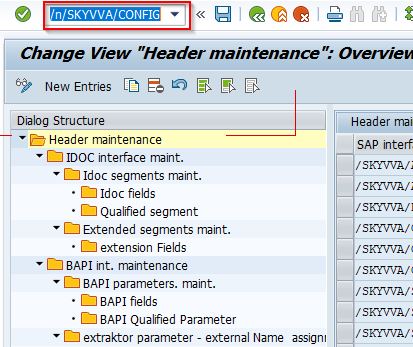
Goto T-code /skyvva/config:
Goto Response interface tab.
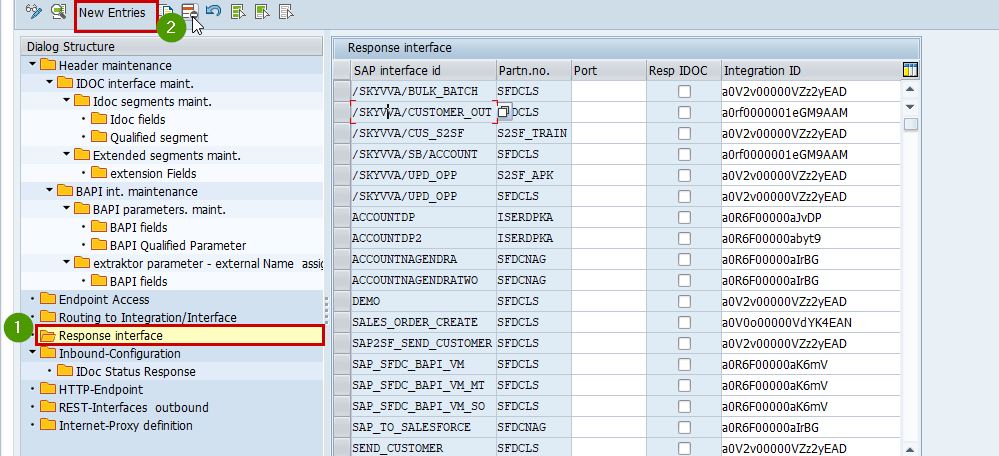
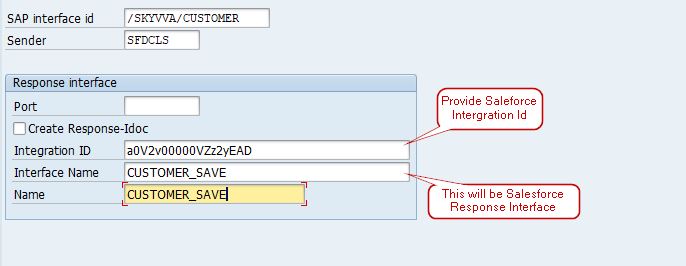
After New entry, the parent the Interface and port from f4 help.
#

10. Run Apex code #

Now, SALESFORCE and SAP interface is ready.
Run the apex code from Developer Console.
Open Console by going to set at the top corner and the Developer Console.
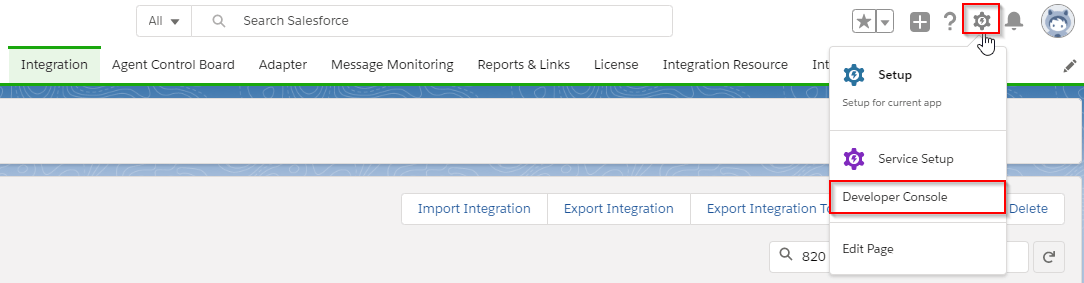
New Window will appear and press ctrl+E to open Apex editor.
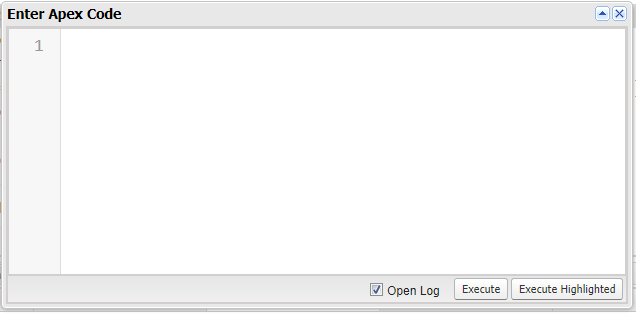
Sample Apex Code.
skyvvasolutions.CallOutControl c=new skyvvasolutions.CallOutControl();
c.returnXml=true;
c.returnListRecord=true;
c.isCreateMessage=true;
c.actionDoIntegrate=false;
 String[] id1=new String[]{‘Data Record-Id’};
skyvvasolutions.CallOutResponse r=skyvvasolutions.Iservices.invokeCallout2(‘Integration Name’,’Interface Name’,id1,’SYNC’, c);
Data Record Id: Each database table in salesforce have Id field, which is a unique identification of particular records.
And then Execute,  Data will be saved in save.
After successful execution, the response will come with the created customer number.
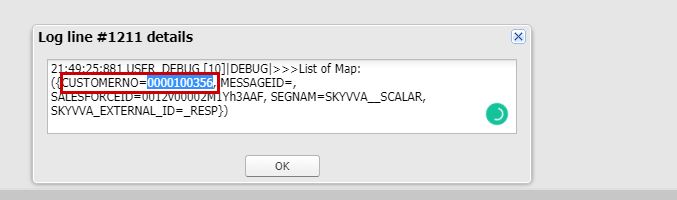
11. Testing Result #

Now, we can the Message in Integration.
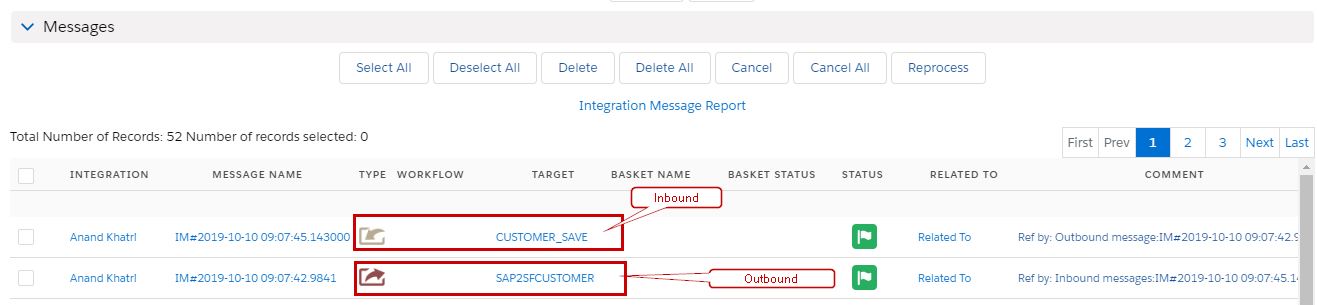
Both the Outbound and Inbound get called one after another.
Now, we see out the created customer in the Account Table.
Share This Article :

  • Facebook
  • X
  • LinkedIn
1. How to develop Outbound interface using BAPI synchronously?1. How to develop Outbound interface using BAPI synchronously?
Table of Contents
  • 5. Create Inbound Interface in Salesforce
  • 6. Import XML
  • 7. Mapping of fields
  • 8. Change Outbound Interface.
  • 9. Making Response Interface in sap
  • 10. Run Apex code
  • 11. Testing Result

Copyright © 2026 | Apsara Consulting GmbH | All rights reserved

  • Imprint
  • Zurück zur Apsara Webseite
  • Back to Apsara website