Skip to content
  • Blog
  • Docs
  • Documentation
  • Imprint
SKYVVA Integration App – Documentation
SKYVVA Integration App - Documentation
  • Documentation
  • Zurück zur Webseite
  • Back to website
SKYVVA Integration App – Documentation
SKYVVA Integration App - Documentation
Popular Search how tohow to useagenthowdatarestformulacustombatchstore

SAP PI/PO Adapter

  • Enhanced Domain with the Skyvva Salesforce Connector using the SOAP adapter
  • How to create a synchronous outbound hierarchical quote interface in SAP PI/PO using SKYVVA SFDC2SAPPI Adapter?
    • 1. How to create a synchronous outbound hierarchical quote interface in SAP PI/PO using SKYVVA SFDC2SAPPI Adapter?
  • How to pass Queue-ID into the URL parameter of the SAP-PI/PO using SKYVVA V3 SAP PI/PO Adapter with SOAP Protocol?
    • 1. How to pass Queue-ID into the URL parameter of the SAP-PI/PO using SKYVVA V3 SAP PI/PO Adapter with SOAP Protocol?
  • How to Setup the SKYVVA Module Parameters in SAP PI/PO with V3?
    • 1. How to Setup the SKYVVA Module Parameters in SAP PI/PO with V3?
  • How to create an inbound hierarchical interface using SKYVVA Bulk mode with V3 SKYVVA Connector module?
    • 1. How to create an inbound hierarchical interface using SKYVVA Bulk mode with V3 SKYVVA Connector module?
  • How to create an interface using SKYVVA Bulk Query using SAP PI/PO with SKYVVA Connector module?
    • 1. How to create an interface using SKYVVA Bulk Query using SAP PI/PO with SKYVVA Connector module?
  • How to create an inbound interface for sending base 64 string attachment from SAP PO to Salesforce?
    • 1. How to create an inbound interface for sending base 64 string attachment from SAP PO to Salesforce?
  • How to create an inbound hierarchical interface using SKYVVA Bulk mode with V2 SKYVVA Connector module?
    • 1. How to create an inbound hierarchical interface using SKYVVA Bulk mode with V2 SKYVVA Connector module?
  • How to create an inbound interface to post a hierarchical sObject using the SKYVVA connector module?
    • 1. How to create an inbound interface to post a hierarchical sObject using the SKYVVA connector module?
  • How to use the hybrid mapping mode?
    • 1. How to use the hybrid mapping mode?
  • How to create an inbound asynchronous interface with the normal integrate operation in SAP PI/PO with V3 adapter module?
    • 1. How to create an inbound asynchronous interface with the normal integrate operation in SAP PI/PO with V3 adapter module?
  • How to create an inbound interface using integrate AutoSwitch mode with SKYVVA connector module?
    • 1. How to create an inbound interface using integrate AutoSwitch mode with SKYVVA connector module?
  • How to create inbound Hierarchical IntegrateSynchronous interface in SAP PI/PO using SKYVVA V3 Connector Module?
    • 1. How to create inbound Hierarchical IntegrateSynchronous interface in SAP PI/PO using SKYVVA V3 Connector Module?
  • What is SKYVVA Connector Module?
    • 1. What is SKYVVA Connector Module?
  • How to send an acknowledgement from SAP to SKYVVA?
    • 1. How to send an acknowledgement from SAP to SKYVVA?
  • How to create an outbound synchronous proxy interface in SAP PI/PO using SKYVVA SFDC2SAPPI Adapter?
    • 1. How to create an outbound synchronous proxy interface in SAP PI/PO using SKYVVA SFDC2SAPPI Adapter?
  • How to check the SKYVVA Java module version which is deployed in SAP PI/PO?
    • 1. How to check the SKYVVA Java module version which is deployed in SAP PI/PO?
  • How to create inbound synchronous query interface in SAP PI/PO with SAP BAPI using SKYVVA V3 connector module?
    • 1. How to create inbound synchronous query interface in SAP PI/PO with SAP BAPI using SKYVVA V3 connector module?
  • How to create an inbound interface using integrate SFDC Bulk mode with SKYVVA V3 Connector Module?
    • 1. How to create an inbound interface using integrate SFDC Bulk mode with SKYVVA V3 Connector Module?
  • How to create an interface using SKYVVA REST Query using SAP PI/PO with SKYVVA V3 Connector module?
    • 1. How to create an interface using SKYVVA REST Query using SAP PI/PO with SKYVVA V3 Connector module?
  • How to create an outbound interface for sending base 64 string attachment from Skyvva to SAP PO as file?
    • 1. How to create an outbound interface for sending base 64 string attachment from Skyvva to SAP PO as file?
  • How to create an outbound synchronous interface in SAP PI/PO using SKYVVA SAP PI/PO adapter using REST Protocol with URL Query parameter?
    • 1. How to create an outbound synchronous interface in SAP PI/PO using SKYVVA SAP PI/PO adapter using REST Protocol with URL Query parameter?
  • How to create an inbound asynchronous interface with the normal integrate operation in SAP PI/PO with V3 adapter module to generate the Skyvva External ID and Transaction ID?
    • 1. How to create an inbound asynchronous interface with the normal integrate operation in SAP PI/PO with V3 adapter module to generate the Skyvva External ID and Transaction ID?
  • How to create an interface using SKYVVA REST Query using SAP PI/PO with SKYVVA Connector module?
    • 1. How to create an interface using SKYVVA REST Query using SAP PI/PO with SKYVVA Connector module?
  • How to create an outbound skyvva interface using Interface Execution Scheduler with SAP PI/PO using SFDC2SAPPI Adapter?
    • 1. How to create an outbound skyvva interface using Interface Execution Scheduler with SAP PI/PO using SFDC2SAPPI Adapter?
  • How to create inbound synchronous query interface in SAP PI/PO using SKYVVA?
    • 1. How to create inbound synchronous query interface in SAP PI/PO using SKYVVA?
  • How to create an inbound interface using integrate Autoswitch mode with SKYVVA V3 Connector Module?
    • 1. How to create an inbound interface using integrate Autoswitch mode with SKYVVA V3 Connector Module?
  • How to create an inbound interface using SFDC Bulk mode with Skyvva Connector module?
    • 1. How to create an inbound interface using SFDC Bulk mode with Skyvva Connector module?
  • How to create an outbound synchronous interface in SAP PI/PO using SKYVVA SOAP V3 Adapter?
    • 1. How to create an outbound synchronous interface in SAP PI/PO using SKYVVA SOAP V3 Adapter?
  • How to create inbound IntegrateSynchronous interface in SAP PI/PO using SKYVVA?
    • 1. How to create inbound IntegrateSynchronous interface in SAP PI/PO using SKYVVA?
  • How to create an outbound synchronous interface in SAP PI/PO using SKYVVA SAP PI/PO adapter using REST Protocol with URL Path parameter?
    • 1. How to create an outbound synchronous interface in SAP PI/PO using SKYVVA SAP PI/PO adapter using REST Protocol with URL Path parameter?
  • How to create an inbound interface using integrate batch mode with SKYVVA V3 Connector Module?
    • 1. How to create an inbound interface using integrate batch mode with SKYVVA V3 Connector Module?
  • How to send an acknowledgement from SKYVVA to SAP?
    • 1. How to send an acknowledgement from SKYVVA to SAP?
  • How to create an inbound interface to post a single sObject?
    • 1. How to create an inbound interface to post a single sObject?
  • How to generate the WSDL in Skyvva in Lightening and Classic mode?
    • 1. How to generate the WSDL in Skyvva in Lightening and Classic mode?
  • How to pass Queue-ID into the URL parameter of the SAP-PI/PO SOAP Adapter?
    • 1. How to pass Queue-ID into the URL parameter of the SAP-PI/PO SOAP Adapter?
  • How to create an outbound asynchronous interface in SAP PI/PO EOIO mode using SKYVVA SFDC2SAPPI Adapter?
    • 1. How to create an outbound asynchronous interface in SAP PI/PO EOIO mode using SKYVVA SFDC2SAPPI Adapter?
  • How to create an inbound interface using integrate Skyvva Bulk mode with SKYVVA V3 Connector Module?
    • 1. How to create an inbound interface using integrate Skyvva Bulk mode with SKYVVA V3 Connector Module?
  • How to create an inbound interface using integrate batch mode with Skyvva connector module?
    • 1. How to create an inbound interface using integrate batch mode with Skyvva connector module?
  • How to create an outbound synchronous interface in SAP PI/PO using SKYVVA REST V3 Adapter?
    • 1. How to create an outbound synchronous interface in SAP PI/PO using SKYVVA REST V3 Adapter?
  • How to create an interface using SKYVVA Bulk mode with SKYVVA Connector module?
    • 1. How to create an interface using SKYVVA Bulk mode with SKYVVA Connector module?
  • How to pass URL Path Parameter and URL Query Parameter in REST Adapter?
    • 1. How to pass URL Path Parameter and URL Query Parameter in REST Adapter?
  • How to create an outbound asynchronous IDOC interface in SAP PI/PO using SKYVVA SFDC2SAPPI Adapter?
    • 1. How to create an outbound asynchronous IDOC interface in SAP PI/PO using SKYVVA SFDC2SAPPI Adapter?
  • How to create inbound IntegrateSynchronous interface in SAP PI/PO using SKYVVA V3 Connector Module?
    • 1. How to create inbound IntegrateSynchronous interface in SAP PI/PO using SKYVVA V3 Connector Module?
  • How to use the SKYVVA CDC Feature for an outbound interface with SAP PI/PO?
    • 1. How to use the SKYVVA CDC Feature for an outbound interface with SAP PI/PO?
  • How to create an inbound hierarchical interface using SKYVVA Batch mode with V2 SKYVVA Connector module?
    • 1. How to create an inbound hierarchical interface using SKYVVA Batch mode with V2 SKYVVA Connector module?
  • How to create an inbound hierarchical interface using SKYVVA Batch mode with V3 SKYVVA Connector module?
    • 1. How to create an inbound hierarchical interface using SKYVVA Batch mode with V3 SKYVVA Connector module?
  • How to create an inbound asynchronous interface with the integrateBatch operation in SAP PI/PO with V3 adapter module to generate the Skyvva External ID and Transaction ID?
    • 1. How to create an inbound asynchronous interface with the integrateBatch operation in SAP PI/PO with V3 adapter module to generate the Skyvva External ID and Transaction ID?
  • How to Setup the SKYVVA Module Parameters in SAP PI/PO with V2?
    • 1. How to Setup the SKYVVA Module Parameters in SAP PI/PO with V2?
  • How to create an inbound asynchronous interface with the integrateBulk operation in SAP PI/PO with V3 adapter module to generate the Skyvva External ID and Transaction ID?
    • 1. How to create an inbound asynchronous interface with the integrateBulk operation in SAP PI/PO with V3 adapter module to generate the Skyvva External ID and Transaction ID?
  • How to create inbound synchronous query interface in SAP PI/PO using SKYVVA V3 connector module?
    • 1. How to create inbound synchronous query interface in SAP PI/PO using SKYVVA V3 connector module?
  • How to create an interface using SKYVVA Bulk Query using SAP PI/PO with SKYVVA V3 Connector module?
    • 1. How to create an interface using SKYVVA Bulk Query using SAP PI/PO with SKYVVA V3 Connector module?
  • How to create an outbound synchronous interface in SAP PI/PO with XML format using SKYVVA REST V3 Adapter?
    • 1. How to create an outbound synchronous interface in SAP PI/PO with XML format using SKYVVA REST V3 Adapter?
  • How to create an outbound synchronous BAPI interface in SAP PI/PO using SKYVVA SFDC2SAPPI Adapter?
    • 1. How to create an outbound synchronous BAPI interface in SAP PI/PO using SKYVVA SFDC2SAPPI Adapter?
  • What is SKYVVA SAP PI/PO Adapter?
    • 1. What is SKYVVA SAP PI/PO Adapter?
  • How to create an outbound synchronous interface in SAP PI/PO using SKYVVA SAP PI/PO adapter using REST Protocol with JSON format?
    • 1. How to create an outbound synchronous interface in SAP PI/PO using SKYVVA SAP PI/PO adapter using REST Protocol with JSON format?
  • How to create an outbound synchronous proxy interface in SAP PI/PO using SKYVVA SOAP Adapter?
    • 1. How to create an outbound synchronous proxy interface in SAP PI/PO using SKYVVA SOAP Adapter?
  • How to create an outbound synchronous interface in SAP PI/PO using SKYVVA SAP PI/PO Adapter using SOAP Protocol?
    • 1. How to create an outbound synchronous interface in SAP PI/PO using SKYVVA SAP PI/PO Adapter using SOAP Protocol?
  • How to create an outbound synchronous BAPI interface in SAP PI/PO using SKYVVA REST Adapter?
    • 1. How to create an outbound synchronous BAPI interface in SAP PI/PO using SKYVVA REST Adapter?
  • How to create message type from Import SAP Metadata?
    • 1. How to create message type from Import SAP Metadata?
  • How to create a synchronous Quote Interface from SKYVVA to ECC and response back from ECC to SKYVVA
    • 1. How to create a synchronous Quote Interface from SKYVVA to ECC and response back from ECC to Skyvva

Tutorials (Lightning)

Agent Old Administration Guide

SAP Release Notes

Agent Release Notes

Agent - New Administration Guide

SAP CPI Adapter

SKYVVA Administration Guide (Lightning)

SKYVVA Release Notes

SAP/ERP | S4/HANA (Latest Version) Adapter

SAP-ERP (Old Version) Adapter

Mule Adapter

Migration from SAP-PO SOAP Skyvva connector to REST connector module

View Categories
  • Home
  • Documentation
  • SAP PI/PO Adapter
  • How to create an interface using SKYVVA REST Query using SAP PI/PO with SKYVVA Connector module?

1. How to create an interface using SKYVVA REST Query using SAP PI/PO with SKYVVA Connector module?

This document describes how to create an inbound interface using SKYVVA REST query mode in SAP PI/PO with SKYVVA connector module.
What Is REST Query?
REST query -This is the new type we support and we can handle bigger sizes as the searchService. This is possible because Salesforce held the cursor and can return the result page by page. In our module, we can collect the result set and combine it to a new message.
The SKYVVA search will internally work on your query and will provide the complete result from your query.
You can configure in your Interface with operationType as “REST Query“ or “REST Query All“ to use REST Query feature.  Then you need to configure your SQOL in the SKYVVA interface. Base on your configuration in Interface SkYVVA connector will automatically detects the operation type and work accordingly with the same search operation.

2. SKYVVA interface creation
Create an inbound interface, for example, “RESTQueryTest_IN” as shown below.
Select the Operation type as REST Query” or “REST Query All”
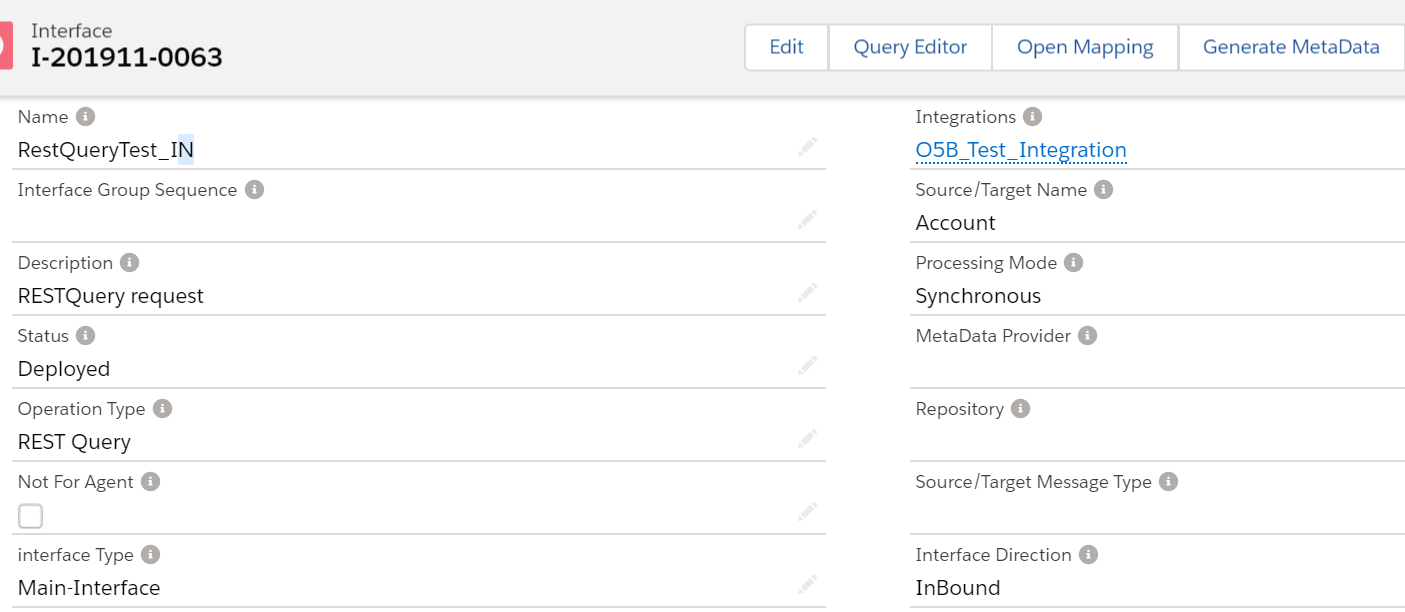
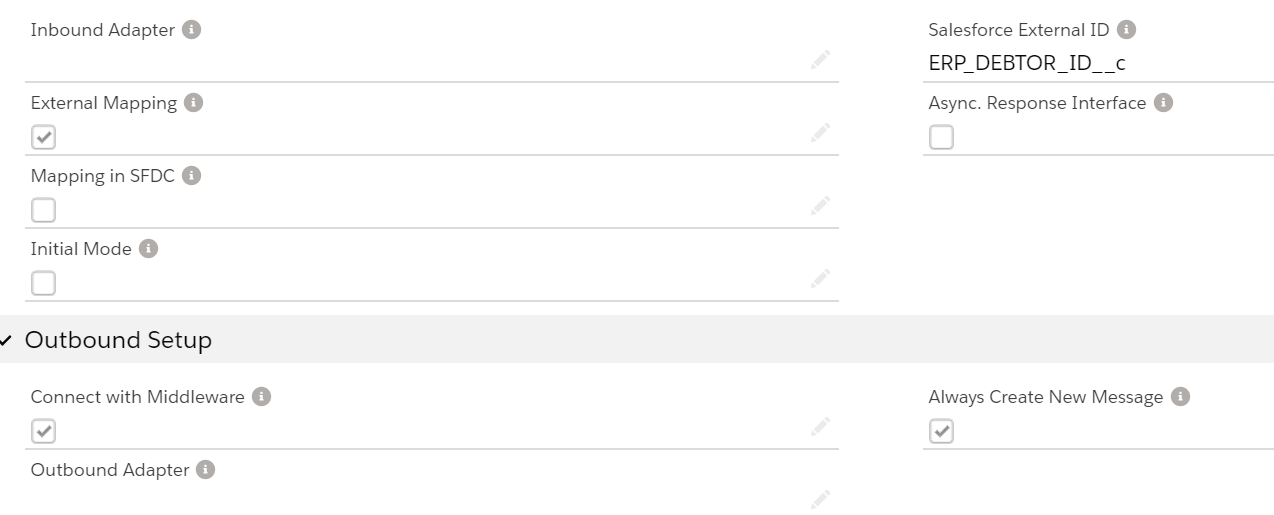
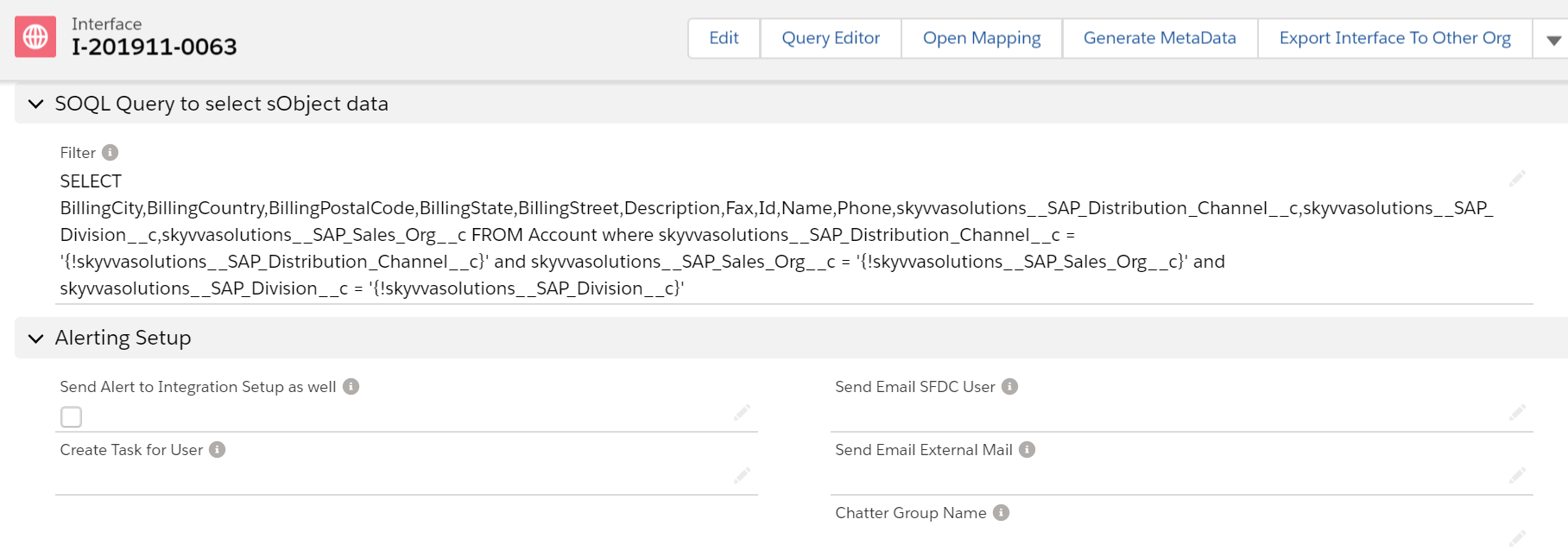
In this example we are going to put the SQL statement in the Skyvva Interface.
Now save the interface and download the WSDL.

Step 3 – Import WSDL into ESR
First, we have to create a namespace in ESR like “http://SAP_to_SF_RESTQueryTest“.
Now create an external definition under the namespace like below.Here the WSDL is for RESTQueryTest. So, we can give the name as ED_RESTQuery_Req
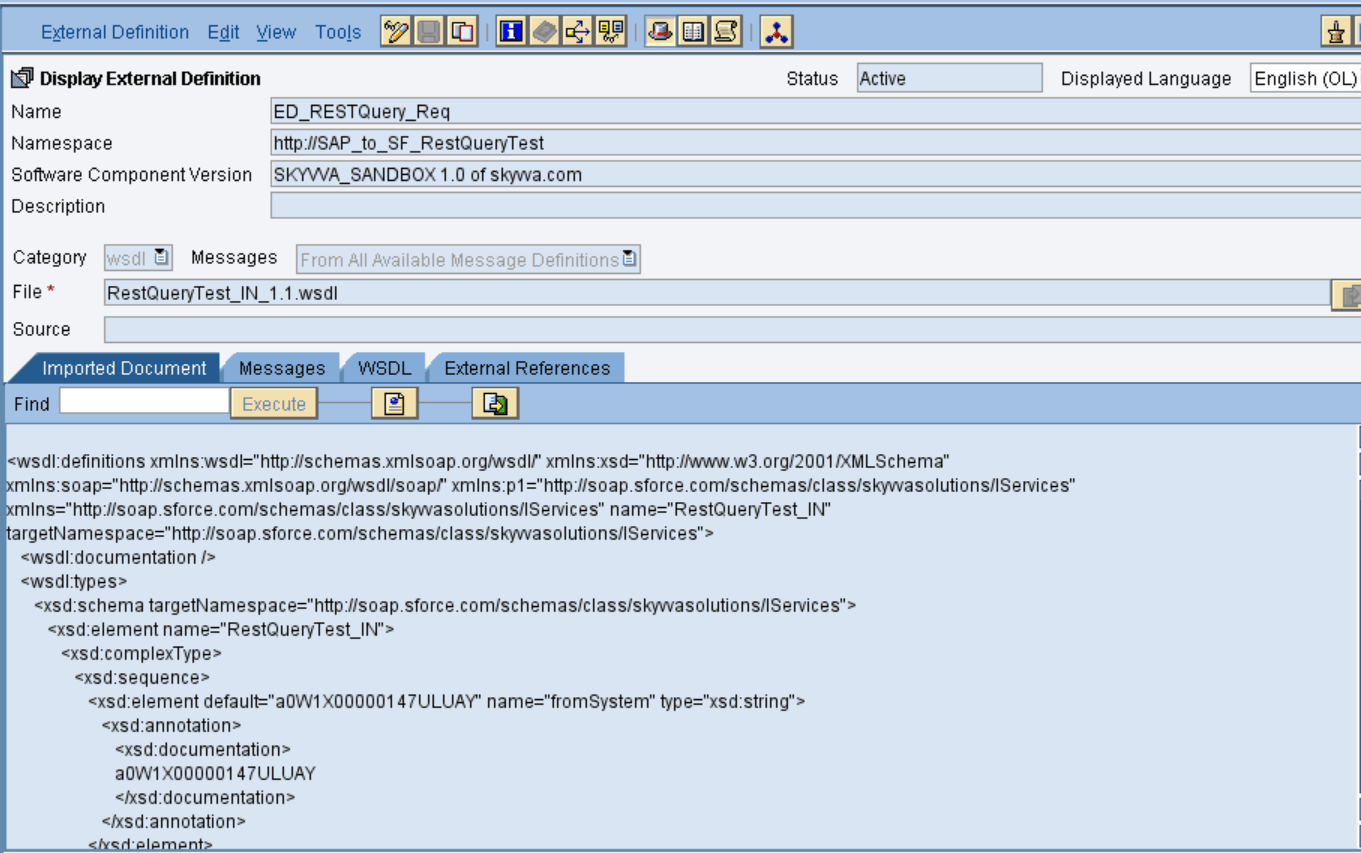
Here instead of WSDL from salesforce we can use our own message type in this example like below.
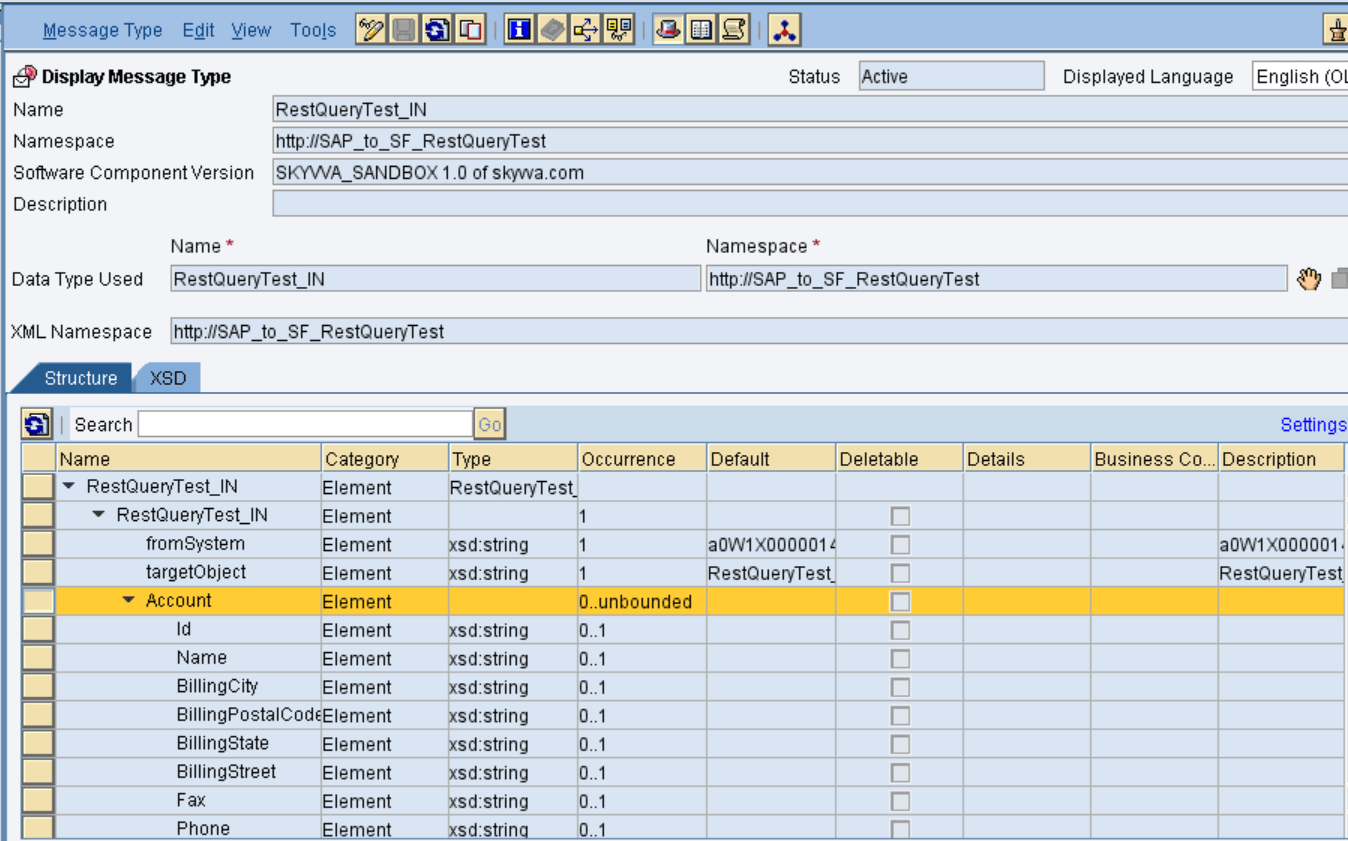
Here we are going to use only one interface for both Request and Response.
Import the WSDL and save and activate the external definition.

  • Sender request data type

Create sender request data type as shown below
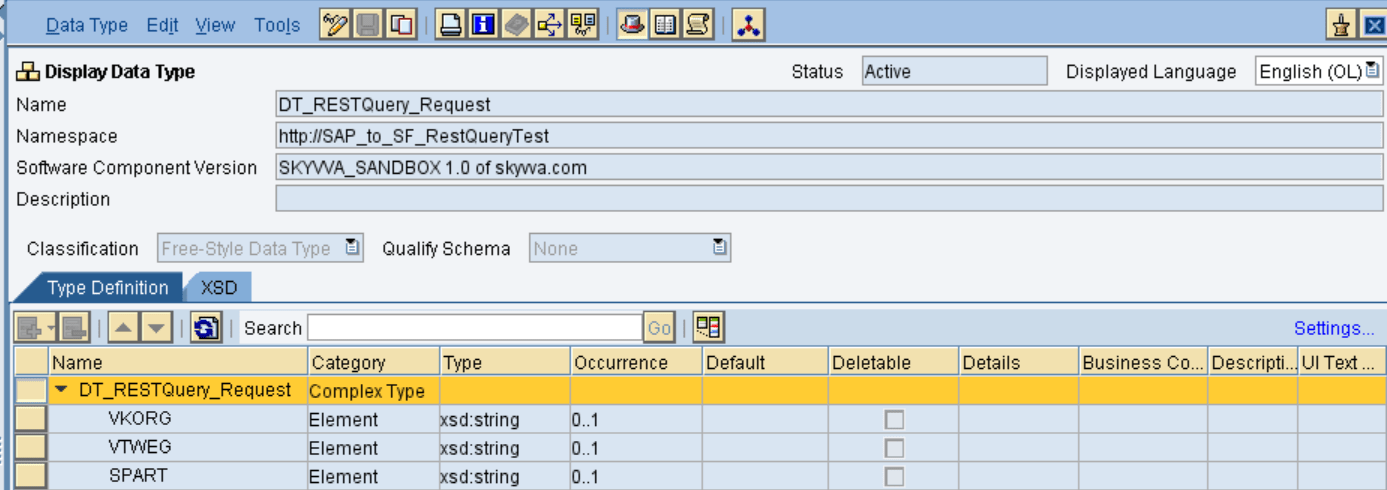
Sender response datatype –
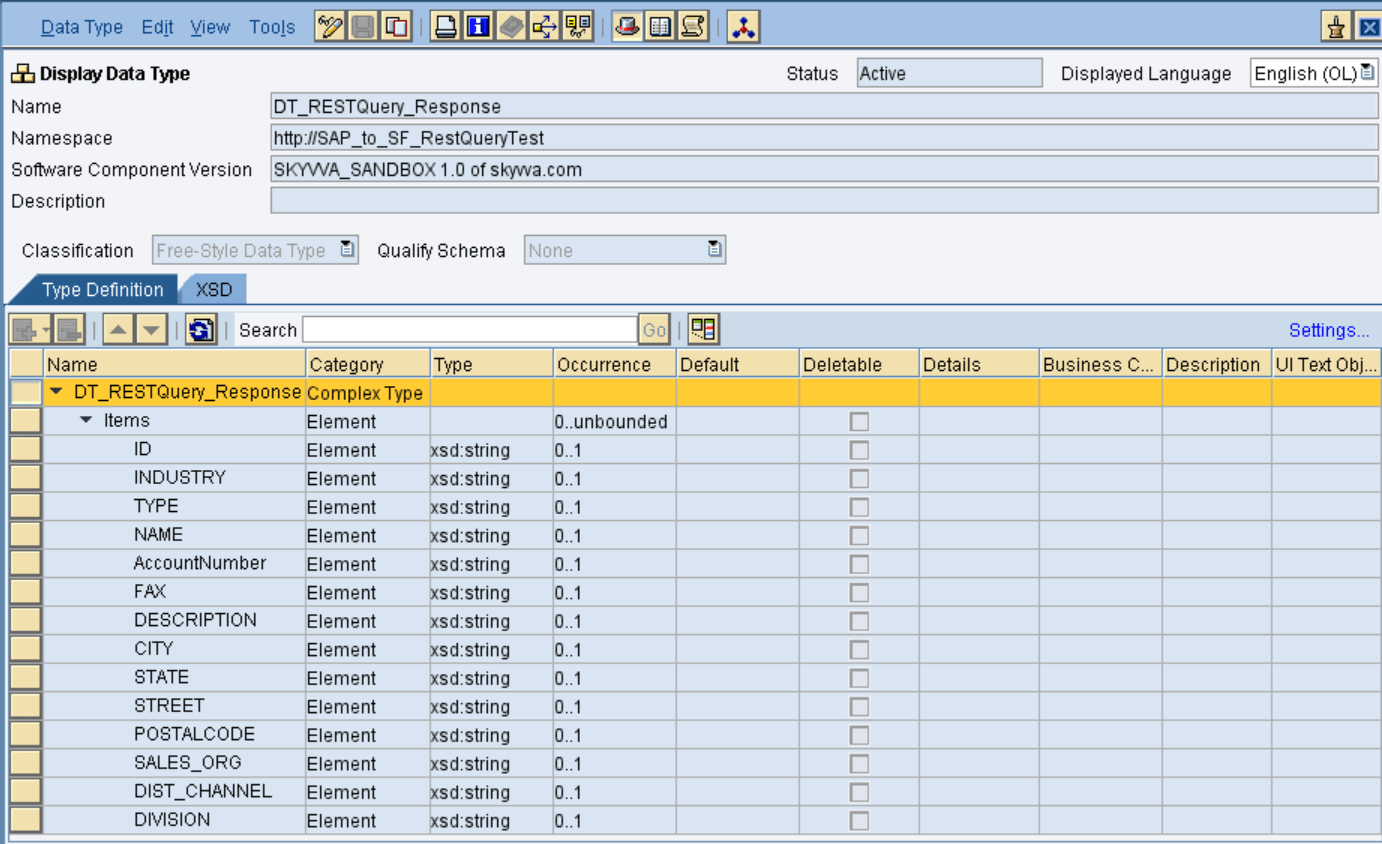
after creating the source data type click on save and activate.

  • Source request message type

Create the request message type as shown below:
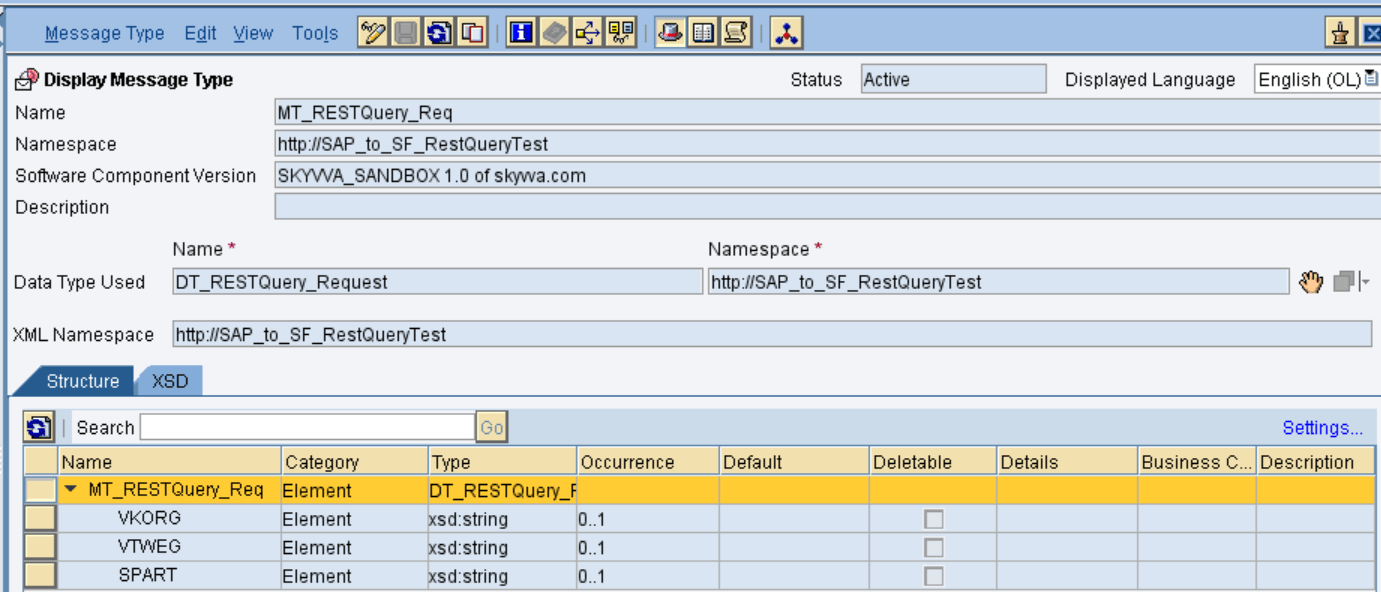
  • Source response message type

Create the response message type as shown below:
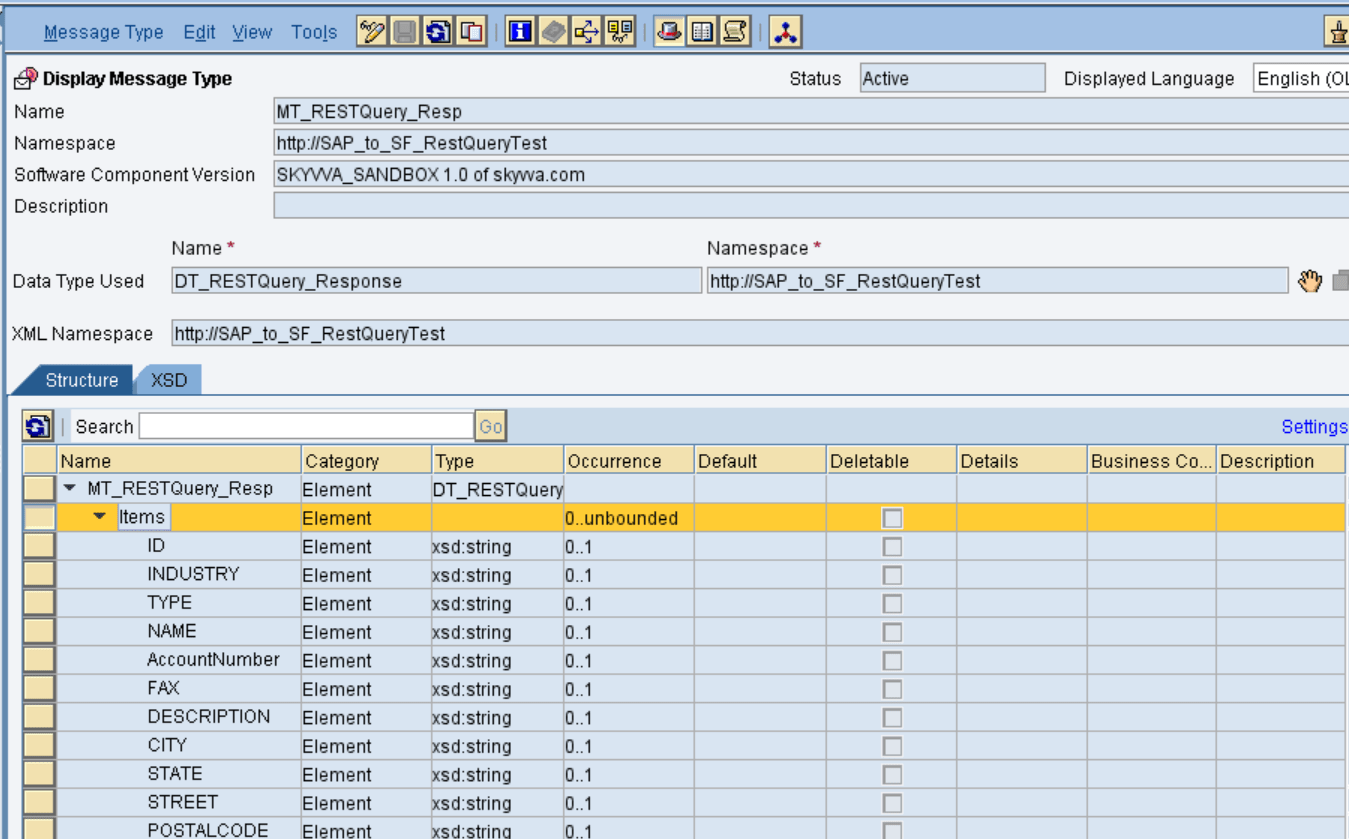
  • Outbound Service Interface

Create an Outbound service interface, in that select category as outbound and select the respective message type.
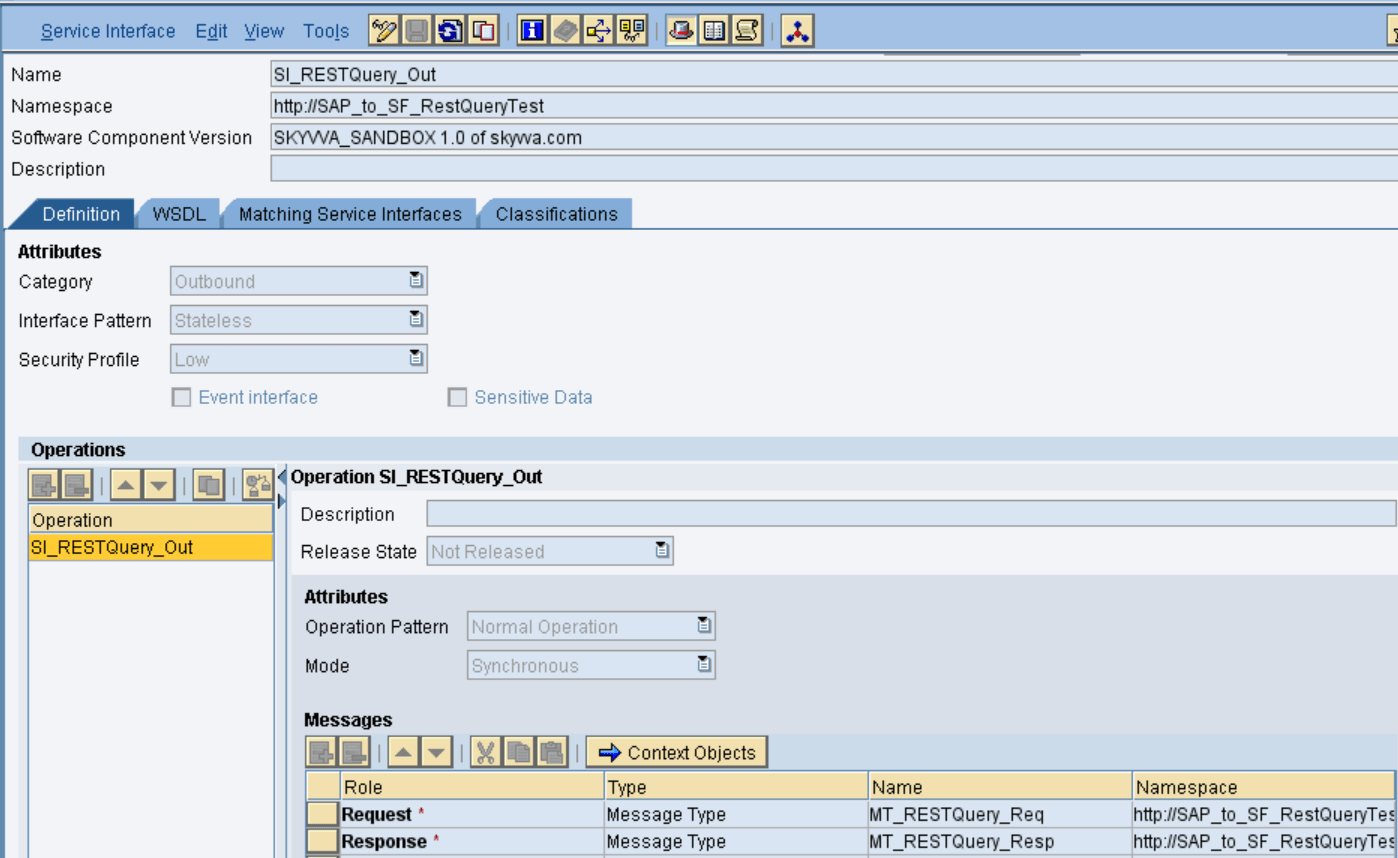
then save and activate the outbound service interface.

  • Inbound Service Interface

Create an inbound service interface, in that select category as inbound and select the respective external definition.
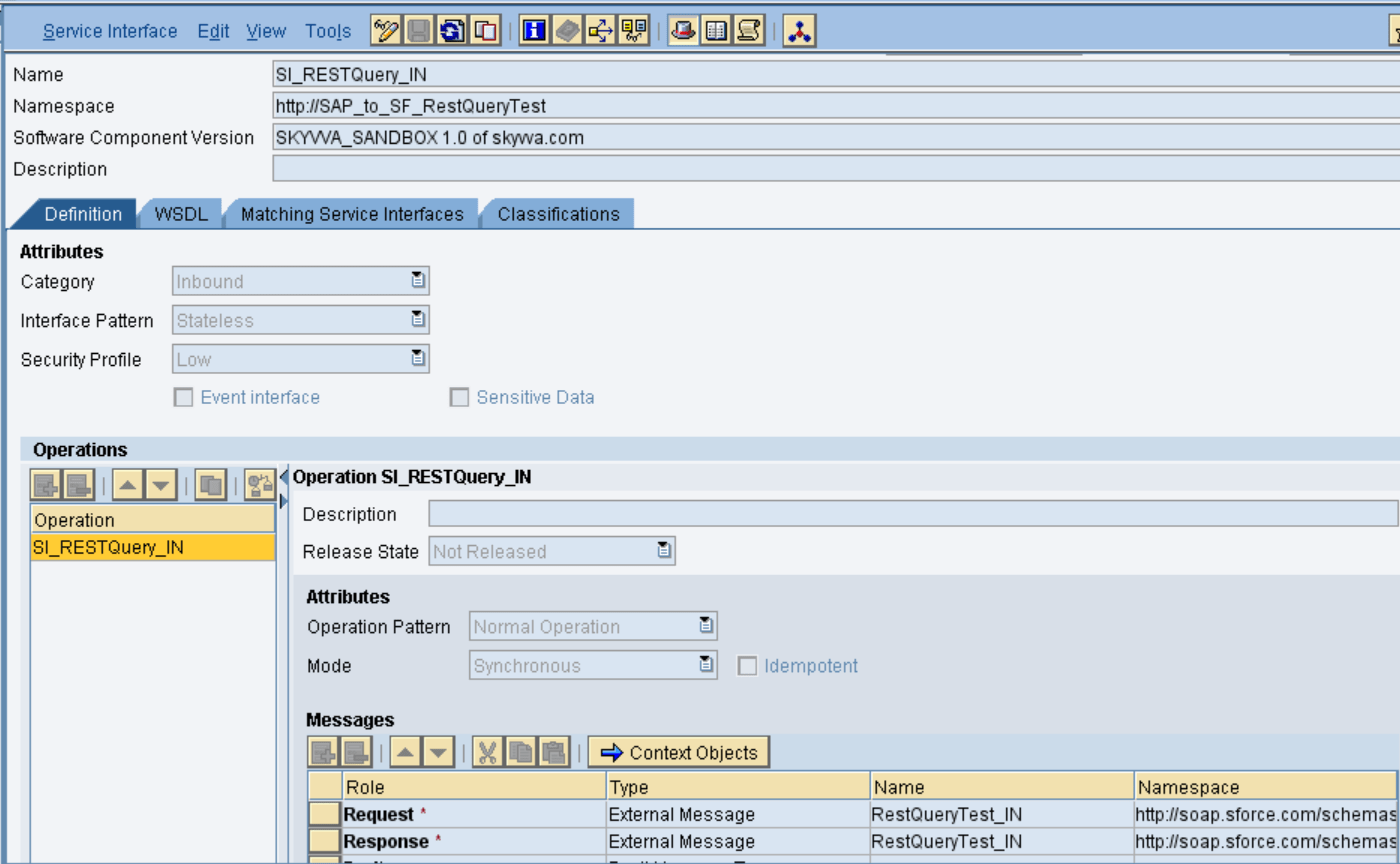
Save and active the inbound service interface.

  • Request Message Mapping

Create request message mapping as shown below:
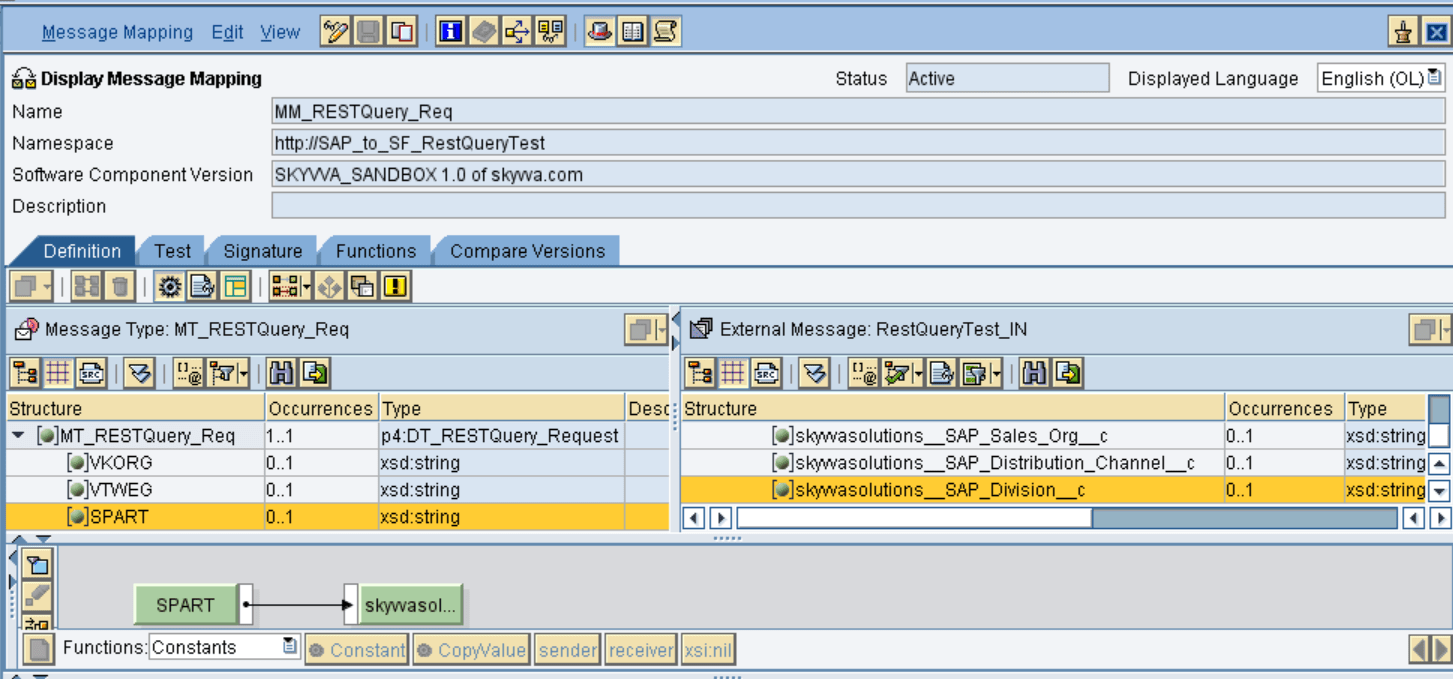
The different way to put the SELECT statement
Here we are able to build the select statement dynamically by the pi mapping. Thus we need a field in the request payload which for example is called ‘SKYVVA__SOQL_SELECT’ and where we can build the SELECT-statement by using concat formula in the mapping. In this case, you are taking the value from this field and it will dominate the SELECT-statement on the module parameter.
In the request WSDL we need to add SKYVVA system field e.g. ‘SKYVVA__SOQL_SELECT’ and build dynamically the SELECT in the mapping.
We have at 3 different places to put the SELECT statement e.g.:

  1. In the interface
  2. In the module parameter
  3. In the PO request mapping in the field ‘SKYVVA__SOQL_SELECT’ .

Here is the SQL Statement used in SKYVVA interface.
SELECT BillingCity,BillingCountry,BillingPostalCode,BillingState,BillingStreet,Description,Fax,Id,Name,Phone,skyvvasolutions__SAP_Distribution_Channel__c,skyvvasolutions__SAP_Division__c,skyvvasolutions__SAP_Sales_Org__c FROM Account where skyvvasolutions__SAP_Distribution_Channel__c = ‘{!skyvvasolutions__SAP_Distribution_Channel__c}’ and skyvvasolutions__SAP_Sales_Org__c = ‘{!skyvvasolutions__SAP_Sales_Org__c}’ and skyvvasolutions__SAP_Division__c = ‘{!skyvvasolutions__SAP_Division__c}’

  • Response Message Mapping

Create response message mapping as shown below:
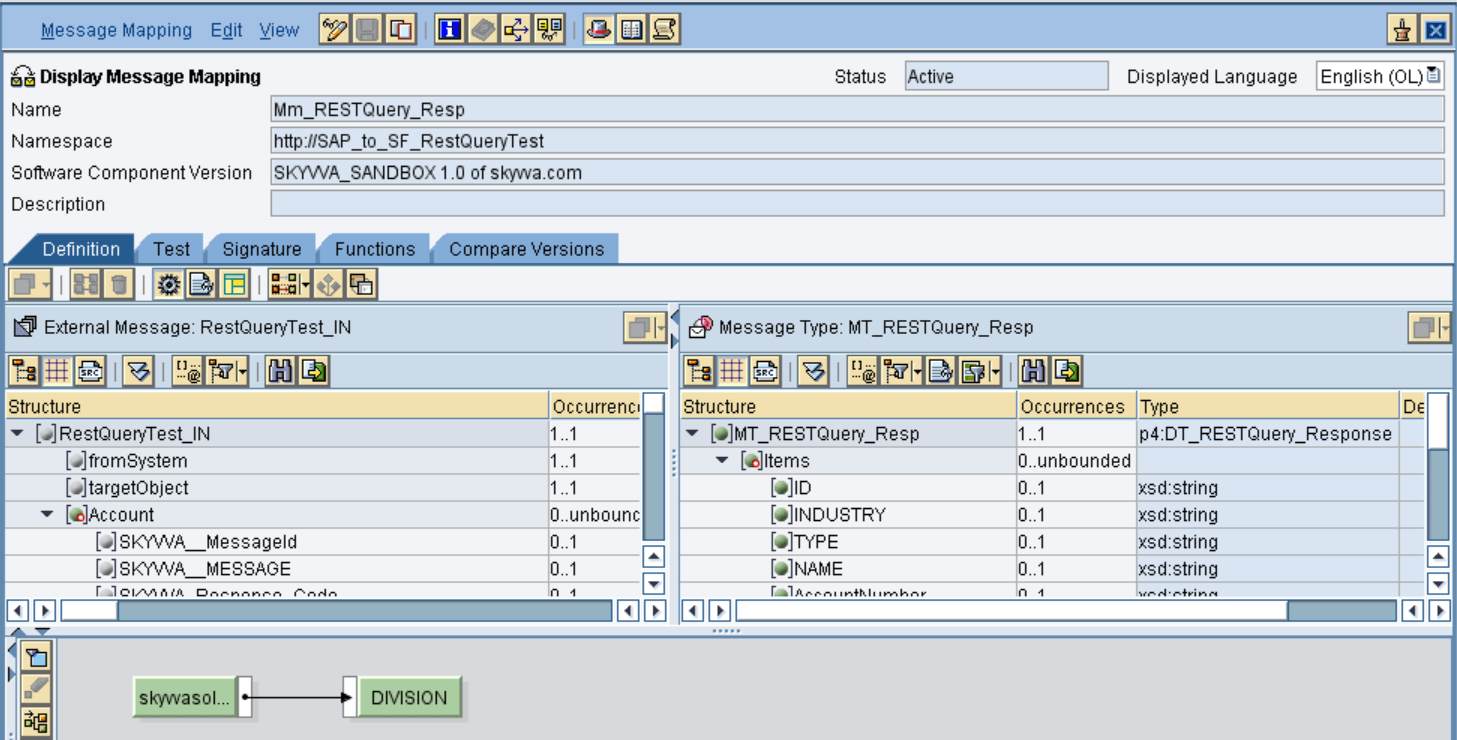
Insert the respective source and target structure and then do the mapping.
Now save and activate the message mapping.

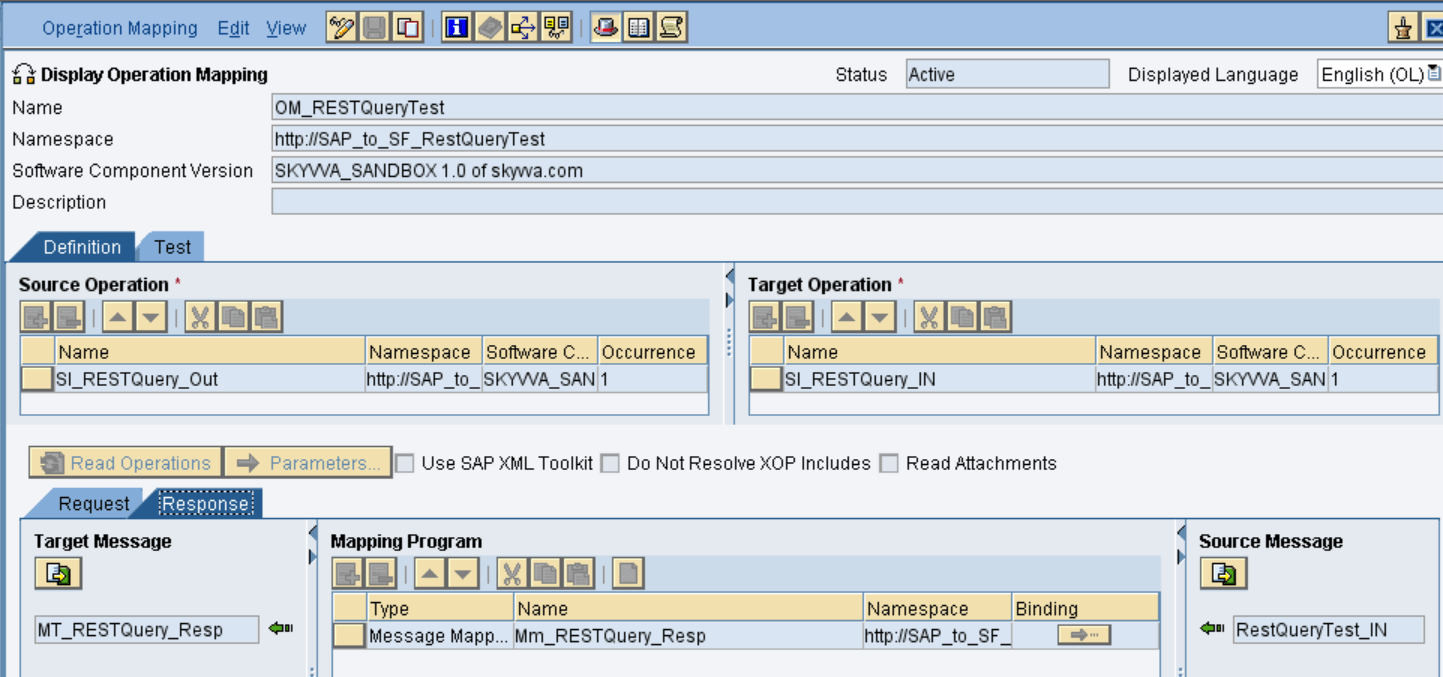
  • Operation Mapping

Create Operation mapping as shown below
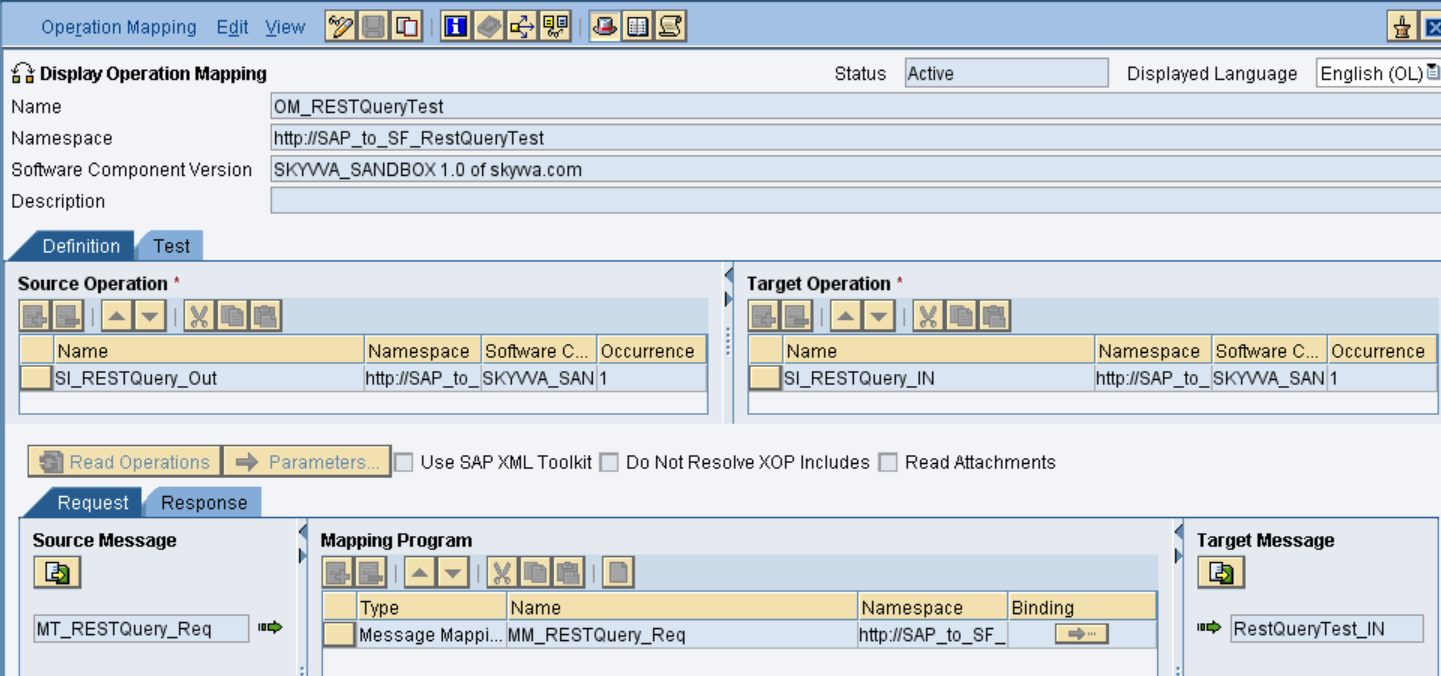
Select the respective outbound and inbound service interfaces and also the message mapping for request and response then save and activate the operation mapping.

Creation of Integrated Configuration Objects
After creating the objects in ESR. We have to configure these objects in the integration directory.
First, we have to create Configuration Scenario.
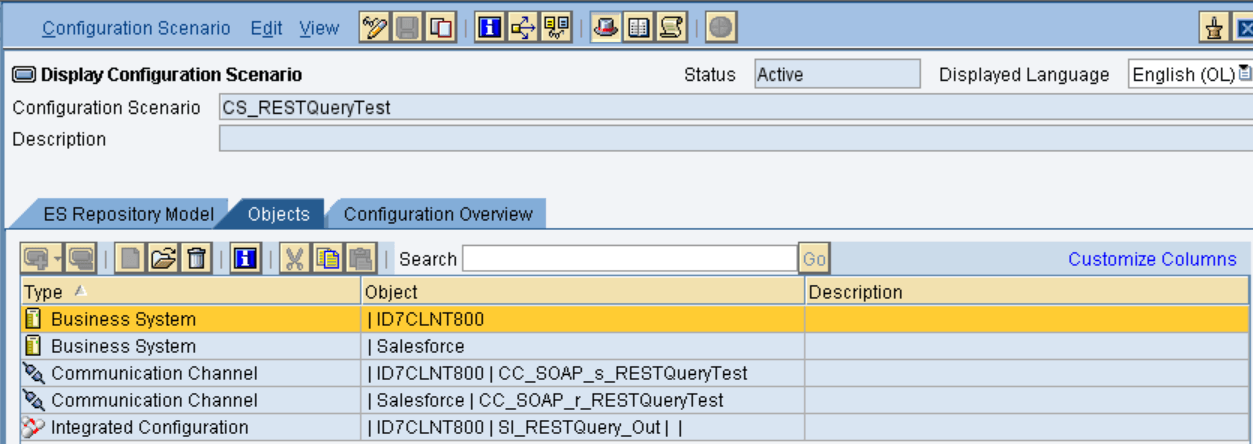
An Integration scenario has the following objects.

  • Business System for Sender and Receiver
  • Sender and Receiver Communication channel
  • Integrated Configuration

These are the objects we should create.
Since in this example we are using SOAPUI as source system. So need to create Business component for SOAPUI as BC_SOAPUI. For Salesforce you can use our proposal “Salesforce” as the business system. We have to import these business systems from SLD.

Configuring the Sender SOAP communication channel
Create sender communication channel as shown below.
Since we are using SOAP UI as a source. So, here we are using SOAP  in the sender channel.
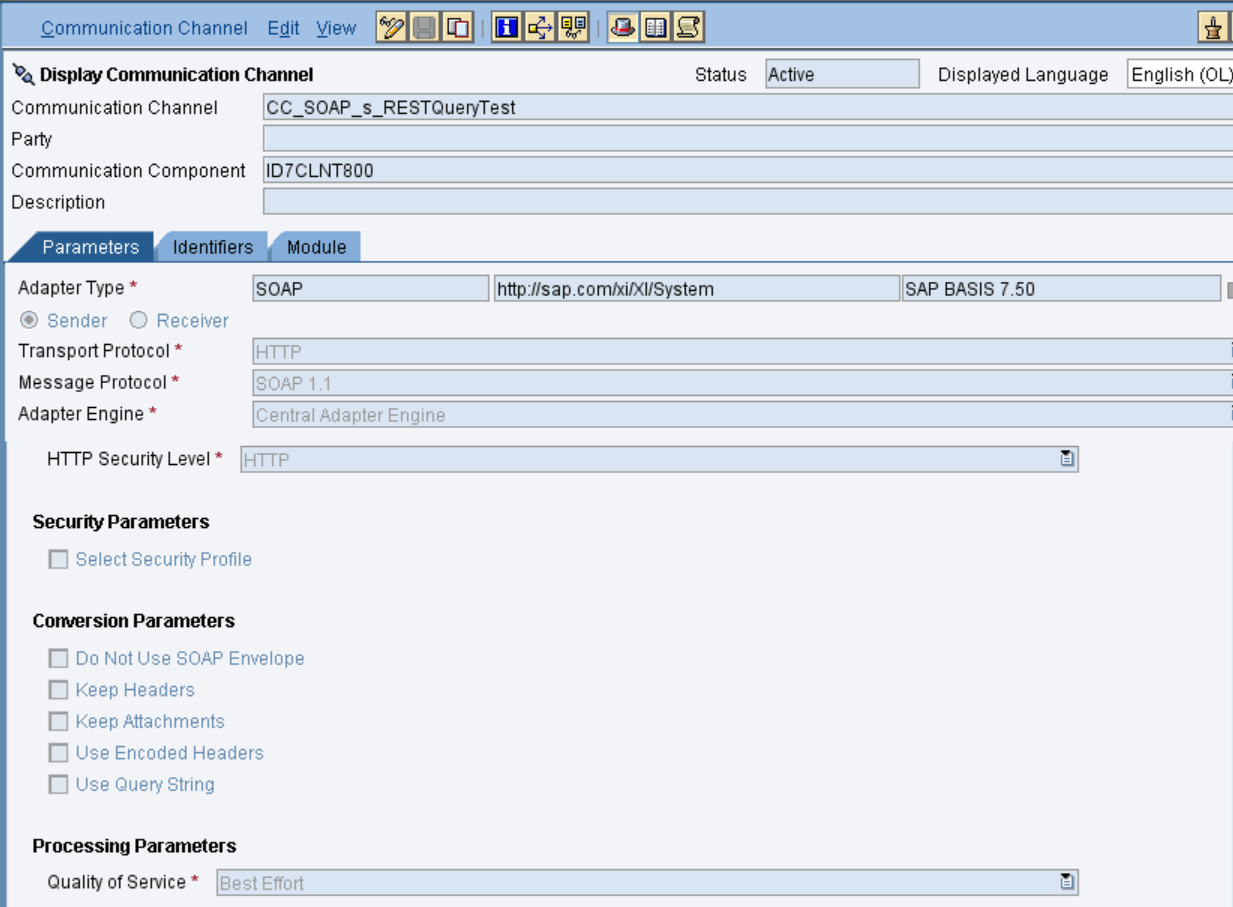
Provide the necessary details as shown and then save and activate the channel.

  • Configuring the SOAP receiver channel

Configuration for Tab “General”
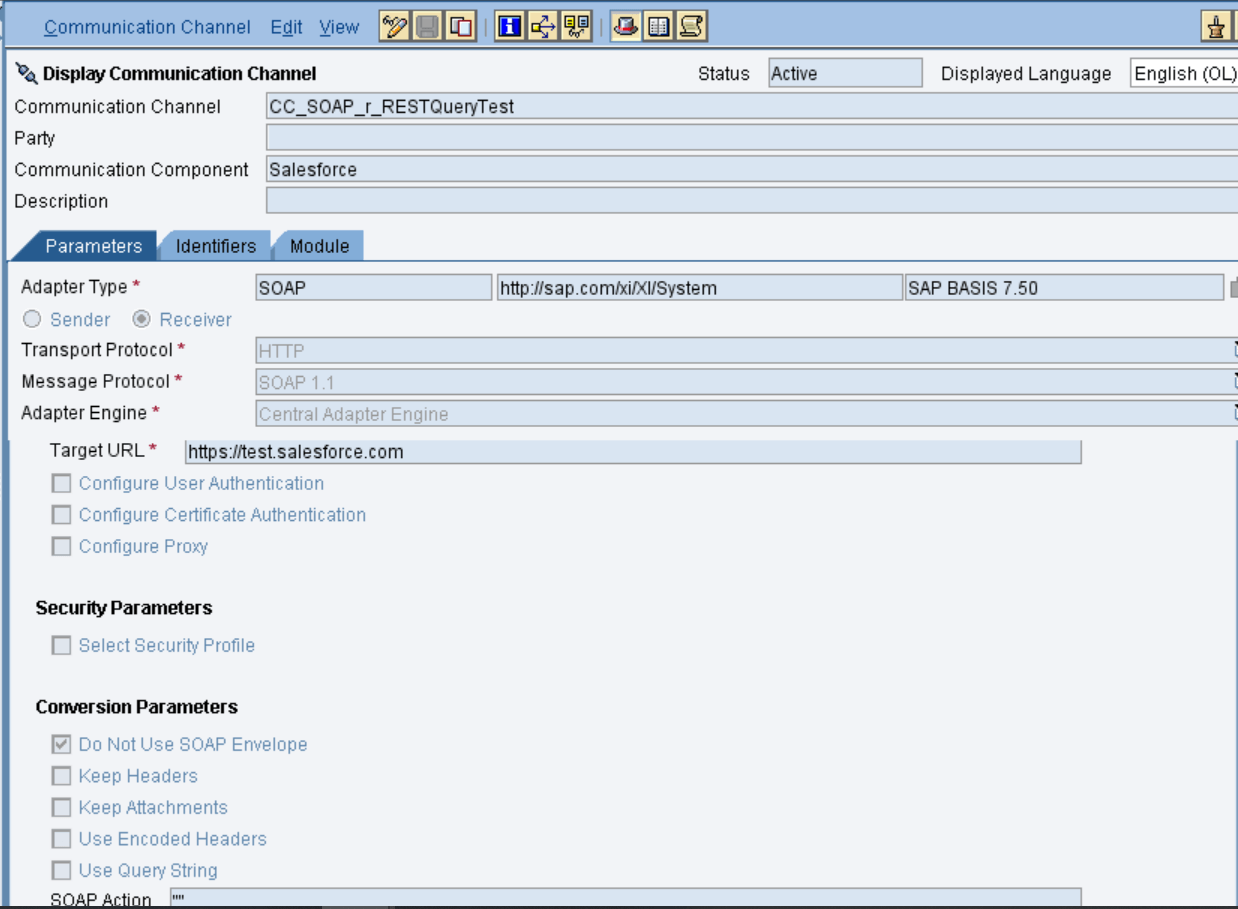
Specify the parameters as shown in the above screenshot.
Below is the configuration for the “Advanced” Tab.
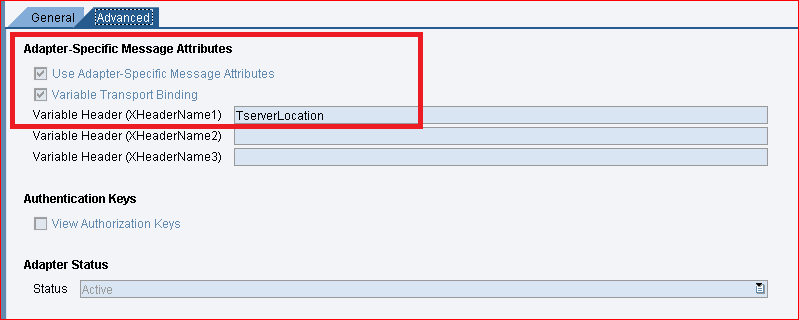
The value “TserverLocation” has to be entered for the parameter Variable Header (XHeaderName1).
Below are the settings for Tab “Module”. Here, the SKYVVA module containing the logic for session handling must be specified.
We need 3 modules in the soap receiver channel e.g.
1. SFDC_Query_REQUEST -> prepare the execution of the REST and BUK query and pass the message payload to the 3. module
2. XISOAPAdapterBean -> calling our new soap API ‘RouteRequest’ to just pass back the request from the 1. module
3. SFDC_Query_RESULT -> here we only fetching the result which has been executed
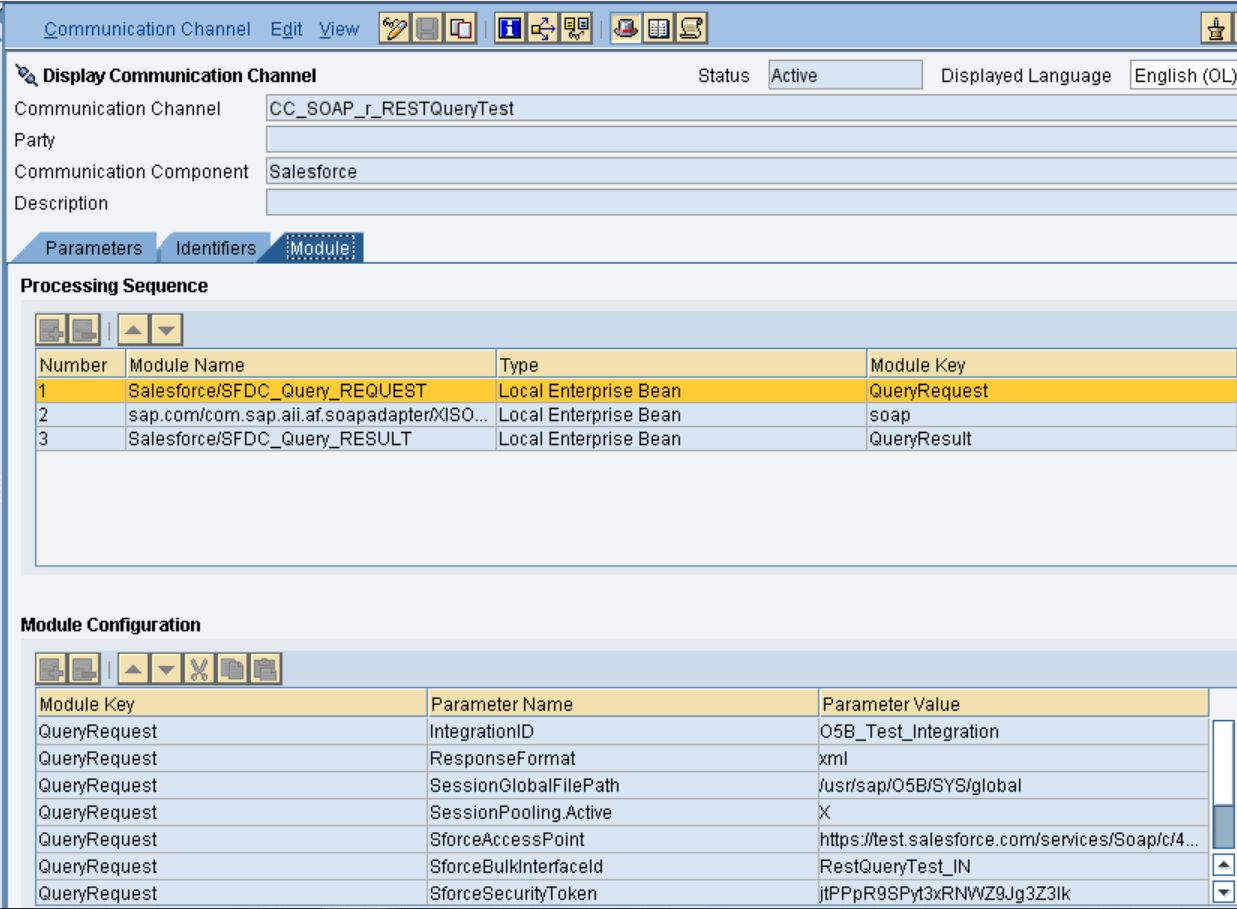

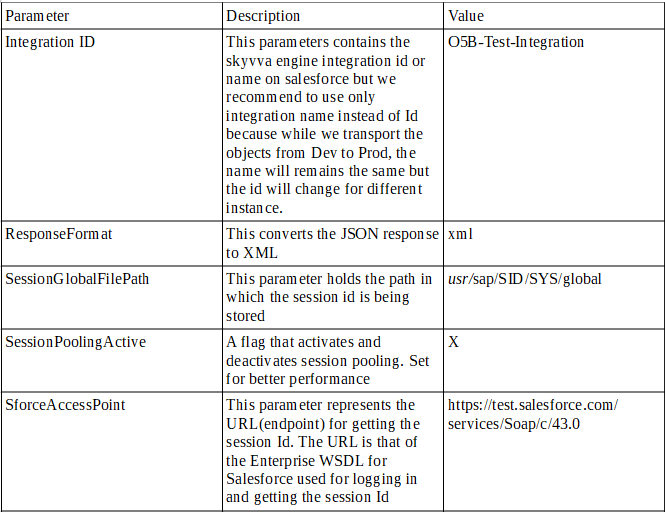
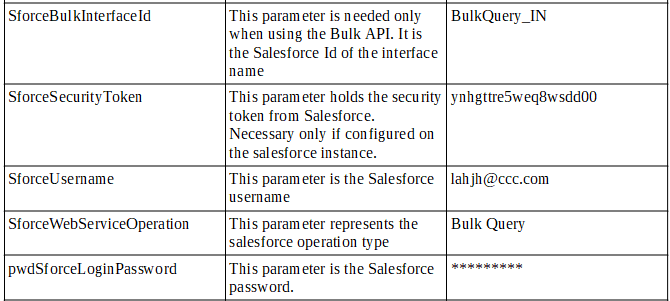
The below parameters has the following meaning.
Integrated Configuration
Create integrated configuration objects as shown below.
Enter the required data e.g. the Communication Component, Interface and Namespace and then click on create button to create an ICO.
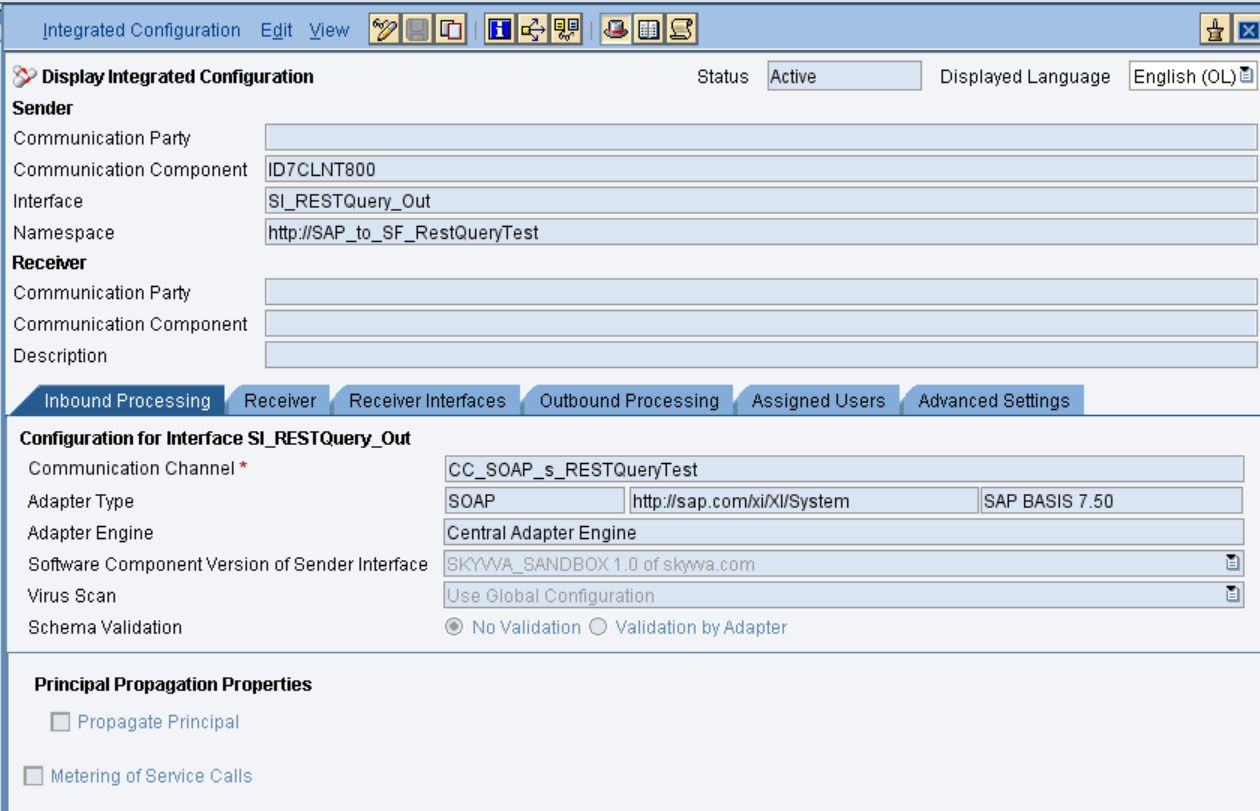
Now go through the tabs from left to right to configure the relevant objects. In this first tab “Inbound Processing” here we have to specify the sender communication channel.
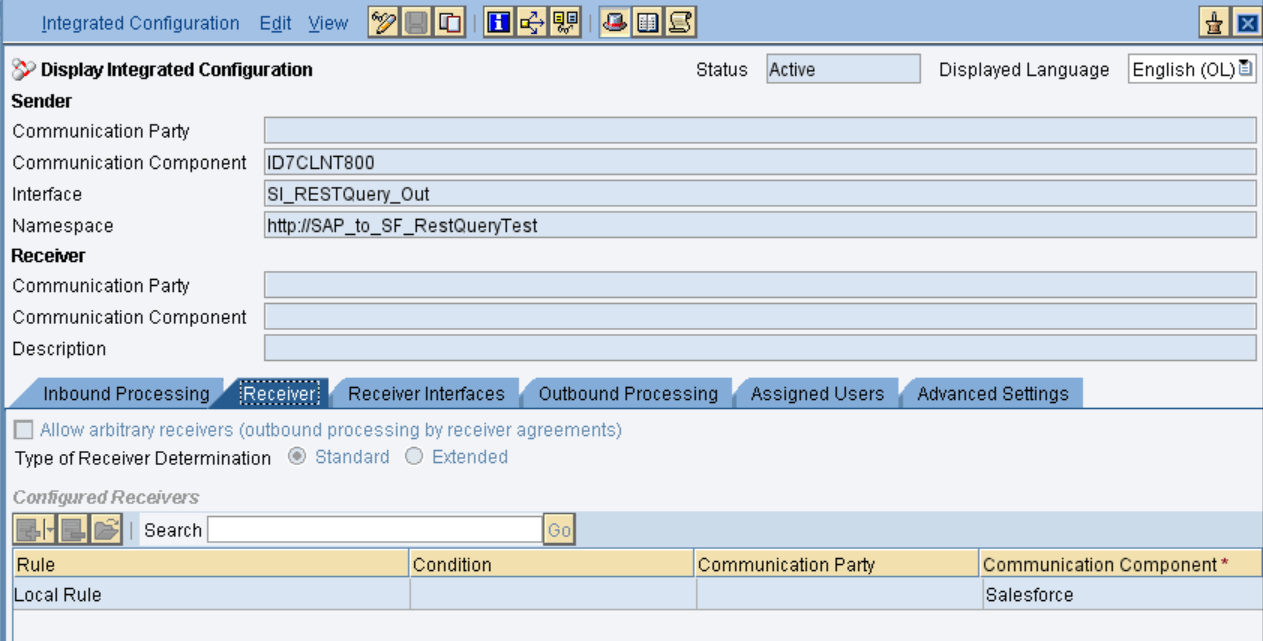
Here in the “Receiver” tab, we have to specify the receiver business system.
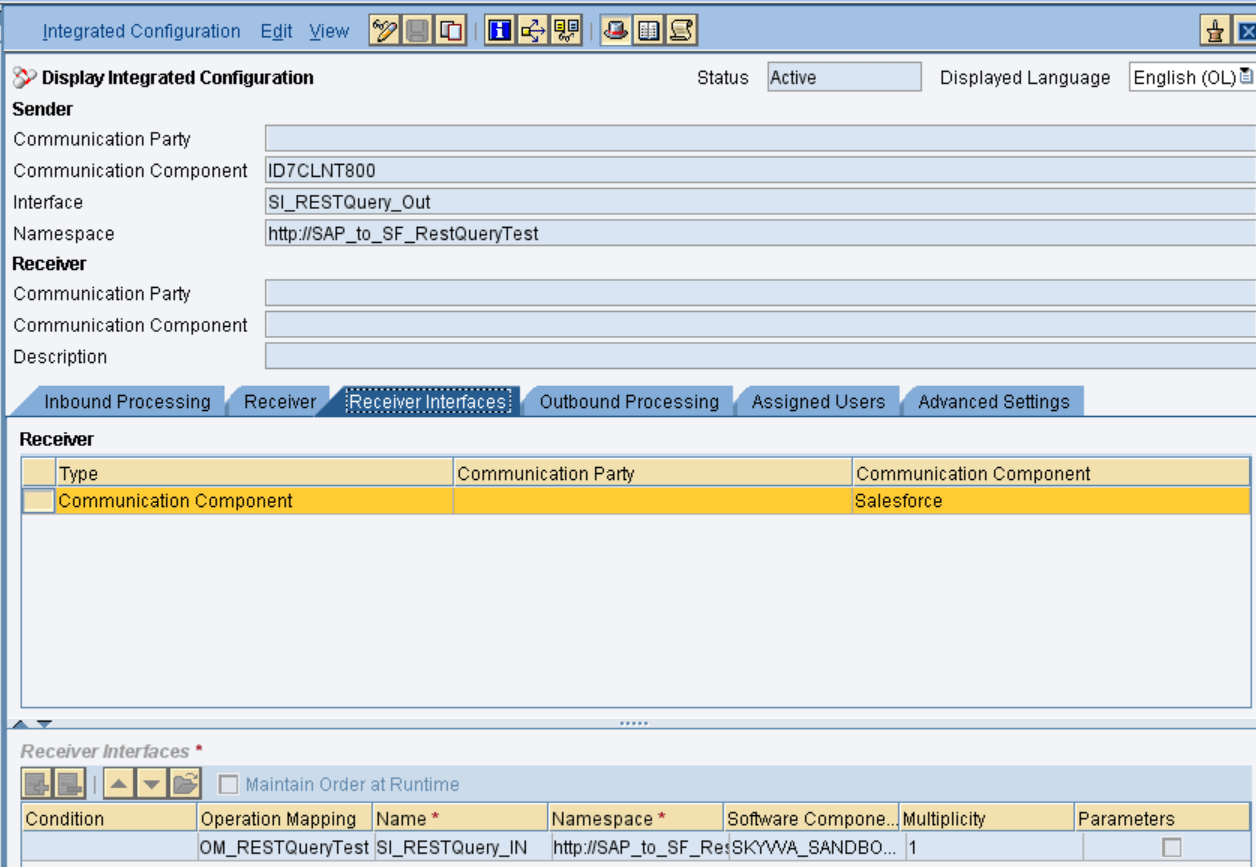
In Receiver interfaces tab specify the operation mapping.
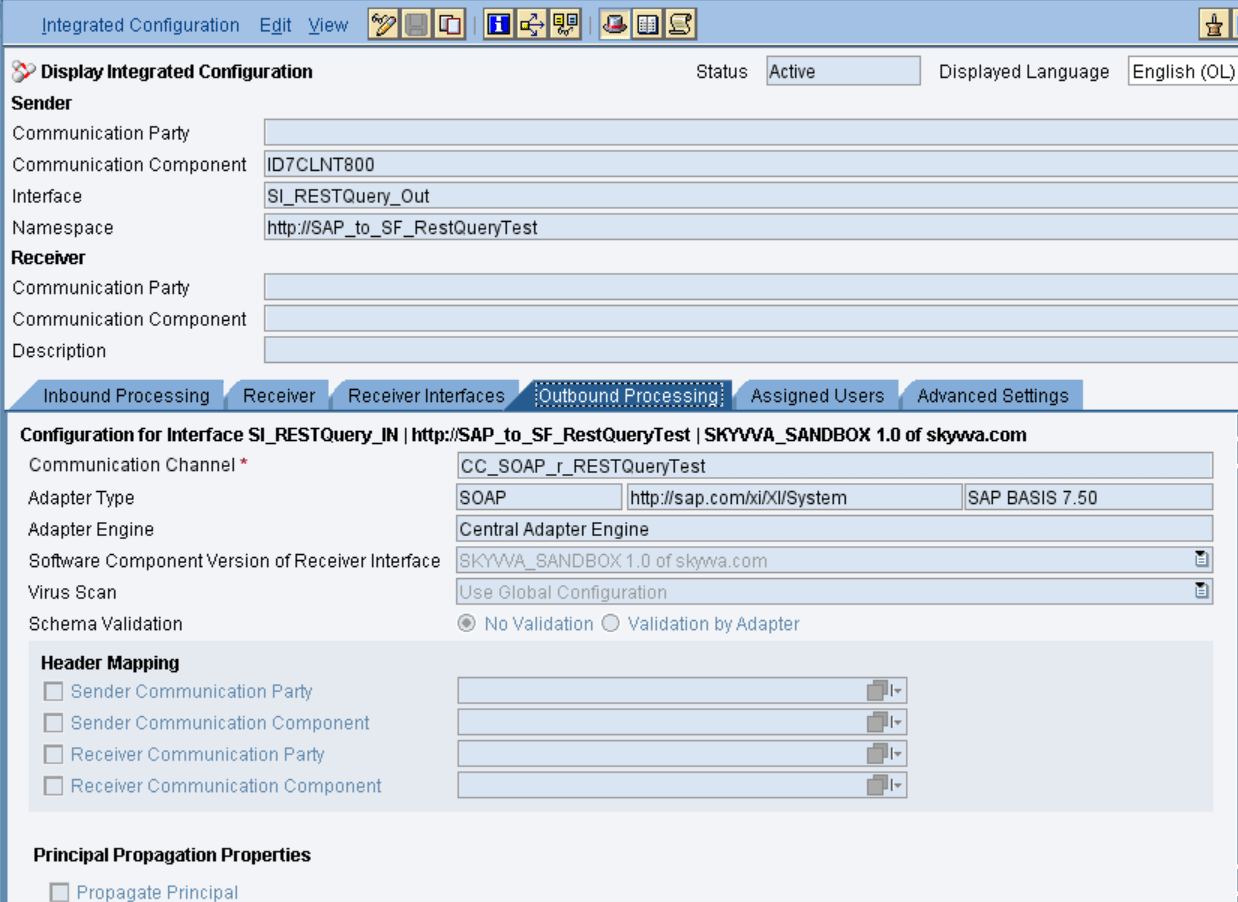
In the “outbound processing” tab, we have to specify the receiver channel.
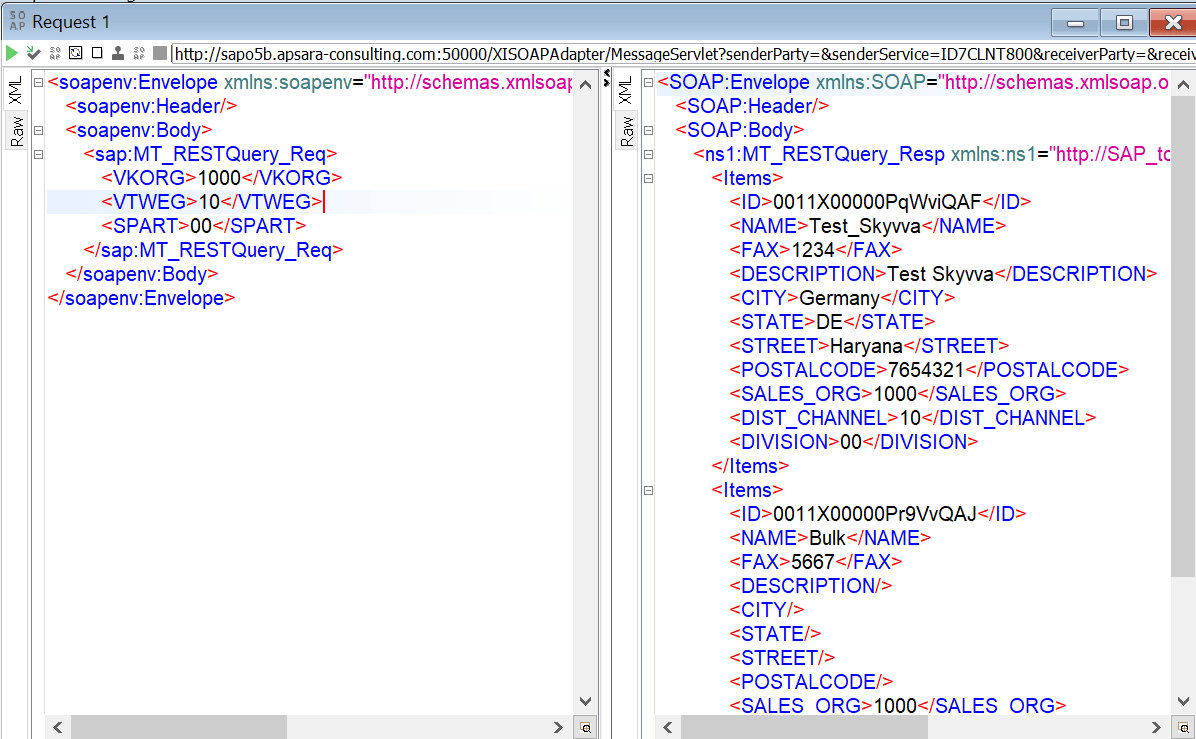
  • Test the Inbound Interface.

Triggering the data from the Source system.
Here is the result from Salesforce.
Share This Article :

  • Facebook
  • X
  • LinkedIn
1. How to create an interface using SKYVVA REST Query using SAP PI/PO with SKYVVA Connector module?1. How to create an interface using SKYVVA REST Query using SAP PI/PO with SKYVVA Connector module?

Copyright © 2026 | Apsara Consulting GmbH | All rights reserved

  • Imprint
  • Zurück zur Apsara Webseite
  • Back to Apsara website